
Base X 减法演示机
几何画板及绘图内容加载中,请稍等……
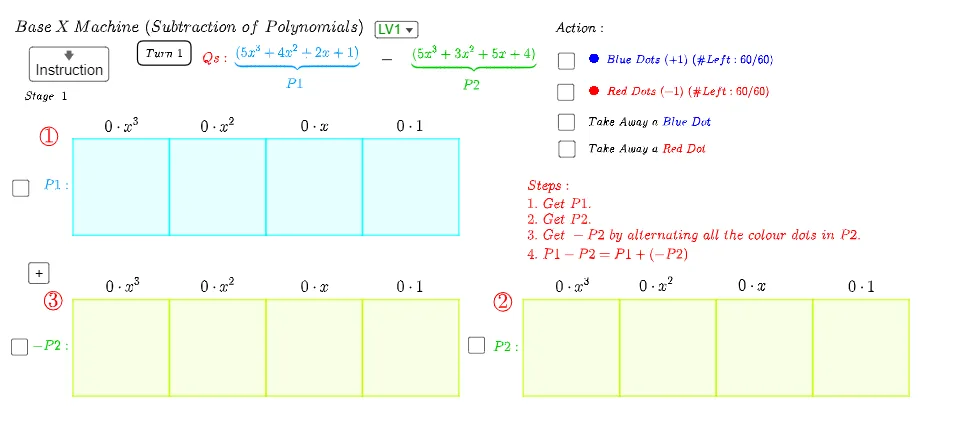
①本范例演示了在任意进制下进行减法运算的可视化过程,通过条形图清晰展示数位相减的过程与借位逻辑;②涉及的核心数学概念包括进制转换、自然数运算、条形图表示、函数与几何图形(如抛物线、椭圆、金字塔);③作图要点提炼自构造摘要,主要运用了Join、Polygon、IndexOf、First、If、Shuffle、Random、Textfield、Point等GeoGebra命令与对象,用于动态生成和调整减法运算的展示;④适合初中及以上数学学习者,用于理解不同进制运算及数据可视化。
GeoGebra 命令及参数
Join({x31N, x32N}) → rx3NJoin({x31P, x32P}) → rx3PJoin({x11N, x12N}) → rx1NJoin({x11P, x12P}) → rx1PJoin({x21N, x22N}) → rx2NJoin({x21P, x22P}) → rx2PPolygon(I_3, J_3, K_3, L_3) → X31, a14, a16, a32, a29Polygon(L_3, M_3, N_3, K_3) → X21, a1, a27, a28, a3Polygon(M_3, P_3, O_3, N_3) → X11, a5, a25, a26, a7Polygon(P_3, Q_3, R_3, O_3) → X01, a9, a17, a24, a10Polygon(S_3, V_3, U_3, T_3) → X32, a23, a20, a21, a22Polygon(V_3, W_3, Z_3, U_3) → X22, a11, a19, a18, a12Polygon(W_3, B_4, A_4, Z_3) → X12, a13, a4, a2, a15Polygon(B_4, C_4, D_4, A_4) → X02, a31, a6, a8, a30Polygon(I_3, L_3, U_3, T_3) → Rx3, r11, r10, r9, r7Polygon(L_3, M_3, Z_3, U_3) → Rx2, r5, r4, r2, r3Polygon(M_3, P_3, A_4, Z_3) → Rx1, r6, r1, r14, r12Polygon(P_3, Q_3, D_4, A_4) → Rx0, r16, r15, r13, r8IndexOf(false, FP) → tmpIIndexOf(false, FN12) → NDtmpIFirst(x31P) → TAtmpIIf(NDtmpI ≟ NDtmpI, true, false) → NDHIf(Length[x31P] - Length[x31N] ≟ Element[Coef1, IndexOf["x^3", Order1]], true, false) → Bx31If(Length[x21P] - Length[x21N] ≟ Element[Coef1, IndexOf["x^2", Order1]], true, false) → Bx21If(Length[x11P] - Length[x11N] ≟ Element[Coef1, IndexOf["x", Order1]], true, false) → Bx11If(Length[x01P] - Length[x01N] ≟ Element[Coef1, IndexOf["", Order1]], true, false) → Bx01Shuffle({1, 2, 3, 4}) → OrderS, {3, 2, 1, 4}Random(-5, 5) → L23Co01Random(-5, 5) → L23Co02Random(-5, 5) → L23Co32Random(-5, 5) → L23Co31Random(-5, 5) → L23Co22Random(-5, 5) → L23Co21Random(-5, 5) → L23Co12Random(-5, 5) → L23Co11Join({x01N, x02N}) → rx0NJoin({x01P, x02P}) → rx0PIf(TAPP ≟ true ∧ TANN ≟ true, true, false) → TAPNFirst(rx0P) → tmpPFirst(rx0N) → tmpNIf(Element[tmpP, 1] ≟ Element[tmpP, 1], true, false) → tPIf(Element[tmpN, 1] ≟ Element[tmpN, 1], true, false) → tNTextfield(Br3) → Ir3Textfield(Br2) → Ir2Textfield(Br1) → Ir1Textfield(Br0) → Ir0Random(0, 5) → L1Co01Random(0, 5) → L1Co02Random(0, 5) → L1Co11Random(0, 5) → L1Co12Random(0, 5) → L1Co21Random(0, 5) → L1Co22Random(0, 5) → L1Co31Random(0, 5) → L1Co32Random(1, 2) → SignL1Polygon(A, B, C, D) → Background, a, b_1, c, dIndexOf(false, FP) → PDtmpIIf(PDtmpI ≟ PDtmpI, true, false) → PDHPolygon(E, F, K, J) → X33, b1, b3, b4, b2Polygon(F, G, L, K) → X23, b5, b6, b7, b8Polygon(G, H, M, L) → X13, b9, b10, b11, b12Polygon(H, I, N, M) → X03, b13, b16, b15, b14If(Length[x33P] - Length[x33N] ≟ Element[Coef2, IndexOf["x^3", Order2]], true, false) → Bx33If(Length[x23P] - Length[x23N] ≟ Element[Coef2, IndexOf["x^2", Order2]], true, false) → Bx23If(Length[x13P] - Length[x13N] ≟ Element[Coef2, IndexOf["x", Order2]], true, false) → Bx13If(Length[x03P] - Length[x03N] ≟ Element[Coef2, IndexOf["", Order2]], true, false) → Bx03If(Length[x32P] - Length[x32N] ≟ (-Element[Coef2, IndexOf["x^3", Order2]]), true, false) → Bx32If(Length[x22P] - Length[x22N] ≟ (-Element[Coef2, IndexOf["x^2", Order2]]), true, false) → Bx22If(Length[x12P] - Length[x12N] ≟ (-Element[Coef2, IndexOf["x", Order2]]), true, false) → Bx12If(Length[x02P] - Length[x02N] ≟ (-Element[Coef2, IndexOf["", Order2]]), true, false) → Bx02Point(xAxis) → RPolygon(O, P, Q, R) → PolyP2a, o, p, q, rIf(SelectedIndex[Level] ≟ 3 ∧ Stage ≟ 1, true, false) → BL3If(SelectedIndex[Level] ≟ 2 ∧ Stage ≟ 1, true, false) → BL2If(SelectedIndex[Level] ≟ 1 ∧ Stage ≟ 1, true, false) → BL1If(SelectedIndex[Level] ≟ 3, true, false) → BL3NIf(SelectedIndex[Level] ≟ 2, true, false) → BL2NIf(SelectedIndex[Level] ≟ 1, true, false) → BL1NIf(x11P ≠ {}, true, false) → TAPHIf(x11N ≠ {}, true, false) → TANH
AI 绘图提示语参考
画一个基于任意进制的减法机器,包括两个数的减法过程,通过条形图展示每一位的减法和借位逻辑。使用四个条形图表示两个数的每一位,通过条形图的长度差表示减法结果,使用多边形连接条形图的端点,展示借位过程。最后,使用文本框显示计算过程。
以上提示语为根据原始绘图命令整理而来,仅供参考。