
平行四边形角度
几何画板及绘图内容加载中,请稍等……
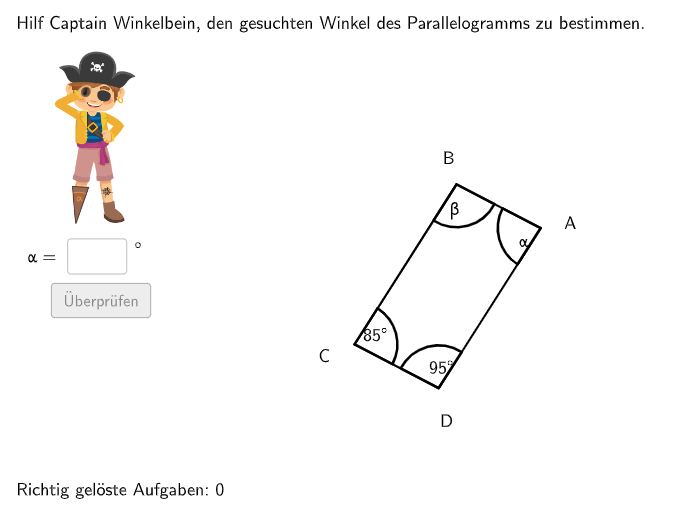
这个范例演示了平行四边形的角度特性。核心数学概念包括平行四边形的对角线、角度关系和旋转。使用了GeoGebra命令如Random、Rotate、Angle、Textfield等进行构造。适合5-6年级学生学习特殊四边形的性质。
GeoGebra 命令及参数
Random(1, 360) → randomgradShuffle(Sequence[i, i, 60, 100] \ {90}) → alphaList, {85, 73, 96, 89, 69, 63, 65, 78, 81, 61, 80, 66, 79, 87, 91, 95, 71, 64, 62, 82, 70, 84, 93, 100, 76, 94, 74, 86, 75, 77, 72, 83, 97, 68, 67, 99, 60, 98, 92, 88}Shuffle(Sequence[minbeta + 40, maxbeta - 30, 10]) → betaList, {100, 90}Shuffle(2…4) → radlist, {2, 3, 4}Rotate(MKreis + (0, b), randomgrad°, MKreis) → ALine(A, MKreis) → jRotate(SenkP, (-(α / 2)) + randomgrad°, A) → SenkP'_{1}Ray(A, SenkP'_{1}) → fCircle(A, rad1) → cIntersect(c, f) → B,Rotate(A, (-β), B) → B'Ray(B, B') → iShuffle({1, 2, 3, 4}) → gesuchtListe, {4, 2, 3, 1}If(questionCount ≟ 1, 1, questionCount ≟ 2, 2, gesuchtListe(1)) → gesuchtRotate(SenkP, α / 2 + randomgrad°, A) → SenkP'Ray(A, SenkP') → gShuffle(2…4) → radlist2, {4, 2, 3}Circle(A, rad2) → pIntersect(p, g) → D,Angle(B, A, D) → alpRotate(A, β, D) → A'Ray(D, A') → hCircle(B, rad2) → eIntersect(e, i) → F,Angle(D, C, B) → gamTextfield(input1) → InputBox1Textfield(input2) → InputBox2Polygon(PtopLeftCornerFeedback, PtopRightCornerFeedback, PbottomRightCornerFeedback, PbottomLeftCornerFeedback) → rectangleCorrect, rectangleCorrectS3, rectangleCorrectS4, rectangleCorrectS2, rectangleCorrectS1Shuffle(Sequence[Random[0, 10], i, 1, 100]) → randomNosForX, {4, 7, 0, 0, 2, 9, 5, 9, 9, 3, 7, 3, 6, 3, 10, 6, 0, 6, 10, 10, 5, 8, 9, 6, 7, 9, 6, 3, 5, 7, 8, 10, 3, 9, 5, 0, 8, 2, 0, 0, 9, 8, 4, 0, 9, 7, 10, 2, 1, 1, 0, 5, 5, 1, 5, 9, 10, 2, 9, 6, 5, 2, 2, 1, 6, 6, 7, 5, 7, 8, 6, 3, 7, 2, 9, 3, 0, 3, 5, 0, 5, 4, 4, 1, 7, 1, 1, 7, 2, 1, 1, 2, 2, 1, 2, 1, 0, 2, 2, 4}Element(randomNosForX, Mod[questionCount, 100] + 1) → numXShuffle(Sequence[Random[0, 10], i, 1, 100]) → randomNosForY, {9, 7, 1, 0, 4, 5, 2, 8, 2, 2, 7, 0, 3, 9, 2, 9, 9, 0, 9, 1, 8, 10, 9, 5, 8, 6, 6, 8, 2, 0, 7, 0, 3, 10, 9, 3, 10, 6, 6, 3, 7, 4, 9, 10, 5, 9, 0, 3, 9, 7, 7, 10, 10, 6, 9, 5, 8, 4, 2, 7, 1, 3, 10, 0, 2, 4, 0, 10, 0, 10, 10, 8, 9, 2, 8, 2, 6, 4, 8, 7, 0, 10, 7, 2, 9, 7, 9, 0, 5, 6, 7, 7, 3, 1, 5, 6, 4, 8, 3, 7}Element(randomNosForY, Mod[questionCount, 100] + 1) → numYAppend(true, Sequence[If[randomNosForX(i) ≟ randomNosForX(i - 1), false, true], i, 2, 100]) → stayXAppend(true, Sequence[If[randomNosForY(i) ≟ randomNosForY(i - 1), false, true], i, 2, 100]) → stayYRemove(Sequence[If[stayX(i), randomNosForX(i), 0], i, 1, 100], Sequence[0, i, 1, 100]) → randomNosForXwithoutRepeatRemove(Sequence[If[stayY(i), randomNosForY(i), 0], i, 1, 100], Sequence[0, i, 1, 100]) → randomNosForYwithoutRepeatElement(randomNosForXwithoutRepeat, Mod[questionCount, Length[randomNosForXwithoutRepeat]] + 1) → numXwithoutRepeatElement(randomNosForYwithoutRepeat, Mod[questionCount, Length[randomNosForYwithoutRepeat]] + 1) → numYwithoutRepeatDefined(input1) → fixedAngle(SenkP, A, SenkP') → SantasLittleHelper2Angle(SenkP'_{1}, A, SenkP) → SantasLittleHelper1Angle(A, D, C) → delAngle(C, B, A) → betIf(questionCount ≟ 1, 2, questionCount ≟ 2, 4, gesucht ≟ 1 ∨ gesucht ≟ 3, RandomElement[{2, 4}], gesucht ≟ 2, RandomElement[{1, 3, 4}], gesucht ≟ 4, RandomElement[{1, 2, 3}]) → gesucht2Midpoint(A, C) → ECircle(MKreis, 4) → dRotate(A + (0, 0.65), randomgrad°, A) → BeschPosARotate(C + (0, -0.65), randomgrad°, C) → BeschPosCRotate(B + (-0.65, 0), randomgrad°, B) → BeschPosBRotate(D + (0.65, 0), randomgrad°, D) → BeschPosDMidpoint(B, D) → MDeltText(BeschriftungAlpha, BeschPosAlpha, false, true, 0, 0) → Text10Text(BeschriftungBeta, BeschPosBeta, false, true, 0, 0) → Text11Text(BeschriftungGamma, BeschPosGamma, false, true, 0, 0) → Text12Text(BeschriftungDelta, BeschPosDelta, false, true, 0, 0) → Text13Text(BeschA, BeschPosA, false, true, 0, 0) → Text14Text(BeschB, BeschPosB, false, true, 0, 0) → Text15Text(BeschC, BeschPosC, false, true, 0, 0) → Text16Text(BeschD, BeschPosD, false, true, 0, 0) → Text17Segment(A, B) → kSegment(B, C) → l
AI 绘图提示语参考
画一个平行四边形,展示其对角线、内角关系和旋转特性。首先绘制一个随机角度的平行四边形,然后画出两条对角线,并标示出对角线交点。接着,通过旋转其中一个角,演示平行四边形的旋转对称性,并标出旋转角度。最后,添加文本说明,解释平行四边形的对角线互相平分、对角相等、邻角互补等性质。
以上提示语为根据原始绘图命令整理而来,仅供参考。