
平行线与横截线交错的 alternate exterior angles 交互式探究
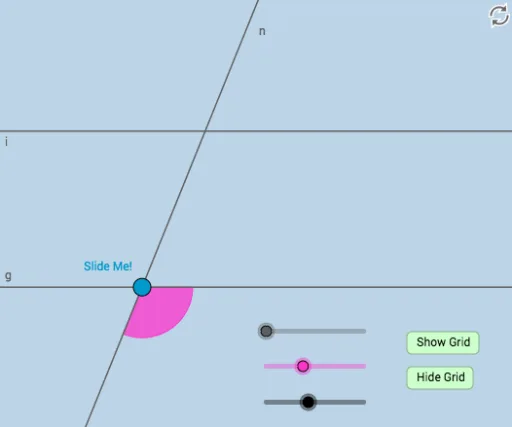
几何画板及绘图内容加载中,请稍等……
①本范例演示了当横截线与平行线相交时,形成的 alternate exterior angles 的关系;②涉及的核心数学概念包括平行线性质、横截线、同位角、内错角及 alternate exterior angles 的定义;③作图要点——从下方『构造摘要』提炼用到了 Point, Line, Rotate, Angle, Circle, Intersect, Segment, Vector, Ray, CircleArc, CircleSector, Translate 等GeoGebra命令/对象;④适合高中数学学生用于理解平行线与横截线交错的几何性质,以及 alternate exterior angles 的恒等关系。
GeoGebra 命令及参数
Point(y = 0) → ALine(A, B) → fRotate(B, α, A) → B'Angle(B, A, B') → γLine(A, B') → gRotate(B', β, A) → B''Angle(B', A, B'') → δLine(A, B'') → hCircle(A, a) → cIntersect(c, h, 2) → CLine(C, g) → iCircle(C, A) → dCircle(A, C) → eIntersect(e, h, 2) → JSegment(A, C) → jCircle(A, (0.3 * j)) → kCircle(C, (0.3 * j)) → pIntersect(p, h) → N, OIntersect(k, h) → P, QIntersect(k, g) → T, UIntersect(p, i, 2) → VIntersect(p, i, 1) → WCircle(C, j / 2) → g_1Circle(A, j / 2) → h_1Intersect(g_1, i, 2) → DIntersect(g_1, i, 1) → EIntersect(g_1, h, 2) → HIntersect(g_1, h) → I, ZIntersect(h_1, h) → A_1, B_1Intersect(h_1, g) → E_1, F_1Point(j) → G_1Vector(A, G_1) → uSegment(A, G_1) → lRay(A, A_1) → mRay(C, H) → nVector(A, G_1) → vSegment(G_1, C) → sCircleArc(C, N, O) → rPoint(r) → FRotate(F, (-δ), C) → F'Angle(F', C, F) → εSegment(A, C) → bCircleSector(A, P, U) → d_1Translate(d_1, v) → e_1CircleArc(C, W, V) → f_1Point(f_1) → GRotate(G, (-(π - ε)), C) → G'Angle(G', C, G) → ζCircleSector(C, G', G) → k_1CircleArc(A, P, U) → qSegment(A, C) → t
AI 绘图提示语参考
画两条平行线,然后画一条穿过它们的直线,标记出一对同旁外角。接着,围绕其中一个点旋转这些线和角,画出另一对同旁外角,并标出它们的度数。最后,用圆和圆弧连接这些点,形成几何图形。
以上提示语为根据原始绘图命令整理而来,仅供参考。