
调整数轴步长与刻度间距:绘制整数点练习
几何画板及绘图内容加载中,请稍等……
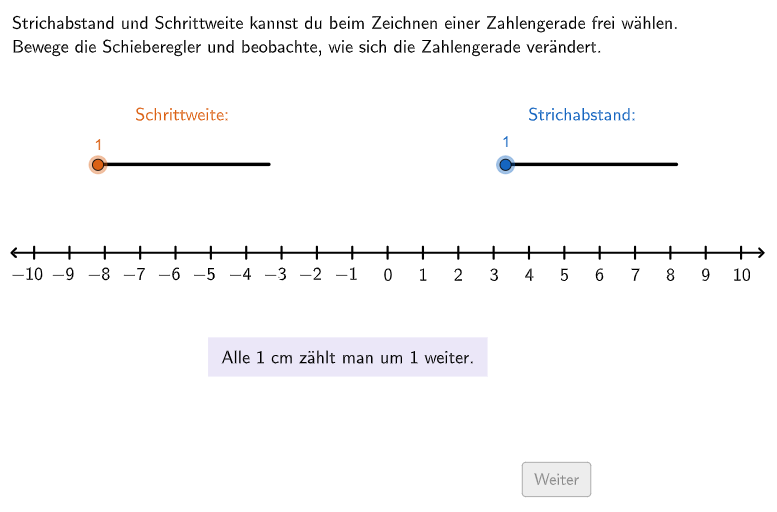
该GeoGebra范例演示了如何动态调整数轴的步长(单位长度)和刻度线间距,以便在数轴上准确标出给定的整数点。核心数学概念是数轴、整数、数的顺序与比较,以及负数的直观表示。作图要点包括:使用滑块(slider)控制步长(schrittweite)和刻度间距(strichabs),通过序列(Sequence)、点(Point)、线段(Segment)等命令生成数轴和刻度,利用条件判断(If)和文本(Text)显示题目与反馈,并设置多个检查点(P1correct等)验证学生放置的点是否正确。该材料适合小学5-6年级学生,用于练习在数轴上比较和排列整数,也可作为教师课堂演示或学生自主探究的互动工具。
GeoGebra 命令及参数
Join(Shuffle[{{1, 2, 3, 4, 5, 6}, {2, 1, 5, 4, 3, 6}, {3, 5, 4, 6, 1, 2}, {4, 2, 1, 5, 3, 6}, {5, 2, 1, 6, 4, 3}, {6, 1, 2, 5, 4, 3}, {1, 5, 3, 6, 2, 4}, {2, 4, 5, 1, 6, 3}, {3, 2, 1, 5, 4, 6}, {4, 5, 2, 1, 6, 3}, {5, 1, 6, 2, 3, 4}, {6, 4, 3, 2, 1, 5}}]) → listExCountsPoint(Line[O, xAxis]) → OEPSegment(O, OEP) → strahlPIf(step ≟ 1, 0.9, 0.9) → widthFlatten(Join[{Sequence[Sequence[O + (m * ((width * strichabs), 0)) + (j * (0, width)), m, 0, length / ((width * strichabs))], j, 0, 1], Sequence[Sequence[O + (m * (((-width) * strichabs), 0)) + (j * (0, width)), m, 0, length / ((width * strichabs))], j, 0, 1]}]) → listCoordsPoint(listCoords) → P3Point(listCoords) → P2Point(listCoords) → P1Sequence(O + (((strichabs * width) * m), 0), m, 0, length / ((strichabs * width))) → listPointsPZip(Segment[P + (0, (-linelength)), P + (0, linelength)], P, listPointsP) → listLinesPSegment(O + (0, 0.3), O + (0, -0.3)) → lineSequence(O + ((((-strichabs) * width) * m), 0), m, 1, length / ((strichabs * width))) → listPointsNSegment(O, OEN) → strahlNSequence(Text["\textsf{" + ((m * schrittweite)) + "}", O + (((m * width) * strichabs), -1), true, true, -0, 1], m, 0, Length[listPointsP] - 1) → listTextsPZip(Segment[P + (0, (-linelength)), P + (0, linelength)], P, listPointsN) → listLinesNSequence(Text["\textsf{\(-\)" + ((m * schrittweite)) + "}", O + ((((-m) * width) * strichabs) - 0.17, -1), true, true, -0, 1], m, 1, Length[listPointsP] - 1) → listTextNText((("\textsf{\textcolor{#6557d2}{\(" * numY) * "\)}}"), P2 + (If[numY < 0, -0.165, 0], 0.15), false, true, 0, 1) → CapP2Text((("\textsf{\textcolor{#2e7d32}{\(" * numX) * "\)}}"), P1 + (If[numX < 0, -0.165, 0], 0.15), false, true, 0, 1) → CapP1Text((("\textsf{\textcolor{#9c4381}{\(" * numZ) * "\)}}"), P3 + (If[numZ < 0, -0.165, 0], 0.15), false, true, 0, 1) → CapP3
AI 绘图提示语参考
画一条可调节的数字数轴,包含正半轴和负半轴。数轴中间有一个起点,向右延伸为正数区域,向左延伸为负数区域。在数轴上方或下方有对应的数字标签,正数显示为普通数字,负数显示带有负号的数字。数轴上布满了垂直的刻度线,均匀分布在整条数轴上。数轴下方有控制区域,可能包含用于调整参数的滑块界面。整个图形清晰展示数轴、刻度、数字标签和刻度线之间的对应关系,适合用于整数的比较和排序教学。
以上提示语为根据原始绘图命令整理而来,仅供参考。