
3.2 瓷砖拼贴:向量平移与对称变换的几何探究
几何画板及绘图内容加载中,请稍等……
所属专题
geometriadinamica.es
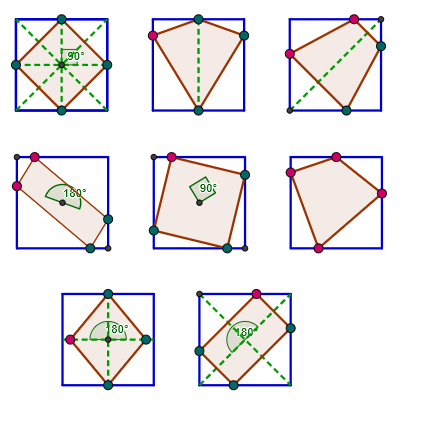
① 本范例通过一系列向量平移、对称和旋转操作,展示如何用基本几何元素(点、线段、三角形、矩形)构造出类似瓷砖拼贴的重复图案,直观呈现二维平面上的变换组合效果。② 核心数学概念包括二维向量、平移、轴对称、旋转、中点、垂线以及三角形与矩形的性质,同时涉及角度和三角关系的应用。③ 作图要点:使用GeoGebra命令如Line(直线)、Circle(圆)、Intersect(交点)、Polygon(多边形)、Point(点)、Vector(向量)、Translate(平移)、Midpoint(中点)、Segment(线段)、Mirror(镜像)、OrthogonalLine(垂线)、Rotate(旋转)和Angle(角),并创建多个对象(如A、B、C、poly1、u、A'、C'、D'、E'等)以完成多级变换。④ 适合中学几何或向量教学,用于帮助学生理解变换的合成、对称性以及如何通过构造命令实现图案设计,也可作为数学与艺术结合的拓展活动。
GeoGebra 命令及参数
Line(A, B) → bCircle(A, a) → cIntersect(c, b, 2) → CPolygon(A, C, 4) → poly1, d, e, f, g, D, EPoint(b) → FVector(A, F) → uTranslate(A, u) → A'Translate(C, u) → C'Translate(D, u) → D'Translate(E, u) → E'Polygon(A', C', D', E') → poly1', a', c', d', e'Translate(A', u) → A''Translate(C', u) → C''Translate(D', u) → D''Translate(E', u) → E''Polygon(A'', C'', D'', E'') → poly1'', a'', c'', d'', e''Translate(A'', u) → A'''Translate(C'', u) → C'''Translate(D'', u) → D'''Translate(E'', u) → E'''Translate(A''', u) → GTranslate(C''', u) → HTranslate(D''', u) → ITranslate(E''', u) → JTranslate(G, u) → G'Translate(H, u) → H'Translate(I, u) → I'Translate(J, u) → J'Point(e') → SPoint(d'') → TPoint(e'') → UVector(A, L_1) → v_1Translate(A, v_1) → A'_1Translate(C, v_1) → C'_1Translate(D, v_1) → D'_1Translate(E, v_1) → E'_1Polygon(A'_1, C'_1, D'_1, E'_1) → poly1'_1, a'_1, c'_1, d'_1, e'_1Translate(A', v_1) → A''_1Translate(C', v_1) → C''_1Translate(D', v_1) → D''_1Translate(E', v_1) → E''_1Polygon(A''_1, C''_1, D''_1, E''_1) → poly1''_1, a''_1, c''_1, d''_1, e''_1Midpoint(e'_1) → M_1Midpoint(c'_1) → N_1Midpoint(d'_1) → O_1Midpoint(a'_1) → P_1Midpoint(O_1, P_1) → Q_1Segment(M_1, Q_1) → d_1Point(d_1) → R_1Midpoint(e''_1) → S_1Midpoint(d''_1) → T_1Midpoint(a''_1) → U_1Midpoint(T_1, U_1) → V_1Mirror(R_1, Q_1) → Z_1Polygon(O_1, R_1, P_1, Z_1) → poly10, o_1, r_1, p_1, z_1Segment(C, E) → q_1Segment(A, D) → s_1Segment(A'', D'') → b_2Segment(P_1, O_1) → c_2Segment(A''_1, D''_1) → d_2Segment(E''_1, C''_1) → e_2Segment(M_1, N_1) → f_2Midpoint(f) → KMidpoint(g) → MMidpoint(d) → NMidpoint(e) → OPolygon(K, M, N, O) → poly3, k, m, n, oMidpoint(d') → PMidpoint(a') → ROrthogonalLine(S, e') → pOrthogonalLine(T, b_2) → qOrthogonalLine(U, b_2) → rIntersect(c', p) → QIntersect(a'', r) → VIntersect(q, c'') → WPolygon(S, P, Q, R) → poly4, s, p_2, q_2, r_2Polygon(U, T, W, V) → poly5, u_1, t, w, vSegment(V_1, E''_1) → c_1Segment(P, R) → e_1Segment(K, N) → l_1Segment(O, M) → m_1Vector(A, B_2) → n_1Translate(A, n_1) → A'_2Translate(C, n_1) → C'_2Translate(D, n_1) → D'_2Translate(E, n_1) → E'_2Polygon(A'_2, C'_2, D'_2, E'_2) → poly1'_2, a'_2, c'_2, d'_2, e'_2Translate(A', n_1) → A''_2Translate(C', n_1) → C''_2Translate(D', n_1) → D''_2Translate(E', n_1) → E''_2Polygon(A''_2, C''_2, D''_2, E''_2) → poly1''_2, a''_3, c''_2, d''_3, e''_2Translate(A'', n_1) → A'''_1Translate(C'', n_1) → C'''_1Translate(D'', n_1) → D'''_1Translate(E'', n_1) → E'''_1Polygon(A'''_1, C'''_1, D'''_1, E'''_1) → poly1'''_1, a'''_1, c'''_1, d'''_1, e'''_1Point(d'_2) → D_2Point(e'_2) → H_2Midpoint(E'_2, C'_2) → I_2Midpoint(E''_2, C''_2) → J_2Point(d''_3) → K_2Point(d'''_1) → L_2Point(e'''_1) → M_2Point(a'''_1) → N_2Point(c'''_1) → P_2Mirror(D_2, I_2) → O_2Mirror(H_2, I_2) → Q_2Rotate(K_2, 90°, J_2) → R_2Mirror(K_2, J_2) → S_2Polygon(D_2, H_2, O_2, Q_2) → poly11, d_3, h_2, o_2, q_3Mirror(R_2, J_2) → T_2Polygon(K_2, R_2, S_2, T_2) → poly12, k_2, r_3, s_2, t_2Polygon(L_2, M_2, N_2, P_2) → poly13, l_2, m_2, n_2, p_3Angle(Q_2, I_2, H_2) → γAngle(T_2, J_2, K_2) → δPoint(d''_1) → LMirror(L, d_2) → L'Mirror(L, e_2) → L'_1Mirror(L', e_2) → L''Polygon(L, L', L'', L'_1) → poly2, l, l', l'', l'_1Angle(D''_1, V_1, A''_1) → αIntersect(l_1, m_1) → ZAngle(O, Z, K) → βAngle(Z_1, Q_1, R_1) → ε
AI 绘图提示语参考
绘制一个由三角形和矩形组成的图案,通过平移、反射和旋转等变换生成。首先在平面上创建一个三角形和一个矩形,然后通过平移这些基本形状生成一系列重复的图案。接着,使用反射和旋转进一步变换这些图案,形成一个复杂的对称图案。最后,通过平移和旋转生成多个重复的图案,形成一个完整的图案集合。
以上提示语为根据原始绘图命令整理而来,仅供参考。