
Who Ordered More Pizza?
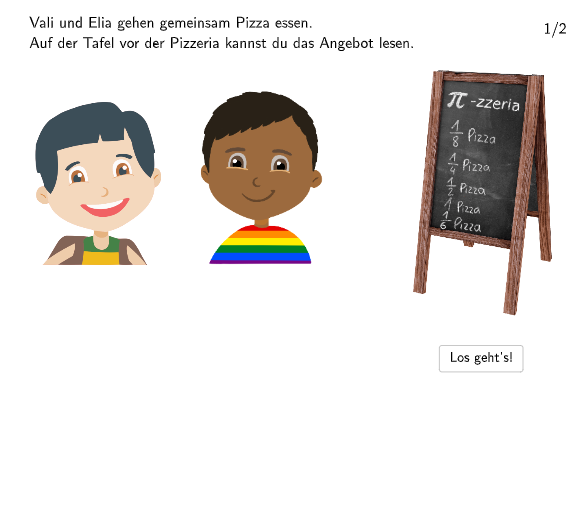
Loading the math board and drawing, please wait…
In collections
Zahlenstrahl und Ordnen von Brüchen
This example demonstrates how to compare fractions to determine who ordered more pizza. The core math concepts involved are relative fraction sizes and fraction operations. Construction highlights from the GeoGebra command summary include: Segment, Point, Line, SpeechBubbleLeft, SpeechBubbleRight, Polygon; Objects: valiTrue, bsp, ZiehMich0, eliaTrue, move, anmEli, SchaufelRechtsPunkt, distSchaufelRechts, anmVal, SchaufelLinksPunkt, distSchaufelLinks, ZiehMich, ZiehMich1, ZiehMich2, ZiehMich3, ZiehMich4, animValPizza2_4, animValPizza2_3, animValPizza2_2, anmEliPizza1_4, anmEliPizza1_3, anmEliPizza1_2, anmEliPizza1_1, anmValPizza1, text1, A, B, losgehts, C, D, vali1, E, F, elia1, G, H, f, weiter, zurueck, I. It is suitable for 5th-6th grade students, used for teaching fraction concepts and comparisons.
GeoGebra Commands & Parameters
Segment((23.5, -2.6), (11, -2.6)) → anmEliPoint(anmEli) → SchaufelRechtsPunktSegment((-17, -3), (-4.5, -3)) → anmValPoint(anmVal) → SchaufelLinksPunktSegment((-13.92, -1.6), (-1.42, -1.6)) → animValPizza2_4Segment((-13.82, -1.62), (-1.32, -1.62)) → animValPizza2_3Segment((-13.76, -1.62), (-1.26, -1.62)) → animValPizza2_2Segment((17.5, -1.74), (5, -1.74)) → anmEliPizza1_4Segment((17.52, -1.72), (5.02, -1.72)) → anmEliPizza1_3Segment((17.58, -1.72), (5.08, -1.72)) → anmEliPizza1_2Segment((17.48, -1.74), (4.98, -1.74)) → anmEliPizza1_1Segment((-13.8, -1.74), (-1.3, -1.74)) → anmValPizza1Line(G, H) → fSpeechBubbleLeft(M, 7.2, 0.8) → polyValiSpeechBubbleRight(N, 6.9, 0.8) → polyEliaPoint(anmValPizza1) → Champ1Anim1Point(anmEliPizza1_1) → Cap1Anim1_1Point(anmEliPizza1_2) → Cap1Anim2_1Point(anmEliPizza1_3) → Cap1Anim3_1Point(anmEliPizza1_4) → Cap1Anim4_1Polygon(Box3LeftTop, Box3RightTop, Box3RightBottom, Box3LeftBottom) → box3, q, r, s, tPolygon(Box3LeftTop_{1}, Box3RightTop_{1}, Box3RightBottom_{1}, Box3LeftBottom_{1}) → box2, q_{1}, r_{1}, s_{1}, t_{1}Polygon(Box3LeftTop_{2}, Box3RightTop_{2}, Box3RightBottom_{2}, Box3LeftBottom_{2}) → box1, q_{2}, r_{2}, s_{2}, t_{2}Point(animValPizza2_4) → Champ2Anim4_1Point(animValPizza2_2) → Champ2Anim2_1Point(animValPizza2_3) → Champ2Anim3_1Segment((-13.84, -1.74), (-1.34, -1.74)) → animValPizza2_1Point(animValPizza2_1) → Champ2Anim1_1Point(anmEliPizza1_1) → Cap2Anim1_{1}Point(anmEliPizza1_1) → Cap3Anim1_1Segment((-13.3, -1.64), (-1.25, -1.64)) → anmValPizza1_2Point(anmValPizza1_2) → Champ1Anim3
AI Drawing Prompt Reference
Create an instructional diagram for comparing fractions on a coordinate plane. Draw two horizontal segmented bars to the left and right, each made from several adjacent segment pieces; place clear endpoints on the segments to mark the subdivision. On the upper area, add a straight line and two speech bubbles positioned on the left and right labeled “Val” and “Eli”. Include multiple rectangular polygon blocks on the canvas to represent the fraction parts, arranged so they align with the left and right segmented bars. The overall layout should visually support deciding which side corresponds to a larger fraction.
The prompt above was compiled from the original drawing commands and is for reference only.