
Which Term Fits?
Loading the math board and drawing, please wait…
In collections
Wiederholung: Variablen, Terme und Gleichungen
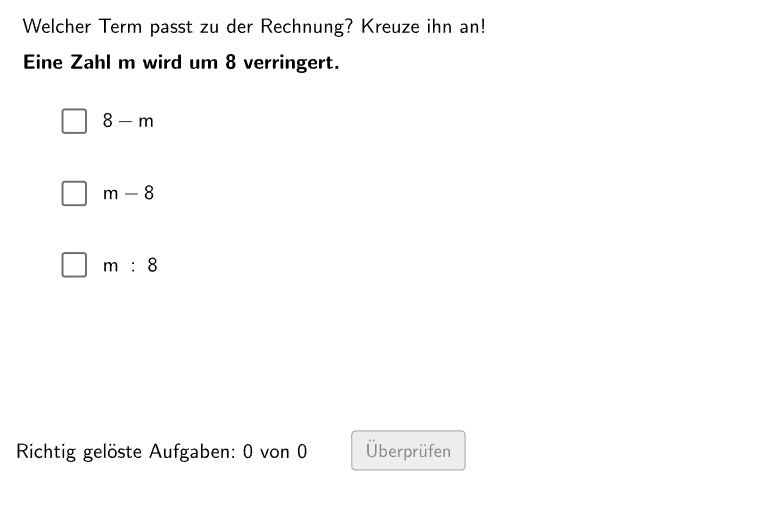
This example demonstrates how to use the GeoGebra interactive platform to let students match the correct mathematical terms in given contexts. The core math concepts involved include the establishment and interpretation of algebraic expressions. Construction highlights - based on the 'Construction Summary' below, which GeoGebra commands/objects were used: Shuffle (random sorting), Element (element selection), If (conditional judgment), Sequence (sequence generation), Textfield (text input field), Polygon (polygon drawing), RoundBox (circular border), Translate (translation transformation); objects include verbVer (verb variant), alphabetWithoutX (X-less alphabet), randomNosVariable (random number variable), randomNosCase (random case), randomNosConstant (random constant), randomNosVerbVer (random verb variant), questionCount (question count), numVariable (number variable), textVariable (text variable), numCase (number case), numConstantRest (number constant remainder), numVerbVer (number verb variant), textVerbVer (text verb variant), textCase2 (text case 2), numConstantCase2 (number constant case 2), numConstant (number constant), textCase6 (text case 6), textCase4 (text case 4), textCase3 (text case 3), textCase1 (text case 1), Case5 (case 5), textCase5 (text case 5), cases (cases), textCase (text case), textProblem (text problem), Pos1 (position 1), Listdy (list dy), Pos (position), checkbox1 (checkbox 1), checkbox2 (checkbox 2), wrongCount (wrong count), exCount (exercise count), correctCount (correct count), PtopLeftCornerFeedback1 (top-left corner feedback 1), PtopLeftCornerFeedback2 (top-left corner feedback 2), PtopLeftCornerFeedback3 (top-left corner feedback 3), ptopLeftCornerFeedbacks (top-left corner feedback), checkbox3 (checkbox 3), PtopLeftCornerFeedback (top-left corner feedback), PbottomLeftCornerFeedback (bottom-left corner feedback). Suitable for grades 5-6, for algebraic expression learning and practice.
GeoGebra Commands & Parameters
Shuffle({"a", "b", "c", "d", "e", "f", "g", "h", "i", "j", "k", "l", "m", "n", "k", "p", "q", "r", "s", "t", "u", "v", "w", "y", "z"}) → alphabetWithoutX, {"s", "a", "k", "n", "i", "e", "g", "b", "u", "m", "q", "r", "l", "j", "z", "p", "y", "v", "f", "c", "k", "t", "h", "w", "d"}Shuffle(Sequence[Random[1, Length[alphabetWithoutX]], i, 1, 100]) → randomNosVariable, {25, 13, 18, 3, 10, 16, 1, 24, 25, 13, 10, 12, 25, 4, 20, 19, 24, 15, 5, 15, 7, 7, 6, 5, 20, 25, 10, 6, 25, 24, 18, 20, 19, 19, 15, 15, 16, 18, 25, 7, 23, 17, 20, 25, 14, 16, 8, 3, 17, 15, 10, 15, 10, 16, 22, 10, 8, 13, 3, 8, 20, 8, 7, 10, 24, 10, 4, 21, 20, 8, 24, 19, 20, 9, 20, 15, 2, 7, 20, 17, 3, 6, 20, 7, 18, 25, 24, 16, 21, 23, 14, 21, 20, 8, 23, 9, 21, 1, 18, 8}Shuffle(Sequence[Random[1, 6], i, 1, 100]) → randomNosCase, {3, 5, 2, 3, 4, 1, 5, 2, 2, 4, 4, 1, 5, 6, 3, 5, 4, 4, 6, 3, 6, 1, 2, 4, 3, 4, 3, 4, 1, 5, 2, 5, 6, 4, 2, 4, 1, 6, 5, 6, 6, 5, 6, 2, 5, 1, 4, 5, 2, 6, 4, 3, 6, 5, 6, 2, 1, 5, 5, 2, 2, 2, 3, 5, 3, 1, 3, 3, 4, 6, 6, 6, 5, 3, 5, 3, 1, 3, 1, 6, 1, 5, 4, 4, 2, 5, 3, 6, 4, 2, 3, 4, 3, 3, 6, 6, 3, 1, 5, 5}Shuffle(Sequence[Random[1, 10], i, 1, 100]) → randomNosConstant, {7, 1, 7, 2, 8, 8, 1, 8, 9, 3, 8, 6, 6, 9, 6, 5, 6, 5, 5, 9, 7, 2, 3, 1, 8, 7, 9, 1, 3, 8, 9, 9, 2, 6, 5, 4, 6, 6, 1, 6, 2, 6, 7, 7, 8, 2, 5, 9, 6, 7, 6, 6, 6, 4, 2, 7, 6, 7, 5, 1, 5, 2, 9, 8, 3, 9, 3, 3, 8, 8, 5, 4, 10, 9, 9, 7, 10, 4, 8, 10, 3, 6, 3, 9, 7, 10, 3, 1, 3, 7, 8, 4, 1, 2, 6, 5, 6, 1, 9, 5}Shuffle(Sequence[Random[1, Length[verbVer]], i, 1, 100]) → randomNosVerbVer, {3, 1, 2, 1, 2, 1, 3, 3, 3, 1, 2, 3, 3, 2, 1, 2, 3, 1, 2, 1, 2, 3, 3, 2, 3, 3, 1, 1, 2, 2, 3, 2, 1, 1, 3, 1, 1, 3, 2, 3, 3, 1, 2, 3, 2, 2, 2, 2, 2, 1, 3, 1, 1, 2, 2, 3, 3, 2, 1, 2, 1, 2, 2, 3, 2, 1, 3, 2, 2, 1, 1, 2, 2, 2, 2, 3, 1, 2, 2, 2, 3, 2, 2, 3, 3, 2, 3, 2, 2, 2, 3, 3, 2, 2, 2, 1, 1, 2, 2, 3}Element(randomNosVariable, Mod[questionCount, 20] + 1) → numVariableElement(randomNosCase, Mod[questionCount, 100] + 1) → numCaseElement(randomNosConstant, Mod[questionCount, 100] + 1) → numConstantRestElement(randomNosVerbVer, Mod[questionCount, 100] + 1) → numVerbVerIf(numCase ≟ 2, numConstantCase2, numConstantRest) → numConstantSequence(Pos1 + (i * (0, Listdy)), i, 0, 2) → PosIf(checkbox1, ptopLeftCornerFeedbacks(1), If[checkbox2, ptopLeftCornerFeedbacks(2), If[checkbox3, ptopLeftCornerFeedbacks(3)]]) → PtopLeftCornerFeedbackShuffle(Sequence[Random[1, 3], i, 1, 100]) → randomNosPositionAnswerCorrect, {2, 3, 3, 3, 1, 2, 3, 2, 1, 2, 2, 2, 1, 3, 2, 1, 3, 1, 3, 1, 1, 1, 2, 1, 3, 3, 3, 1, 2, 1, 2, 1, 3, 2, 1, 2, 3, 3, 2, 2, 3, 1, 1, 3, 1, 2, 2, 2, 1, 3, 3, 3, 3, 2, 1, 2, 1, 3, 1, 2, 1, 2, 3, 2, 2, 2, 1, 2, 3, 2, 1, 1, 2, 1, 1, 2, 2, 3, 3, 3, 2, 3, 3, 2, 1, 1, 1, 3, 3, 1, 3, 3, 3, 2, 3, 3, 2, 2, 2, 2}Element(randomNosPositionAnswerCorrect, Mod[questionCount, 100] + 1) → numPositionAnswerCorrectTextfield(aInput) → InputBox1Textfield(bInput) → InputBox2If(numPositionAnswerCorrect ≟ 1, checkbox1, If[numPositionAnswerCorrect ≟ 2, checkbox2, If[numPositionAnswerCorrect ≟ 3, checkbox3]]) → correctPolygon(PtopLeftCornerFeedback, PtopRightCornerFeedback, PbottomRightCornerFeedback, PbottomLeftCornerFeedback) → rectangleCorrect, ptopleftcornerfeedback, ptoprightcornerfeedback, pbottomrightcornerfeedback, pbottomleftcornerfeedbackSequence(RandomElement[Remove[Sequence[3], {randomNosPositionAnswerCorrect(i)}]], i, 1, 100) → randomNosPositionAnswerWrong1, {3, 2, 2, 1, 2, 3, 2, 3, 3, 3, 1, 3, 3, 2, 1, 2, 1, 3, 1, 2, 2, 2, 3, 2, 2, 1, 2, 3, 3, 3, 1, 2, 1, 3, 2, 3, 2, 2, 1, 1, 2, 2, 3, 1, 3, 1, 3, 3, 3, 2, 2, 2, 1, 3, 2, 3, 2, 1, 2, 3, 2, 3, 1, 3, 3, 1, 2, 3, 2, 1, 2, 2, 3, 3, 2, 1, 1, 2, 1, 1, 3, 2, 1, 1, 2, 3, 3, 2, 2, 3, 2, 2, 1, 1, 2, 1, 1, 3, 3, 1}Element(randomNosPositionAnswerWrong1, Mod[questionCount, 100] + 1) → numPositionAnswerWrong1Sequence(RandomElement[Remove[Remove[Sequence[3], {randomNosPositionAnswerCorrect(i)}], {randomNosPositionAnswerWrong1(i)}]], i, 1, 100) → randomNosPositionAnswerWrong2, {1, 1, 1, 2, 3, 1, 1, 1, 2, 1, 3, 1, 2, 1, 3, 3, 2, 2, 2, 3, 3, 3, 1, 3, 1, 2, 1, 2, 1, 2, 3, 3, 2, 1, 3, 1, 1, 1, 3, 3, 1, 3, 2, 2, 2, 3, 1, 1, 2, 1, 1, 1, 2, 1, 3, 1, 3, 2, 3, 1, 3, 1, 2, 1, 1, 3, 3, 1, 1, 3, 3, 3, 1, 2, 3, 3, 3, 1, 2, 2, 1, 1, 2, 3, 3, 2, 2, 1, 1, 2, 1, 1, 2, 3, 1, 2, 3, 1, 1, 3}Element(randomNosPositionAnswerWrong2, Mod[questionCount, 100] + 1) → numPositionAnswerWrong2If(checkbox1, Pos(1), checkbox2, Pos(2), Pos(3)) → CRoundBox(radius, C, dy, dx) → c, d, Vieleck1, e, fTranslate(Pos, (FBdx, 0)) → Pos2If(checkbox1, Pos2(1), checkbox2, Pos2(2), Pos2(3)) → PosFBRoundBox(radius, PosRichtigeOption, dy, dx) → g, h, Vieleck2, k, p
AI Drawing Prompt Reference
Draw a graph containing multiple circles and rectangles, including options for correct and incorrect answers. The correct answer options have three options, and the incorrect answer options have two options. The correct answer options are located at the top left of the graph, and the incorrect answer options are located at the top right. The correct answer options are connected by a circular line, and the incorrect answer options are connected by a rectangular line. The background color of the graph is white, and the color of the circles and rectangles is blue and red. The radius of the circles is 10 units, and the size of the rectangles is 20x20 units. The distance between the options is 20 units, and the center of the graph is at (0, 0).
The prompt above was compiled from the original drawing commands and is for reference only.