
Waterplane Area & Centroid Calculation - Simpson's Rule
Loading the math board and drawing, please wait…
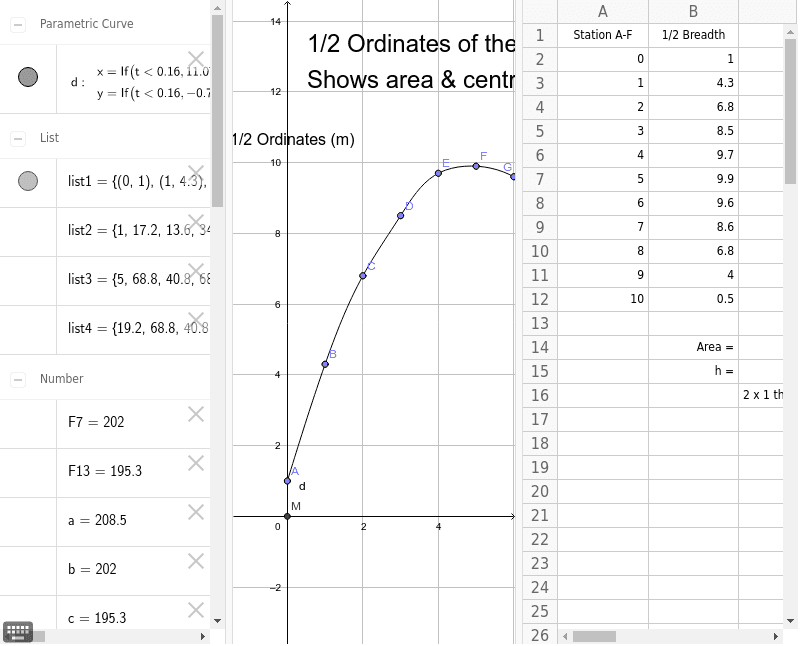
This example demonstrates the calculation of irregular waterplane area and its centroid using Simpson's Rule. Key math concepts include integral calculus, coordinate geometry, and function graphing. GeoGebra commands like Sum, Point, Intersect, and Spline are used to accurately model and compute the water surface. Suitable for high school and above students to understand the application of numerical integration in geometric calculations.
GeoGebra Commands & Parameters
Sum(list2) → aSum(list3) → bSum(list4) → cPoint(yAxis) → APoint(list1) → BPoint(list1) → CPoint(list1) → DPoint(list1) → EPoint(list1) → FPoint(list1) → GPoint(list1) → HPoint(list1) → IPoint(list1) → JPoint(list1) → KIntersect(xAxis, yAxis) → MSpline(list1, 3) → d
AI Drawing Prompt Reference
Draw an irregular water surface formed by connecting a series of points, showing its intersection with the x-axis and y-axis. Use Simpson's Rule to calculate the area and centroid of the water surface, displaying the results graphically. Include the x-axis and y-axis below the water surface, marking their intersections with the water. The water surface is represented by a smooth curve connecting multiple points, with its area and centroid calculated and displayed.
The prompt above was compiled from the original drawing commands and is for reference only.