
Vector Sum Demonstration
Loading the math board and drawing, please wait…
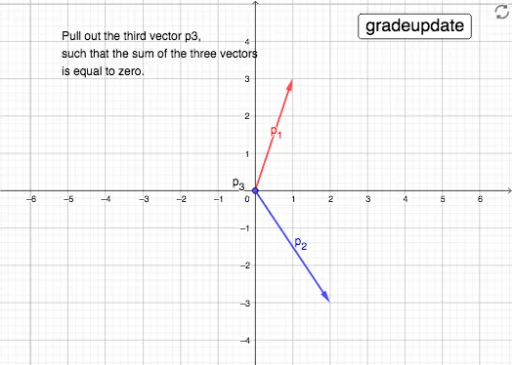
This example demonstrates the vector sum operation in 2D and its geometric interpretation. Core math concepts include vectors, triangles, trigonometry, and coordinate geometry. Construction highlights involve GeoGebra commands like Intersect, Random, Vector, Point, and If. Suitable for high school students learning vector operations and geometric applications.
GeoGebra Commands & Parameters
Intersect(xAxis, yAxis) → ARandom(1, 3) → x2Random(1, 3) → x1Random(1, 3) → y1Random(-3, -1) → y2Vector(A, B) → p_1Vector(A, C) → p_2Point(p_2) → DVector(D, E) → p_3If(p_3 ≟ p3compare, true, false) → p3checkIf(p3check, 1, 0) → grade
AI Drawing Prompt Reference
Draw a 2D vector sum demonstration showing two vectors and their geometric sum. Start with the intersection of the coordinate axes, then create two random vectors starting from the origin. Find the endpoint of the second vector and draw a third vector from this point. Finally, visualize the sum of the two vectors.
The prompt above was compiled from the original drawing commands and is for reference only.