
Vector Addition Dynamic Demonstration: Parallelogram and Triangle Laws
Loading the math board and drawing, please wait…
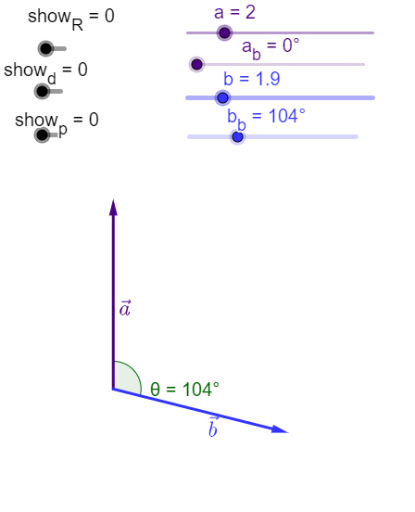
This GeoGebra example interactively demonstrates the addition of two vectors u and v, illustrating the geometric meaning of vector addition. Core mathematical concepts include vector addition via the parallelogram law and triangle law, along with vector rotation and angle measurement. Construction highlights: the Rotate command is used to adjust vector directions, the Vector command creates vectors u and v, the Angle command constructs and displays relevant angles θ, α, β, and sliders show_R, show_d, show_p control the visibility of auxiliary elements such as diagonals, parallelograms, and projections. Suitable for high school or early college students learning vector operations and geometric intuition, as well as for teachers demonstrating vector addition properties in class or for students' self-exploration.
GeoGebra Commands & Parameters
Rotate(Q, (-a_b), O) → AVector(O, A) → uRotate(D, (-b_b), O) → BVector(O, B) → vVector(O, R) → wVector(A, B) → cAngle(v, u) → θVector(B, R) → eVector(A, R) → dAngle(c, j) → αAngle(w, j) → β
AI Drawing Prompt Reference
Create a dynamic demonstration of vector addition: from a common origin, draw two vectors with adjustable directions, marking the angle between them as θ. Construct a parallelogram using these vectors as adjacent sides, and draw the diagonal representing their sum. Also illustrate the triangle law by placing the vectors head-to-tail, and label the related angles α and β. Include auxiliary elements such as diagonals, parallelogram sides, and projections, with sliders to toggle their visibility. The layout should clearly emphasize the geometric interpretation of vector addition.
The prompt above was compiled from the original drawing commands and is for reference only.