
Unit Circle by Will Elliott (2)
Loading the math board and drawing, please wait…
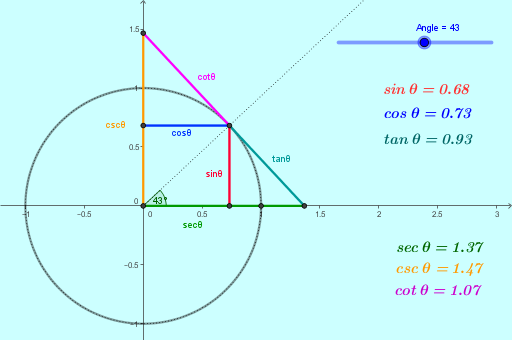
This example demonstrates the construction of the unit circle and its relationship with trigonometric functions. Core math concepts include the circle, trigonometric functions (sine, cosine, tangent, etc.), angles, tangent lines, continuity, and more. Construction highlights GeoGebra commands like Intersect, Circle, Rotate, Angle, Tangent, Ray, Segment, and OrthogonalLine. Suitable for high school mathematics education to understand the definition of trigonometric functions and applications of the unit circle.
GeoGebra Commands & Parameters
Intersect(xAxis, yAxis) → ACircle(A, 1) → cIntersect(c, xAxis, 2) → BRotate(B, Angle°, A) → CAngle(B, A, C) → αTangent(C, c) → a, bIntersect(a, xAxis) → DIntersect(a, yAxis) → ERay(A, C) → dSegment(E, C) → cotθSegment(C, D) → tanθSegment(A, D) → secθSegment(E, A) → cscθOrthogonalLine(C, xAxis) → iOrthogonalLine(C, yAxis) → jIntersect(yAxis, j) → FIntersect(i, xAxis) → GSegment(F, C) → cosθSegment(G, C) → sinθ
AI Drawing Prompt Reference
Draw a unit circle with its center and radius marked. Mark the points where the circle intersects the axes, and connect the center to these points with a line. Label the angles from the center and draw corresponding sine and cosine lines. Also draw tangent lines to the circle and line segments from the center to the points of tangency. Finally, mark the lengths of these segments to show the relationships of tangent, cotangent, sine, and cosine.
The prompt above was compiled from the original drawing commands and is for reference only.