
Unit Circle by Taylor
Loading the math board and drawing, please wait…
In collections
The Unit Circle Begins
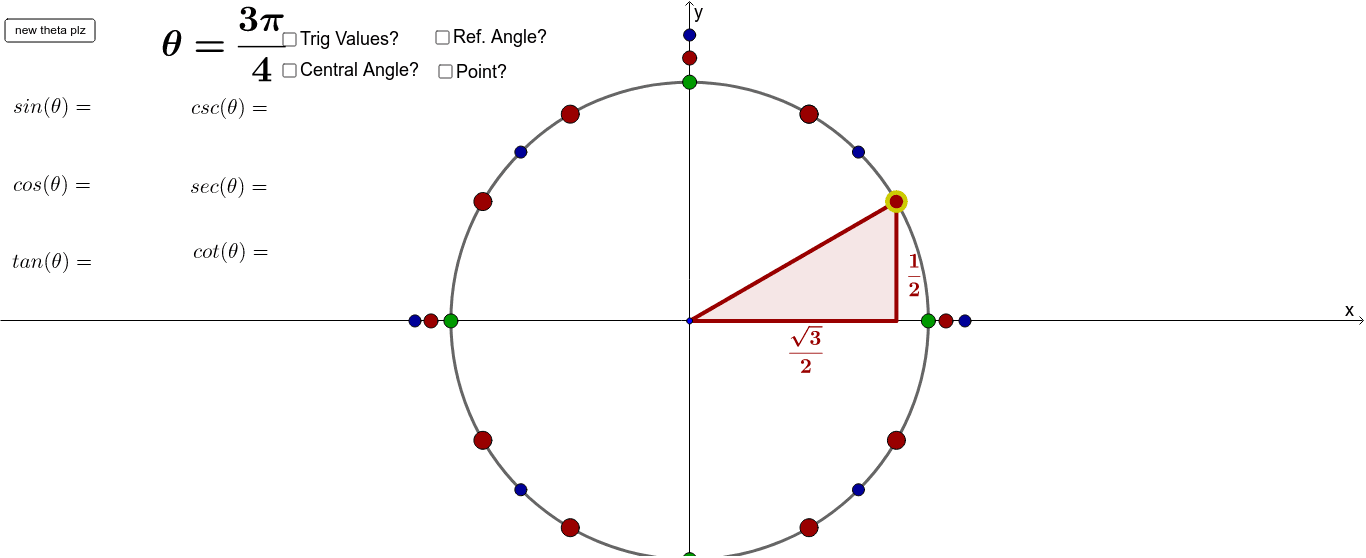
This example demonstrates the geometric construction of the unit circle. Key mathematical concepts include the properties of circles, angles, and trigonometric functions. Using GeoGebra commands such as Point, Segment, and Polygon, the example dynamically shows points on the unit circle, angles, and trigonometric values. Suitable for students in middle school and above learning geometry and trigonometry.
GeoGebra Commands & Parameters
Point(c) → ASequence((π * k) / 12, k, 0, 24) → AnglesSequence((cos(Element[Angles306090, k]), sin(Element[Angles306090, k])), k, 1, 9) → Pts306090Segment(O, B) → dMin(abs(Angles306090 - acos(x(A)))) → d306090Min(abs(Angles459045 - acos(x(A)))) → d459045Min(abs(AnglesVH - acos(x(A)))) → dVHIf((d306090 ≤ d459045) ∧ (d306090 ≤ dVH), 1, 0) → is306090If((d459045 < d306090) ∧ (d459045 < dVH), 1, 0) → is459045If((dVH < d306090) ∧ (dVH < d459045), 1, 0) → isVHIf(y(A) > 0, acos(x(A)), π + acos(-x(A))) → thetaPolygon(O, A, B) → Triangle306090, b, o, aPolygon(O, A, B) → Triangle459045, b_1, o_1, a_1Polygon(O, A, B) → TriangleVH, b_2, o_2, a_2Sequence((cos(Element[Angles459045, k]), sin(Element[Angles459045, k])), k, 1, 4) → Pts459045Sequence((cos(Element[AnglesVH, k]), sin(Element[AnglesVH, k])), k, 1, 4) → PtsVHSequence((cos(Element[AnglesAll, k]), sin(Element[AnglesAll, k])), k, 1, Length[AnglesAll]) → PtsAllElement(AnglesAllLabels, 2) → FailRandom(1, 14) → randIntIf(theta > π, "-", "") → negSinIf((π / 2 < theta) ∧ (theta < (3 * π) / 2), "-", "") → negCosIf(tan(theta) < 0, "-", "") → negTanAngle(O2, O, A) → alphaGreenIf(theta ≟ π / 3 ∨ theta ≟ 2 * π / 3 ∨ theta ≟ 4 * π / 3 ∨ theta ≟ 5 * π / 3, 1) → isTall306090If(theta ≟ π / 6 ∨ theta ≟ 5 * π / 6 ∨ theta ≟ 7 * π / 6 ∨ theta ≟ 11 * π / 6, 1) → isSkinny306090If(theta ≟ π / 4 ∨ theta ≟ 3 * π / 4 ∨ theta ≟ 5 * π / 4 ∨ theta ≟ 7 * π / 4, 1) → isReal459045If(theta ≟ 0 ∨ theta ≟ π ∨ theta ≟ 2 * π, 1) → isHPoint(xAxis) → CPoint(xAxis) → DPoint(xAxis) → EPoint(xAxis) → FPoint(yAxis) → GPoint(yAxis) → HPoint(yAxis) → IPoint(yAxis) → JPoint(c_1) → A_1Point(c_2) → A_2Angle(O2, O, A) → alphaRedAngle(O2, O, A) → alphaBlue
AI Drawing Prompt Reference
Draw a unit circle with the center O, and mark points P for angles 30°, 60°, 90°, etc., connecting them to O to form triangles. Mark points Q for angles 45°, 90°, 45°, etc., and triangles, and points R for all angles. Mark four points C, D, E, F on the x-axis and four points G, H, I, J on the y-axis.
The prompt above was compiled from the original drawing commands and is for reference only.