
Trigonometric Ratios Demo by maths teachers kozhikode
Loading the math board and drawing, please wait…
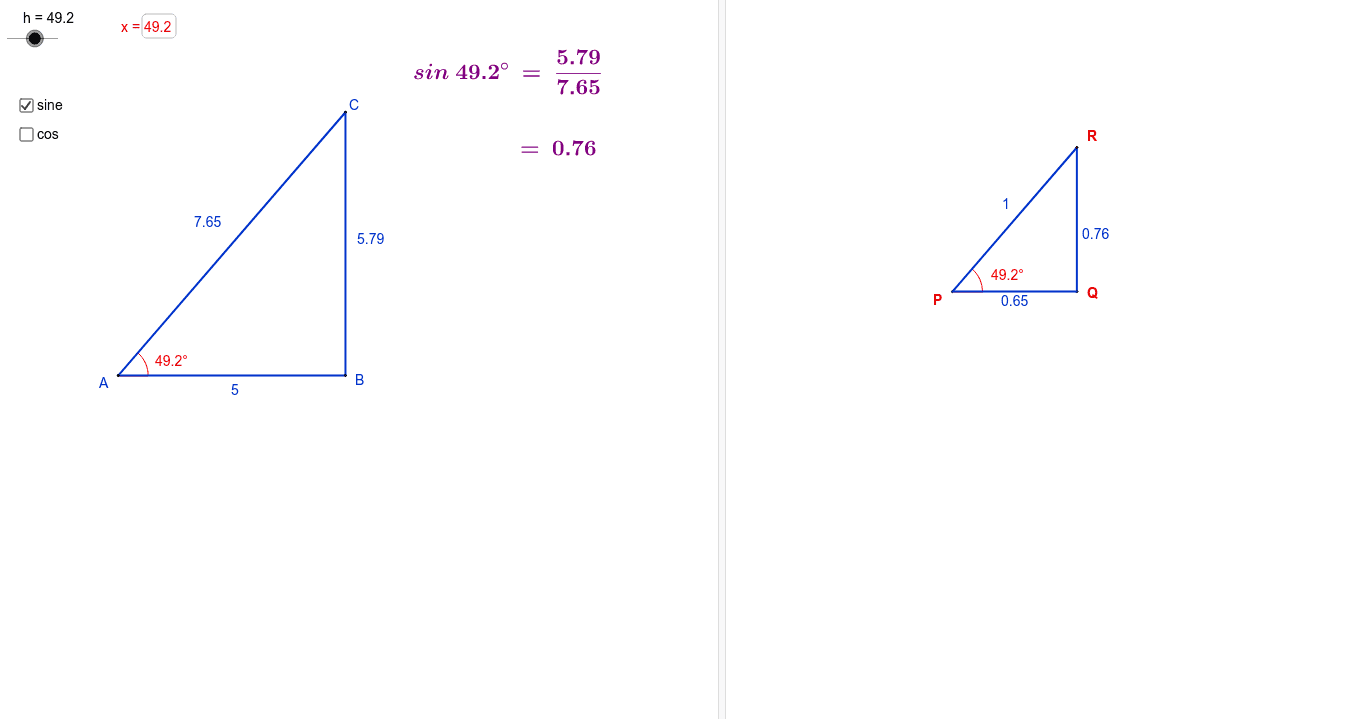
This example demonstrates the calculation and visualization of trigonometric ratios (sine, cosine, tangent) in right-angled triangles. It involves core math concepts like the definition of trigonometric functions, side length relationships in right triangles, area calculation, and properties of the incircle. Constructed using GeoGebra commands such as Point, Intersect, Segment, OrthogonalLine, Rotate, Ray, Distance, Angle, Textfield, and Circle, it helps students intuitively understand the connection between trigonometry and geometric figures, suitable for high school mathematics education to enhance spatial reasoning skills.
GeoGebra Commands & Parameters
Point(xAxis) → BIntersect(xAxis, yAxis) → ASegment(A, B) → aOrthogonalLine(B, xAxis) → bRotate(B, β, A) → B'Ray(A, B') → cIntersect(b, c) → CSegment(B, C) → dSegment(A, C) → eDistance(a, d) → fAngle(B, A, B') → γTextfield(h) → inputBox1Intersect(xAxis, yAxis) → DCircle(D, 1) → kRotate(E, h°, D) → E'Angle(E, D, E') → αOrthogonalLine(E', xAxis) → jOrthogonalLine(E', yAxis) → lIntersect(j, xAxis) → FSegment(E', F) → mSegment(E', D) → nSegment(D, F) → pDistance(m, n) → oSegment(D, F) → q
AI Drawing Prompt Reference
Draw a right triangle to demonstrate the geometric meaning of sine, cosine, and tangent functions. Start with a point on the x-axis, intersect it with the y-axis at the right angle vertex. Connect these points to form one leg of the triangle. Draw a perpendicular line from the point to the x-axis, and let a ray from the right angle vertex intersect this line to form the triangle's other vertices. Label the lengths of all sides, and draw the incircle to illustrate side length relationships and area calculations, helping to understand the connection between trigonometry and geometric figures.
The prompt above was compiled from the original drawing commands and is for reference only.