
Trig Ratios Exploration: Dynamic Right Triangle Geometry
Loading the math board and drawing, please wait…
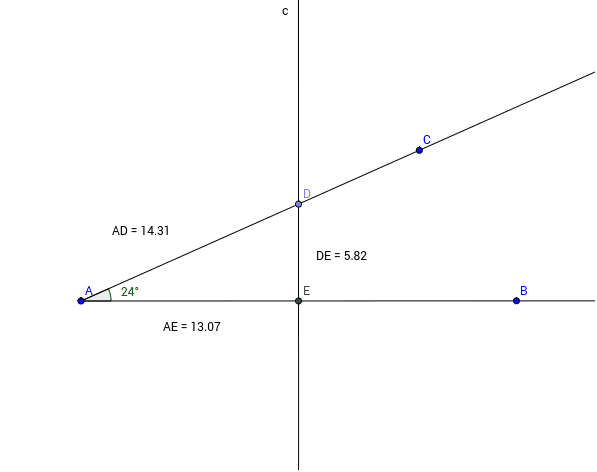
This GeoGebra example provides an interactive exploration of trigonometric ratios (sine, cosine, tangent) in a right triangle. It demonstrates how the ratios of side lengths depend only on the acute angle, not on the triangle's size, reinforcing the concept of similarity. The construction uses commands such as Ray, Point, OrthogonalLine, Distance, Angle, and Intersect to build the triangle and its perpendicular components. Key objects include points A, B, C, D, E, and measured distances like distanceDG, distanceAE, and distanceAD, with text labels displaying the computed ratios. This resource is ideal for middle or high school students learning introductory trigonometry, and for teachers seeking a visual, hands-on tool to illustrate the fundamental definitions of trigonometric functions.
GeoGebra Commands & Parameters
Ray(A, C) → aRay(A, B) → bPoint(a) → DOrthogonalLine(D, b) → cDistance(a, b) → dAngle(b, a) → αIntersect(c, b) → EDistance(D, E) → distanceDGDistance(E, c) → distanceGcDistance(A, E) → distanceAEDistance(A, D) → distanceAD
AI Drawing Prompt Reference
Draw a right triangle with one leg along a horizontal ray and the hypotenuse along another ray from the same vertex, forming an acute angle. Pick a point on the hypotenuse and drop a perpendicular from it to the horizontal ray, marking the foot. Connect the point to the foot to complete the triangle. Label the acute angle and measure the distances from the vertex to the point, from the vertex to the foot, and from the point to the foot. Display text labels showing the ratios of these distances to illustrate sine, cosine, and tangent.
The prompt above was compiled from the original drawing commands and is for reference only.