
Trapezoid Area Demonstration by svanheest
Loading the math board and drawing, please wait…
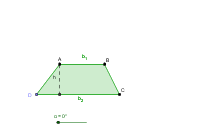
This example demonstrates the graphical representation of a trapezoid's area. Key mathematical concepts include trapezoids, median values, and trigonometry. Using GeoGebra commands such as Ray, Point, and Polygon, the trapezoid is constructed and its area is calculated. Suitable for middle school and above students learning geometry and trigonometry.
GeoGebra Commands & Parameters
Ray(C_1, E) → bPoint(b) → DPolygon(A, D, C, B) → poly1, a_1, b_2, d, b_1OrthogonalLine(A, b) → aIntersect(b, a) → FSegment(A, F) → hMidpoint(d) → GRotate(A, -α, G) → A'Rotate(D, -α, G) → D'Rotate(C, -α, G) → C'Rotate(B, -α, G) → B'Polygon(A', D', C', B') → poly1', a', d', c', b'
AI Drawing Prompt Reference
Draw a trapezoid and demonstrate its area. Start by drawing the two bases, then drop a perpendicular from the midpoint of one base to get the height. Construct the midsegment of the trapezoid, rotate the vertices to form a new trapezoid, and finally calculate and display the area of the original trapezoid.
The prompt above was compiled from the original drawing commands and is for reference only.