
Translation Example by Marc Douglas
Loading the math board and drawing, please wait…
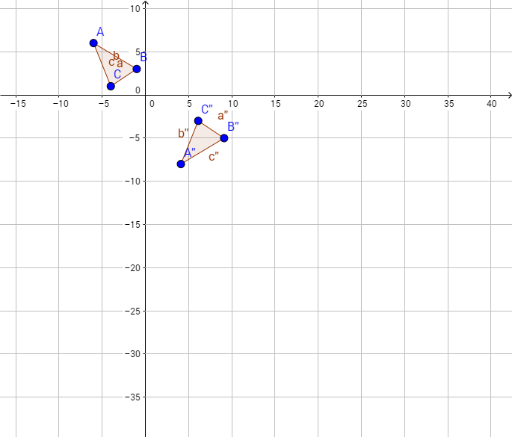
This example demonstrates the process and properties of polygon translation transformation. Core math concepts include vector, geometric transformation, and coordinate geometry. Construction highlights the use of GeoGebra commands like Polygon, Intersect, Vector, Translate, Mirror to build polygons and their translations, reflections, etc., visually showing transformation effects. Suitable for high school students and teachers learning about geometric transformations and vectors.
GeoGebra Commands & Parameters
Polygon(A, B, C) → poly1, c, a, bIntersect(xAxis, yAxis) → DVector(E, F) → uTranslate(A, u) → A'Translate(B, u) → B'Translate(C, u) → C'Polygon(A', B', C') → poly1', c', a', b'Mirror(A', f) → A''Mirror(B', f) → B''Mirror(C', f) → C''Polygon(A'', B'', C'') → poly1'', c'', a'', b''Mirror(A', f) → A''_1Mirror(B', f) → B''_1Mirror(C', f) → C''_1Polygon(A''_1, B''_1, C''_1) → poly1''_1, c''_1, a''_1, b''_1Mirror(A'', b) → A'''Mirror(A''', b) → GMirror(A''', c) → H
AI Drawing Prompt Reference
Draw a triangle, then translate it by a vector to create a congruent second triangle. Reflect the translated triangle across a line to form a third triangle. Reflect this third triangle across another line to produce a fourth triangle. Finally, use one side of the reflected triangle as an axis to reflect a vertex twice, yielding two new points. The figure shows multiple triangles, vectors, lines, and intersection points, illustrating geometric transformations.
The prompt above was compiled from the original drawing commands and is for reference only.