
Transformations: Dilations
Loading the math board and drawing, please wait…
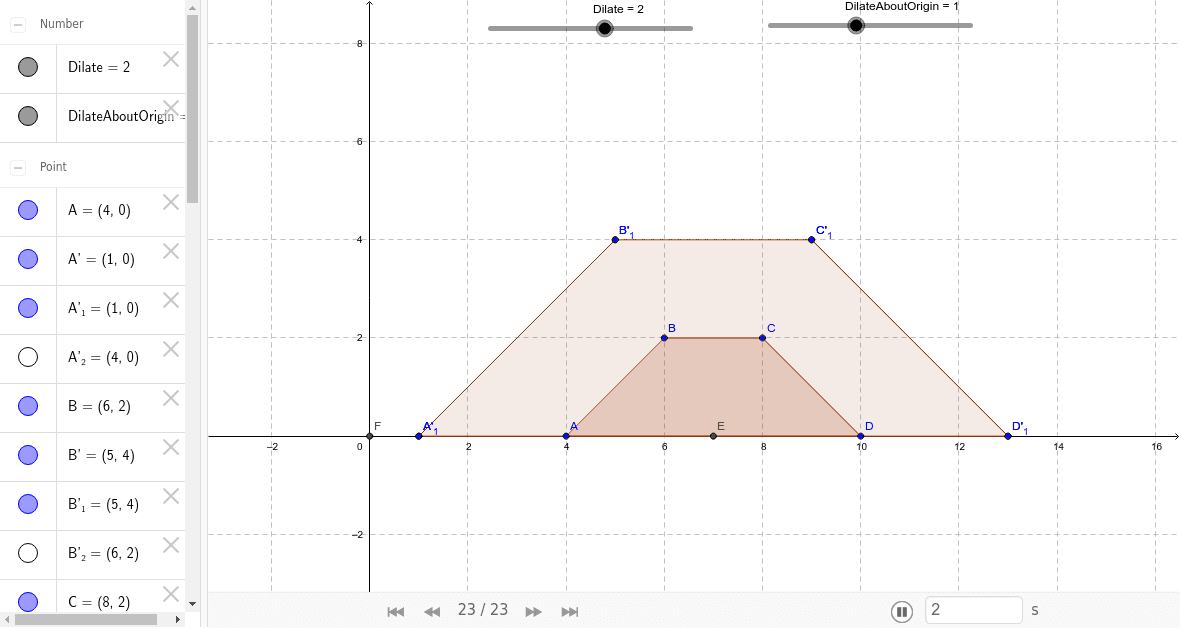
This example visually explores dilations described as growing and shrinking. Students uncover that for dilations with the origin as the center point, individual points maintain a proportional distance from the center. Key math concepts include geometric transformations, ratios, and proportional relationships. The construction utilizes GeoGebra commands like Polygon, Midpoint, Dilate, and Intersect, with objects such as A, B, C, D, poly1, a, b, c, d, and their dilated counterparts. Suitable for middle school and above, this resource helps teach transformations and ratios in a hands-on manner.
GeoGebra Commands & Parameters
Polygon(A, B, C, D) → poly1, a, b, c, dMidpoint(A, D) → EDilate(A, Dilate, E) → A'Dilate(B, Dilate, E) → B'Dilate(C, Dilate, E) → C'Dilate(D, Dilate, E) → D'Dilate(A, Dilate, E) → A'_1Dilate(B, Dilate, E) → B'_1Dilate(C, Dilate, E) → C'_1Dilate(D, Dilate, E) → D'_1Polygon(A'_1, B'_1, C'_1, D'_1) → poly1'_1, a'_1, b'_1, c'_1, d'_1Intersect(xAxis, yAxis) → FDilate(A, DilateAboutOrigin, F) → A'_2Dilate(B, DilateAboutOrigin, F) → B'_2Dilate(C, DilateAboutOrigin, F) → C'_2Dilate(D, DilateAboutOrigin, F) → D'_2Polygon(A'_2, B'_2, C'_2, D'_2) → poly1', a'_2, b'_2, c'_2, d'_2
AI Drawing Prompt Reference
Draw a quadrilateral, find the midpoint of its diagonals, and dilate the quadrilateral from this midpoint to create a new quadrilateral. Then, dilate the original quadrilateral from the origin to create another new quadrilateral. Finally, draw the quadrilateral obtained from the third dilation.
The prompt above was compiled from the original drawing commands and is for reference only.