
The Sine Theorem, Ambiguous Case (Adjustable Triangle)
Loading the math board and drawing, please wait…
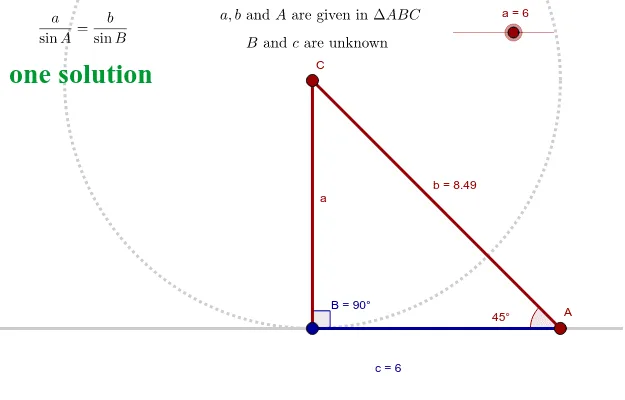
① This example dynamically demonstrates the ambiguous case of the sine rule (SSA) by allowing the user to change two angles and one opposite side, showing when two possible triangles exist. ② Core mathematical concepts include the sine theorem, the law of sines, and the conditions for multiple solutions in triangle solving, involving interior angles, circumcircle, and side-angle relationships. ③ Construction details: Using GeoGebra commands such as Line, Point, Segment, Angle, Circle, Intersect, and OrthogonalLine, the triangle and its circumcircle are built; sliders or draggable points A, C, and side a alter the configuration, with text objects (text1 to text6) displaying measurements, and auxiliary lines and intersection points marking the two possible vertices B and B'. ④ Suitable for high school or early college students learning trigonometry and triangle solving, as well as for teachers demonstrating the ambiguous case in a dynamic geometry environment.
GeoGebra Commands & Parameters
Line(A_1, B_1) → a_2Point(a_2) → ASegment(C, A) → bAngle(C, A, B_1) → A_2Circle(C, a) → c_3Intersect(c_3, a_2, 1) → EIntersect(c_3, a_2, 2) → FSegment(E, C) → dSegment(F, C) → eAngle(a_2, d) → BAngle(a_2, e) → B'OrthogonalLine(C, xAxis) → fIntersect(c_3, f, 1) → GSegment(F, A) → c'Segment(E, A) → c
AI Drawing Prompt Reference
Draw an adjustable triangle demonstrating the ambiguous case of the sine rule. Start with a horizontal line and place a point A on it, with a fixed point C elsewhere. Connect A and C to form one side. Draw a circle centered at C with a given radius, intersecting the horizontal line at two points, which serve as possible vertices B and B'. Connect C to each intersection to form two triangles. Construct the circumcircle of these trianglesholistically, and add a perpendicular line through C to the horizontal axis, intersecting the circle. Display all side lengths and angle measures, and allow dragging points or sliders to adjust angles and side lengths, observing how the number of possible triangles changes.
The prompt above was compiled from the original drawing commands and is for reference only.