
Surface Area and Volume of a Right Circular Cone
Loading the math board and drawing, please wait…
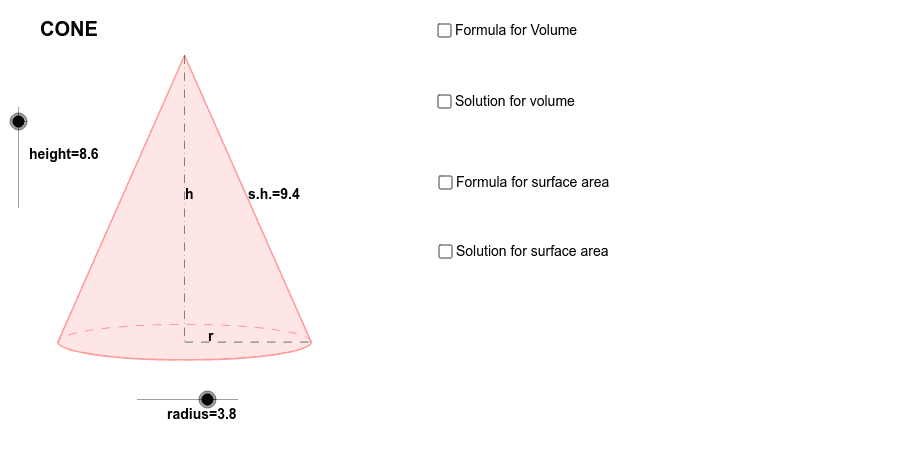
① This example demonstrates the calculation of surface area and volume of a right circular cone, dynamically showing the generation and unfolding of the cone. ② Core mathematical concepts include solid geometry of cones, lateral area, base area, volume formulas, and the idea of solids of revolution linked to integral calculus. ③ Construction highlights: GeoGebra commands Dilate, Vector, Translate, Arc, Polygon, Segment, Midpoint are used to create objects such as height, radius, slant heights s_1, s_2, base circle c, apex A, base center B, and auxiliary points P, L, R, C, with text labels displaying the formulas. ④ Suitable for high‑school solid geometry lessons, introductory university calculus demonstrations, teacher preparation, and student self‑exploration.
GeoGebra Commands & Parameters
Dilate(B, height, A) → CVector(A, C) → uTranslate(P, u) → EArc(c, 3.141592653589793, 0) → fPolygon(L, E, R) → Q, r_1, l, eSegment(E, P) → aSegment(P, R) → bMidpoint(E, P) → DMidpoint(P, R) → FMidpoint(E, R) → SMidpoint(a) → K
AI Drawing Prompt Reference
Draw a right circular cone, dynamically showing the calculation of its surface area and volume, including the unfolding of the cone. Display the height, base radius, and slant heights, and label the lateral area, base area, and volume formulas. Use vector tools to draw a line from the apex to the edge of the base, then generate an unfolding sector using this line. Mark key points like the apex, base center, and sector center, and display relevant formulas.
The prompt above was compiled from the original drawing commands and is for reference only.