
Step 6: Slider and Locus Demonstration
Loading the math board and drawing, please wait…
In collections
Phebe Tanner Translation Tessallation
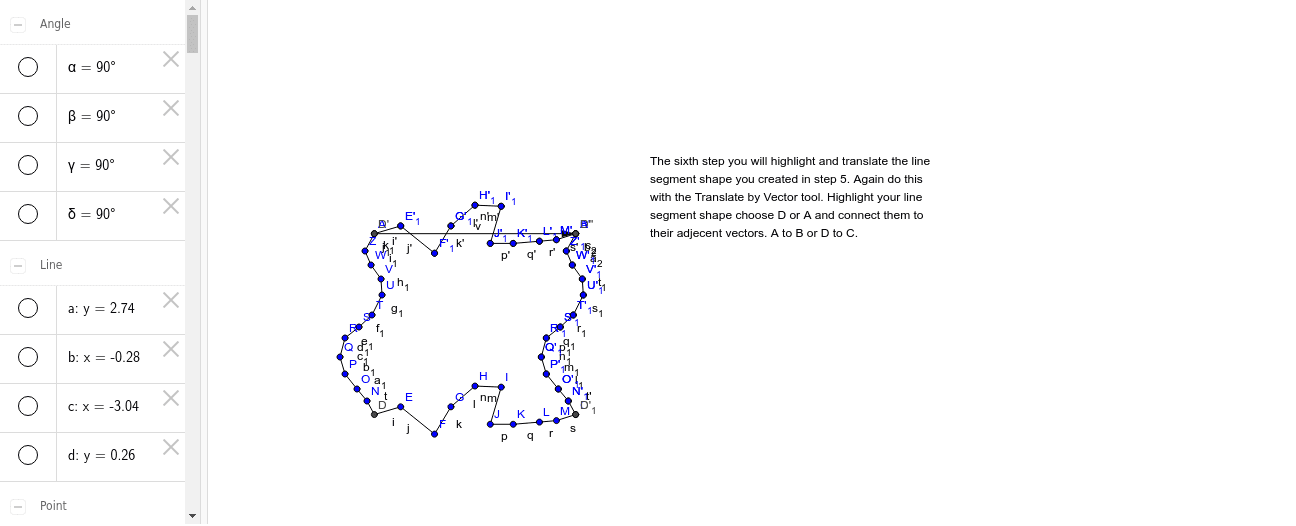
This example dynamically demonstrates the relationship between points and lines using sliders, illustrating the formation of loci. It involves core mathematical concepts such as slider animations, loci, and coordinate geometry. GeoGebra commands and objects like Line, OrthogonalLine, Point, Intersect, Segment, Angle, Vector, and Translate are used in construction. Suitable for high school students to understand parametric equations, dynamic geometry, and function graphing, as well as for visualizing limits and derivatives in calculus.
GeoGebra Commands & Parameters
Line(A, B) → aOrthogonalLine(B, a) → bOrthogonalLine(A, a) → cPoint(b) → COrthogonalLine(C, c) → dIntersect(c, d) → DSegment(D, C) → eSegment(C, B) → fSegment(B, A) → gSegment(A, D) → hAngle(A, B, C) → αAngle(C, D, A) → βAngle(D, A, B) → γAngle(B, C, D) → δSegment(D, E) → iSegment(E, F) → jSegment(F, G) → kSegment(G, H) → lSegment(H, I) → mSegment(I, J) → nSegment(J, K) → pSegment(K, L) → qSegment(L, M) → rSegment(M, C) → sVector(C, B) → uTranslate(D, u) → D'Translate(E, u) → E'Segment(D', E') → i'Translate(E, u) → E'_1Translate(F, u) → F'Segment(E'_1, F') → j'Translate(F, u) → F'_1Translate(G, u) → G'Segment(F'_1, G') → k'Translate(G, u) → G'_1Translate(H, u) → H'Segment(G'_1, H') → l'Translate(H, u) → H'_1Translate(I, u) → I'Segment(H'_1, I') → m'Translate(I, u) → I'_1Translate(J, u) → J'Segment(I'_1, J') → n'Translate(J, u) → J'_1Translate(K, u) → K'Segment(J'_1, K') → p'Translate(K, u) → K'_1Translate(L, u) → L'Segment(K'_1, L') → q'Translate(L, u) → L'_1Translate(M, u) → M'Segment(L'_1, M') → r'Translate(M, u) → M'_1Translate(C, u) → C'Segment(M'_1, C') → s'Segment(D, N) → tSegment(N, O) → a_1Segment(O, P) → b_1Segment(P, Q) → c_1Segment(Q, R) → d_1Segment(R, S) → e_1Segment(S, T) → f_1Segment(T, U) → g_1Segment(U, V) → h_1Segment(V, W) → i_1Segment(W, Z) → j_1Segment(Z, A) → k_1Vector(A, B) → vTranslate(D, v) → D'_1Translate(N, v) → N'Segment(D'_1, N') → t'Translate(N, v) → N'_1Translate(O, v) → O'Segment(N'_1, O') → l_1Translate(O, v) → O'_1Translate(P, v) → P'Segment(O'_1, P') → m_1Translate(P, v) → P'_1Translate(Q, v) → Q'Segment(P'_1, Q') → n_1Translate(Q, v) → Q'_1Translate(R, v) → R'Segment(Q'_1, R') → p_1Translate(R, v) → R'_1Translate(S, v) → S'Segment(R'_1, S') → q_1Translate(S, v) → S'_1Translate(T, v) → T'Segment(S'_1, T') → r_1Translate(T, v) → T'_1Translate(U, v) → U'Segment(T'_1, U') → s_1Translate(U, v) → U'_1Translate(V, v) → V'Segment(U'_1, V') → t_1Translate(V, v) → V'_1Translate(W, v) → W'Segment(V'_1, W') → a_2Translate(W, v) → W'_1Translate(Z, v) → Z'Segment(W'_1, Z') → b_2Translate(Z, v) → Z'_1Translate(A, v) → A'Segment(Z'_1, A') → c_2Translate(D', v) → D''
AI Drawing Prompt Reference
Draw a line segment and its perpendicular line. Take a point on the segment, and trace the path of its foot as it moves, forming a closed shape. Then, translate the foot along the segment direction multiple times with equal distances, drawing several translated line segments to illustrate parametric changes and locus formation in dynamic geometry.
The prompt above was compiled from the original drawing commands and is for reference only.