
Statistics Basics: Range, Min and Max
Loading the math board and drawing, please wait…
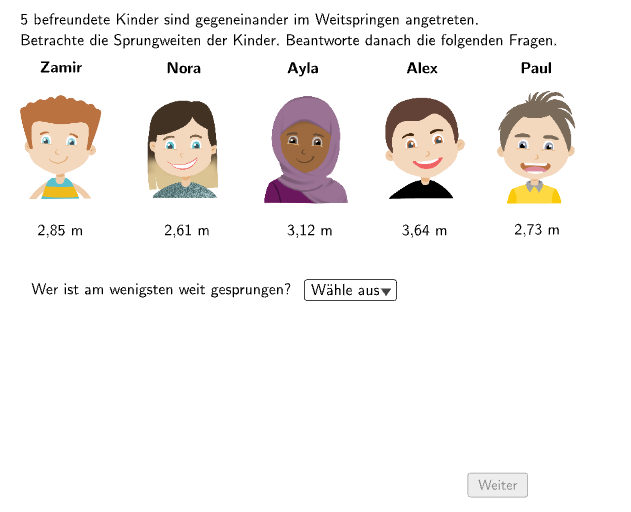
This GeoGebra example uses long jump competition data to teach fundamental statistical concepts. It includes three multiple-choice questions: (1) interpreting what a 1.03m range between Nora and Alex's jumps represents; (2) finding the minimum and maximum from the data set {63,12,45,97,36,34,23,67,164,71}; (3) calculating the maximum given minimum=25 and range=103. Core concepts: Minimum, Maximum, and Range (Spannweite). Construction uses GeoGebra commands including Textfield, Polygon, Shuffle, Element, Append, Remove, Defined, along with interactive objects like testSpannweite, InputBox, and validation buttons. Ideal for grade 5-6 students learning data organization and statistical measures.
GeoGebra Commands & Parameters
Textfield(aInput) → InputBox1Textfield(bInput) → InputBox2Polygon(PtopLeftCornerFeedback, PtopRightCornerFeedback, PbottomRightCornerFeedback, PbottomLeftCornerFeedback) → rectangleCorrect, ptopleftcornerfeedback, ptoprightcornerfeedback, pbottomrightcornerfeedback, pbottomleftcornerfeedbackShuffle(Sequence[Random[0, 10], i, 1, 100]) → randomNosForX, {0, 8, 10, 10, 4, 5, 3, 5, 7, 4, 2, 2, 1, 7, 4, 3, 7, 5, 0, 5, 6, 3, 5, 1, 2, 9, 8, 2, 0, 10, 4, 4, 2, 4, 4, 5, 5, 7, 6, 4, 0, 1, 10, 7, 0, 5, 0, 7, 4, 7, 5, 0, 2, 5, 5, 2, 6, 1, 2, 0, 4, 7, 7, 0, 2, 6, 1, 7, 6, 8, 1, 7, 5, 2, 4, 4, 9, 0, 4, 9, 6, 10, 0, 9, 7, 3, 10, 1, 1, 4, 2, 0, 2, 1, 9, 9, 10, 1, 10, 5}Element(randomNosForX, Mod[questionCount, 100] + 1) → numXShuffle(Sequence[Random[0, 10], i, 1, 100]) → randomNosForY, {5, 0, 4, 4, 2, 9, 5, 4, 5, 8, 2, 3, 3, 9, 7, 6, 0, 6, 7, 8, 1, 7, 4, 1, 8, 6, 7, 2, 5, 5, 1, 2, 9, 3, 7, 8, 10, 10, 10, 10, 5, 6, 1, 0, 2, 2, 0, 8, 8, 8, 7, 6, 7, 0, 8, 1, 0, 6, 9, 0, 9, 7, 1, 0, 8, 1, 8, 4, 8, 4, 3, 5, 0, 0, 10, 0, 7, 2, 3, 8, 7, 8, 3, 9, 7, 4, 9, 1, 9, 7, 1, 3, 9, 8, 4, 5, 7, 4, 10, 3}Element(randomNosForY, Mod[questionCount, 100] + 1) → numYAppend(true, Sequence[If[randomNosForX(i) ≟ randomNosForX(i - 1), false, true], i, 2, 100]) → stayXAppend(true, Sequence[If[randomNosForY(i) ≟ randomNosForY(i - 1), false, true], i, 2, 100]) → stayYRemove(Sequence[If[stayX(i), randomNosForX(i), 0], i, 1, 100], Sequence[0, i, 1, 100]) → randomNosForXwithoutRepeatRemove(Sequence[If[stayY(i), randomNosForY(i), 0], i, 1, 100], Sequence[0, i, 1, 100]) → randomNosForYwithoutRepeatElement(randomNosForXwithoutRepeat, Mod[questionCount, Length[randomNosForXwithoutRepeat]] + 1) → numXwithoutRepeatElement(randomNosForYwithoutRepeat, Mod[questionCount, Length[randomNosForYwithoutRepeat]] + 1) → numYwithoutRepeatDefined((aInput * bInput)) → fixedTextfield(input1) → Box1Textfield(input2) → Box2
AI Drawing Prompt Reference
Draw a statistical teaching diagram focused on range, minimum, and maximum. Place two editable input boxes on the left/top area for entering key parameters (such as values related to range and minimum). In the center, construct a rectangle frame and mark its four corners with small corner feedback/position markers. Prepare two sampled numeric sequences for horizontal and vertical values, then use the samples to generate candidate numbers for questions about interpreting the range and determining minimum and maximum. Include corresponding answer areas such as choice/input regions to present the three types of tasks. Build in the order: input boxes, rectangle with corner markers, then the question/data regions tied to the sampled values.
The prompt above was compiled from the original drawing commands and is for reference only.