
Statistics and Probability Example
Loading the math board and drawing, please wait…
In collections
Arbeiten mit Baumdiagrammen
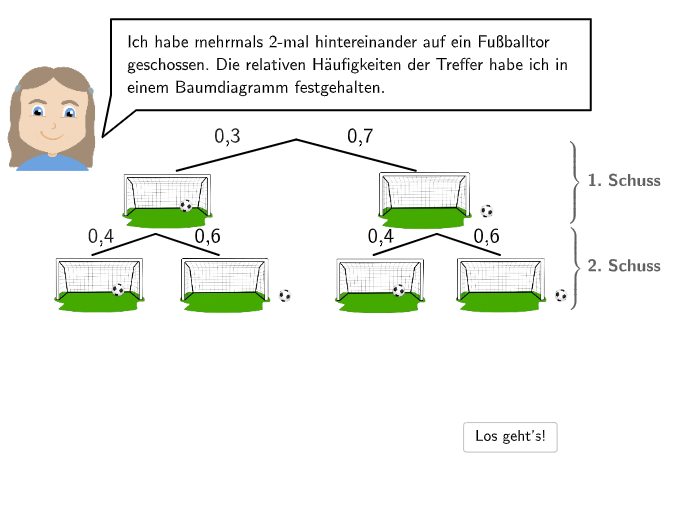
This example demonstrates probability calculation using a tree diagram. Key math concepts include probability statistics, relative frequency, and geometric construction. Construction involves GeoGebra commands like SpeechBubbleLeft, Segment, Line, and Midpoint. Suitable for elementary students in grades 5-6 for teaching statistics and geometry.
GeoGebra Commands & Parameters
SpeechBubbleLeft(PBubbleMichael, 10.8, 1.8) → bubble1SpeechBubbleLeft(PBubbleMichael, 7.5, 1.2) → bubble2SpeechBubbleLeft(PBubbleMichael + (0.1, 0.2), 10.5, 1.9) → bubble3Segment(A, B) → fLine(PspiegleOben, PspiegleInten) → spiegelMirror(A, spiegel) → A'Mirror(B, spiegel) → B'Segment(A', B') → f'Mirror(Ppic1L, spiegel) → Ppic1L'Mirror(Ppic1R, spiegel) → Ppic1R'Mirror(Ppic1L, spiegel) → Ppic1L'_{1}Mirror(E, spiegel) → E'Mirror(Ppic1R, spiegel) → Ppic1R'_{1}Mirror(F, spiegel) → F'Mirror(Ppic2L, spiegel) → Ppic2L'Mirror(Ppic2R, spiegel) → Ppic2R'Mirror(Ppic3L, spiegel) → Ppic3L'Mirror(Ppic3R, spiegel) → Ppic3R'Textfield(input1) → InputBox1Textfield(input2) → InputBox2Textfield(input3) → InputBox3Textfield(input4) → InputBox4Textfield(input5) → InputBox5Textfield(input6) → InputBox6Midpoint(A, B) → CMirror(C, spiegel) → C'Midpoint(E, Ppic1L) → DMidpoint(Ppic1R, F) → GMirror(D, spiegel) → D'Mirror(G, spiegel) → G'If(input7 ≟ 0.6, input8 ≟ 0.3, If[input7 ≟ 0.3, input8 ≟ 0.6]) → c9If(input9 ≟ 0.4, input10 ≟ 0.7, If[input9 ≟ 0.7, input10 ≟ 0.4]) → c11SpeechBubbleLeft(PBubbleMichael + (0.1, 0), 11.3, 2) → bubble4Textfield(input7) → InputBox7Textfield(input8) → InputBox8Textfield(input9) → InputBox9Textfield(input10) → InputBox10Textfield(input11) → InputBox11Mirror(I, spiegel) → I'Mirror(J, spiegel) → J'SpeechBubbleLeft(PBubbleMichael + (0.2, 0.2), 9, 1.7) → bubble5SpeechBubbleLeft(PBubbleMichael + (0.1, 0), 11.3, 2) → bubble4_1Textfield(input12) → InputBox12Segment(A, B) → fhSegment(A', B') → fh'Segment(J, F) → gSegment(J, F) → ghSegment(I, E) → hSegment(I, E) → hhSegment(J', F') → g'Segment(J', F') → gh'Segment(I', E') → h'Segment(I', E') → hh'
AI Drawing Prompt Reference
Draw a probability tree diagram with two symmetric sets of branches. Start with a horizontal base segment, then add a slanted mirror line. Reflect the base segment, branch endpoints, and midpoints across this line to create symmetry. Place multiple text boxes on the branches for entering probability values, with conditional logic (e.g., pairing 0.6 with 0.3). Add several speech bubbles around the figure for annotations. Finally, connect key points with auxiliary segments to complete the statistical teaching diagram.
The prompt above was compiled from the original drawing commands and is for reference only.