
SSS Triangle Congruence Demo
Loading the math board and drawing, please wait…
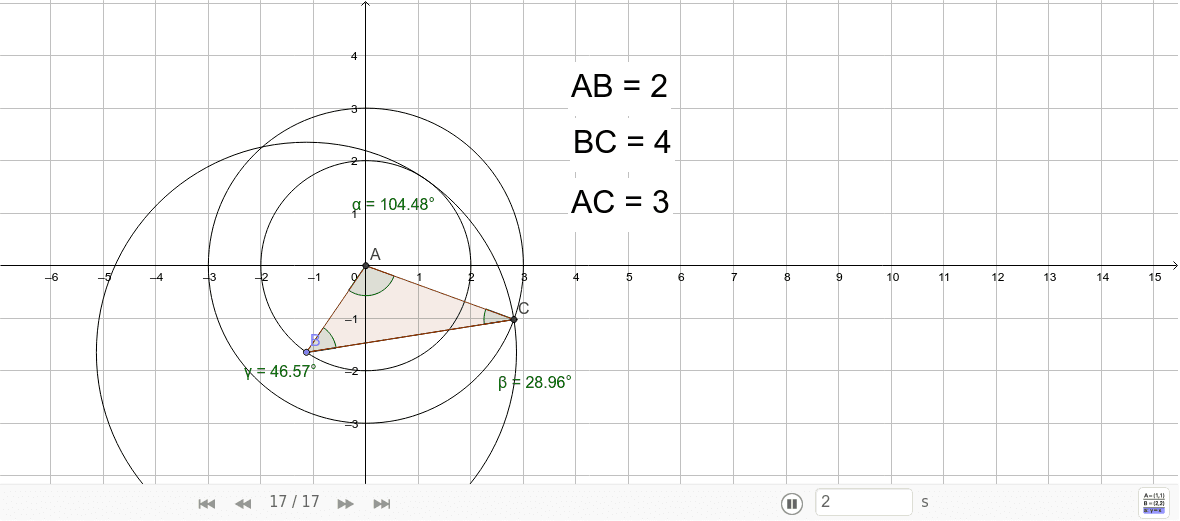
This example demonstrates the SSS (Side-Side-Side) triangle congruence condition by dynamically showing two triangles with equal sides completely overlapping. It involves core math concepts like triangle congruence criteria, distance calculation, angle measurement, and geometric construction. Key GeoGebra commands used include Intersect, Circle, Point, Segment, Polygon, Distance, and Angle to build and verify the congruence. Suitable for high school mathematics teaching to visually understand geometric proofs and spatial reasoning skills development.
GeoGebra Commands & Parameters
Intersect(xAxis, yAxis) → ACircle(A, 2) → cCircle(A, 3) → dPoint(c) → BCircle(B, 4) → eIntersect(d, e, 1) → CSegment(B, C) → aPolygon(B, A, C) → poly1, c_1, b, a_1Distance(A, B) → distanceABDistance(A, C) → distanceACDistance(B, C) → distanceBCAngle(B, A, C) → αAngle(A, C, B) → βAngle(C, B, A) → γ
AI Drawing Prompt Reference
Draw two triangles that dynamically overlap to demonstrate the SSS congruence condition. Start by drawing two concentric circles centered at the origin with radii 2 and 3. Mark a point on the circle of radius 2 and draw another circle centered at this point with radius 4. The intersections of this circle with the circle of radius 3 give the vertices of the second triangle. Connect these points to form two triangles, measuring their sides and angles to verify congruence.
The prompt above was compiled from the original drawing commands and is for reference only.