
Square with Incircle and Similar Triangles Exploration
Loading the math board and drawing, please wait…
In collections
Geometric Shapes
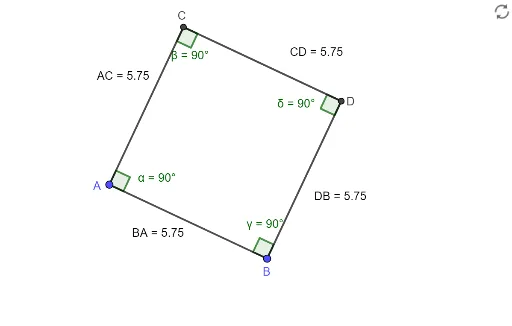
This GeoGebra example demonstrates a square with an inscribed circle, where orthogonal lines and intersections create several similar triangles, allowing exploration of relationships between side lengths, angles, and diagonal distances. Core mathematical concepts include combinatorics (counting configurations), logarithms (possibly used for distance labeling), similar triangle properties, quadratic equations, and incircle geometry. The construction uses Segment to define square sides AB, BC, CD, DA; Circle to create the incircle; OrthogonalLine to draw perpendiculars; Intersect to locate points C and D; Line for auxiliary segments; Angle to label α, β, γ, δ; Distance to measure AC, CD, DB, BA; and Text to display these measurements. This is ideal for high school students learning similar triangles, circle properties, and algebraic problem-solving, and can serve as a visual aid for quadratic equation applications in geometry.
GeoGebra Commands & Parameters
Segment(A, B) → fCircle(A, B) → cOrthogonalLine(A, f) → gIntersect(c, g, 2) → CLine(C, f) → hLine(B, g) → iIntersect(h, i) → DSegment(C, D) → jSegment(A, C) → kSegment(B, D) → lAngle(C, A, B) → αAngle(A, C, D) → βAngle(A, B, D) → γAngle(C, D, B) → δDistance(A, C) → distanceACDistance(C, D) → distanceCDDistance(D, B) → distanceDBDistance(B, A) → distanceBA
AI Drawing Prompt Reference
Draw a square and inscribe a circle within it. Start from one vertex of the square and draw a line segment, then draw a circle with this segment as its diameter. From the intersection of the square's diagonals, draw two perpendicular lines that intersect the circle, connecting these intersection points to two vertices of the square to form two triangles. Label the angles of these triangles and measure and label the lengths of the square's diagonals and sides.
The prompt above was compiled from the original drawing commands and is for reference only.