
Solving Quadratic Equations by April Jones
Loading the math board and drawing, please wait…
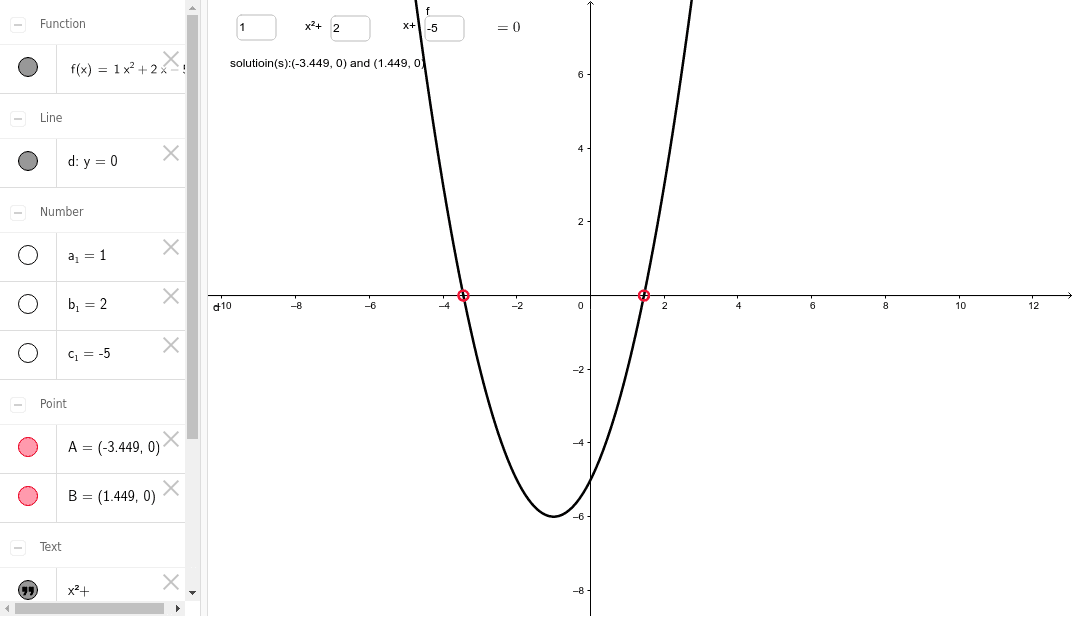
This example demonstrates the geometric interpretation of quadratic equation solutions using a dynamic worksheet. Key concepts include quadratic equations, parabolas, and intersection points. Construction involves GeoGebra commands like Intersect and Textfield, using objects such as a_1, c_1, d, b_1, etc. Suitable for middle school or high school students learning about quadratic equations and their graphical representations.
GeoGebra Commands & Parameters
Intersect(f, d, 1) → AIntersect(f, d, 2) → BTextfield(a_1) → inputBox1Textfield(b_1) → inputBox2Textfield(c_1) → inputBox3
AI Drawing Prompt Reference
Draw a dynamic geometric interpretation of quadratic equation solutions, including a parabola and a line, showing their intersection points, and label the coefficients of the quadratic equation with text boxes for input, then dynamically adjust the parabola based on the input coefficients and display the coordinates of the intersection points.
The prompt above was compiled from the original drawing commands and is for reference only.