
Smoothie Mixer: Combinatorics & Tree Diagram Probability
Loading the math board and drawing, please wait…
In collections
Arbeiten mit Baumdiagrammen
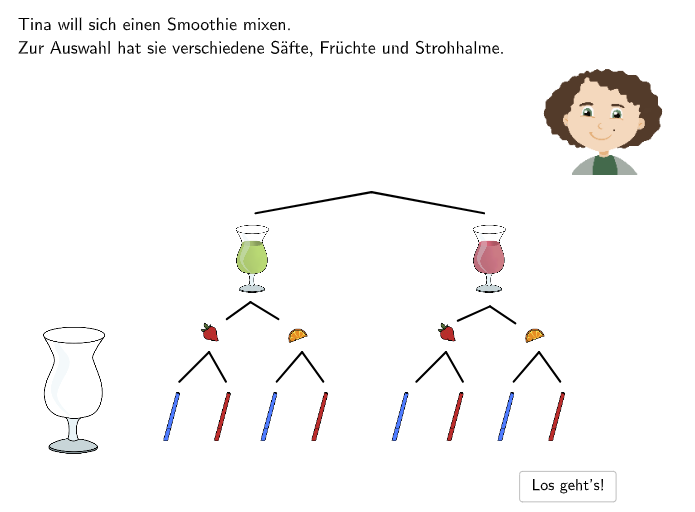
This interactive GeoGebra example teaches combinatorics and probability through a fun smoothie-making scenario. Students learn to: (1) Count possible combinations using tree diagrams (Baumdiagramm), (2) Understand basic probability concepts, (3) Interpret and complete partially drawn tree diagrams. The construction uses GeoGebra commands including Segment for branches, Textfield for inputs, and SpeechBubbleRight for feedback. Contains 4 progressive exercises from simple counting to probability inference. Ideal for Grade 5-6 students (ages 10-12) learning basic probability and counting principles.
GeoGebra Commands & Parameters
Segment(K_1, L_1) → gSegment(M_1, N_1) → hSegment(K_{2}, L_{2}) → g_{1}Segment(M_{2}, N_{2}) → h_{1}Segment(O_1, P_1) → iSegment(Q_1, R_1) → jSegment(O_{2}, P_{2}) → i_{1}Segment(Q_{2}, R_{2}) → j_{1}Segment(O_{4}, P_{4}) → i_{2}Segment(Q_{4}, R_{4}) → j_{2}Segment(O_{3}, P_{3}) → i_{3}Segment(Q_{3}, R_{3}) → j_{3}Textfield(aInput) → InputBox1SpeechBubbleRight(C_2, 10.2, 1) → poly1Segment(V_2, W_2) → fSegment(Z_2, A_3) → k
AI Drawing Prompt Reference
Draw a tree diagram for teaching combinatorics and probability. Start from a top node, split into two main branches, then each branch splits into two sub-branches, creating four groups of terminal branches. Use straight line segments for all branches. Add text input boxes or speech bubbles at some terminal points. The diagram should clearly show hierarchical levels and branching structure, with some branches labeled with numbers or words. Keep the layout clean and educational, emphasizing the counting of possible combinations.
The prompt above was compiled from the original drawing commands and is for reference only.