
Similar Right Triangles to Find River Width - Word Problem
Loading the math board and drawing, please wait…
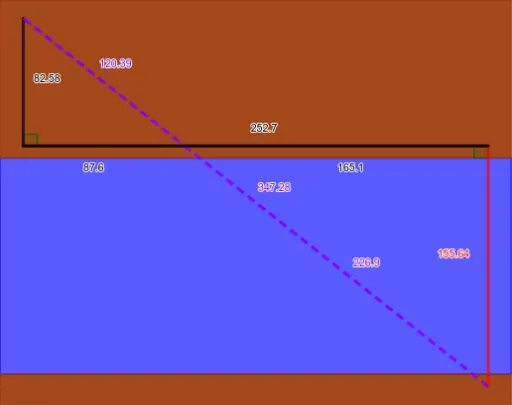
① This example demonstrates how to measure the width of a river using the properties of similar right triangles in a real-world word problem. ② Core math concepts include similar triangles, proportionality of corresponding sides, right triangles, ratios, and solving equations. ③ Construction highlights: using GeoGebra commands such as Textfield, Segment, Polygon, and Angle, the model creates multiple points (A, B, C, D, E, etc.), segments (f, g, h, etc.), and triangles, with input boxes (InputBox1-3) for entering measured values, providing an interactive visual representation of the similarity relationship. ④ Suitable for upper middle school or high school students, this is ideal for modeling and solving geometry application problems, and for teachers to demonstrate the practical use of similar triangles in measurement.
GeoGebra Commands & Parameters
Textfield(Ld) → InputBox1Textfield(Lt) → InputBox2Textfield(Lrt) → InputBox3Segment(B, C) → fSegment(C, A) → gSegment(A, B) → hSegment(A, D) → iSegment(D, E) → jSegment(E, A) → kSegment(E, C) → lSegment(B, D) → mPolygon({H, F, G, I}) → q1Polygon({H, J, K, F}) → q2Polygon({I, G, L, M}) → q3Angle(A, B, C) → αAngle(A, D, E) → β
AI Drawing Prompt Reference
Draw a model for measuring river width using two similar right triangles, with input fields for measurements, showing the proportionality of corresponding sides, and labeled angles and triangles. Start by drawing the base segments to form the triangles, then add input boxes, and finally connect key points with polygons to complete the visual representation.
The prompt above was compiled from the original drawing commands and is for reference only.