
Shape Reflection Demo
Loading the math board and drawing, please wait…
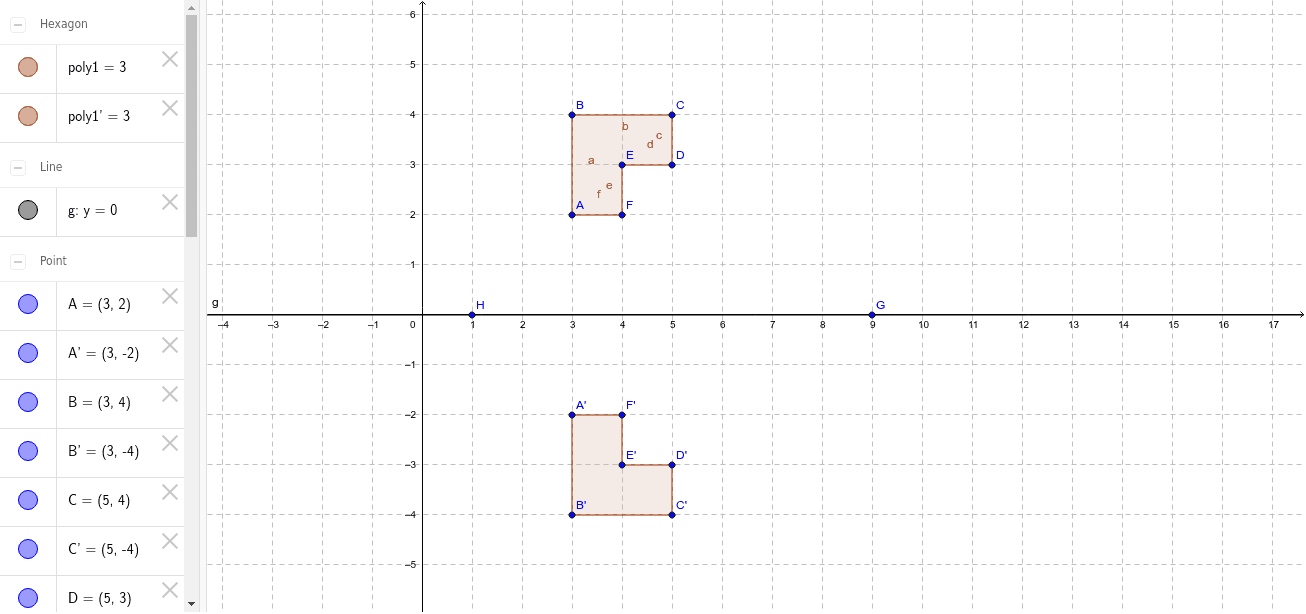
This example demonstrates how to perform shape reflection using GeoGebra, visually showing the relationship between the original and reflected shapes. Core math concepts include reflection transformation, symmetry, coordinate geometry, and polygon construction. Key construction steps involve commands like Polygon, Line, and Mirror, along with objects such as points A, B, C, D, E, F and their reflected counterparts A', B', C', D', E', F'. Suitable for middle school and high school students learning geometric transformations and coordinate geometry, aiding understanding of reflection properties and applications.
GeoGebra Commands & Parameters
Polygon(A, B, C, D, E, F) → poly1, a, b, c, d, e, fLine(G, H) → gMirror(A, g) → A'Mirror(B, g) → B'Mirror(C, g) → C'Mirror(D, g) → D'Mirror(E, g) → E'Mirror(F, g) → F'Polygon(A', B', C', D', E', F') → poly1', a', b', c', d', e', f'
AI Drawing Prompt Reference
Draw a polygon with six vertices, then draw a line as the reflection axis. Reflect each vertex of the polygon across the line to obtain the corresponding reflected points. Finally, form a new polygon using these reflected points to visually demonstrate the relationship between the original and reflected polygons, illustrating the geometric properties of reflection transformation.
The prompt above was compiled from the original drawing commands and is for reference only.