
Shaded Area in a Regular Hexagon with an Inscribed Equilateral Triangle
Loading the math board and drawing, please wait…
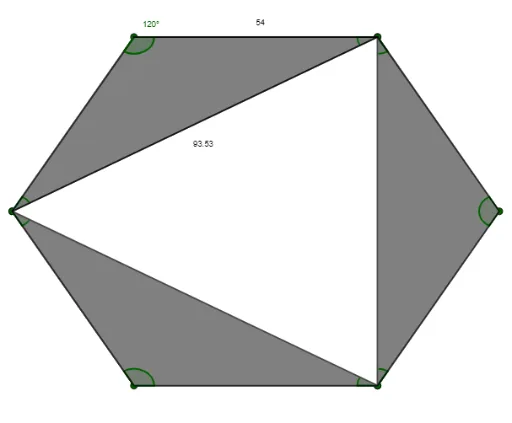
This example demonstrates the shaded area within a regular hexagon containing an inscribed equilateral triangle. Key mathematical concepts include regular polygons, equilateral triangles, geometric transformations, and area calculations. Using GeoGebra commands such as Sequence, Polygon, and PolyLine, dynamic construction and visualization of these geometric shapes are achieved. Suitable for middle school and above students or teachers.
GeoGebra Commands & Parameters
Sequence(((r * cos((i * 60°) + ang)), (r * sin((i * 60°) + ang))), i, 1, 6, 1) → l1Polygon(l2) → t1Polygon(l1) → poly1PolyLine(Append[l1, Element[l1, 1]]) → fPolyLine(Append[l2, Element[l2, 1]]) → gTextfield(L) → InputBox1Segment(Element[l1, 1], Element[l1, 2]) → hSegment(Element[l2, 1], Element[l2, 2]) → iAngle(Element[l1, 3], Element[l1, 2], Element[l1, 1]) → αLength(l1) → nSequence(Angle[Element[l1, Mod[i + 2, 6] + 1], Element[l1, Mod[i + 1, 6] + 1], Element[l1, Mod[i, 6] + 1]], i, 1, 6, 1) → l3
AI Drawing Prompt Reference
Draw a regular hexagon with an inscribed equilateral triangle, highlighting the shaded area between them. Use smooth lines for both the hexagon and the triangle, and label key angles and side lengths. Start by plotting all vertices of the hexagon, then connect the vertices to form both shapes, calculate and display the shaded region, and finally label the angles and side lengths.
The prompt above was compiled from the original drawing commands and is for reference only.