
Rotation Exploration of Butterflies, Windmills, and Wallpaper
Loading the math board and drawing, please wait…
In collections
Butterflies, Pinwheels, and Wallpaper
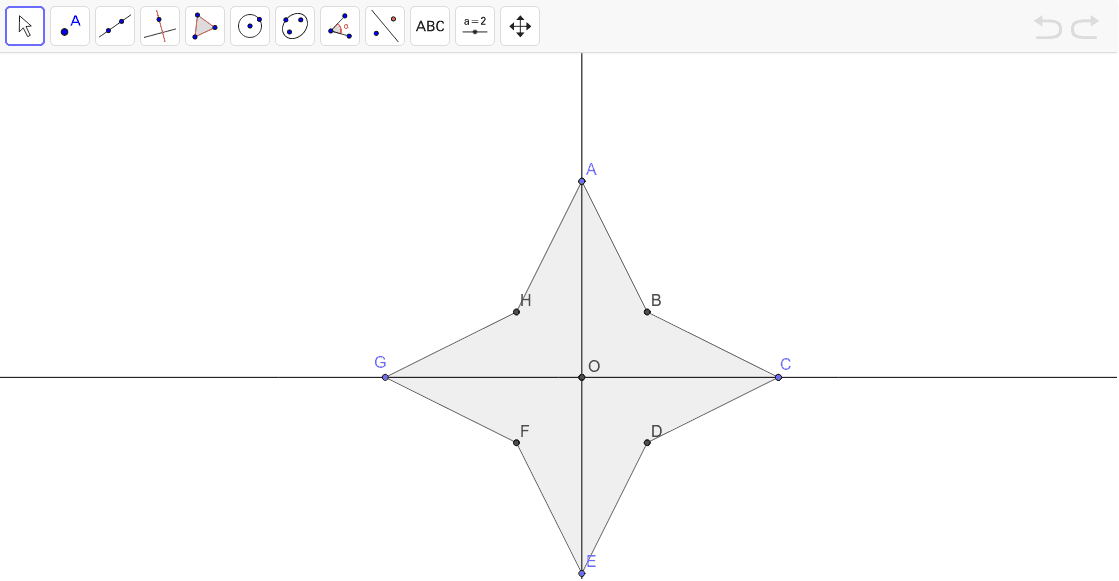
This example demonstrates the rotational symmetry of butterfly, windmill, and wallpaper patterns. Key mathematical concepts include rotation, polygons, and geometric construction. Using commands like Point, Intersect, Polygon, Rotate, Line, Mirror, the user can construct rotationally symmetric patterns. Suitable for middle school and above students to learn about rotational symmetry.
GeoGebra Commands & Parameters
Point(yAxis) → AIntersect(xAxis, yAxis) → C_1Polygon(A, B_1, C_1) → poly1, c, a, bRotate(A, 180*°, C_1) → E_2Rotate(B_1, 180*°, C_1) → B'Rotate(C_1, 180*°, C_1) → C'Polygon(E_2, B', C') → poly1', c', a', b'Line(A, C_1) → e_2Mirror(A, b) → A'Mirror(B_1, b) → B'_1Mirror(C_1, b) → C'_1Polygon(A', B'_1, C'_1) → poly1'_1, c'_1, a'_1, b'_1Mirror(A', xAxis) → D_1Mirror(B'_1, xAxis) → E_1Mirror(C'_1, xAxis) → F_1Polygon(D_1, E_1, F_1) → poly2, f, d_1, e_1Point(xAxis) → G_1Line(C_1, G_1) → gMirror(A', g) → H_1Mirror(B'_1, g) → IMirror(C'_1, g) → JPolygon(H_1, I, J) → poly3, j, h, iMirror(A', g) → EMirror(B'_1, g) → LMirror(C'_1, g) → MPolygon(E, L, M) → poly4, m, k, lMirror(E_2, b') → A''Mirror(B', b') → B''Mirror(C', b') → C''Polygon(A'', B'', C'') → poly1'', c'', a'', b''Point(g) → CPolygon(C_1, B'_1, C) → poly5, n, c_1, b'_2Mirror(C_1, b'_2) → C'_2Mirror(B'_1, b'_2) → O_1Mirror(C, b'_2) → N'Polygon(C'_2, O_1, N') → poly5', n', c'_2, oMirror(C_1, b) → C'_3Mirror(B'_1, b) → PMirror(C, b) → N'_1Polygon(C'_3, P, N'_1) → poly5'_1, n'_1, c'_3, pMirror(C'_2, b) → OMirror(O_1, b) → O'Mirror(N', b) → GPolygon(O, O', G) → poly5'', n'', q, o'Intersect(n'_1, c'_3) → HIntersect(c'_1, a'_1) → BIntersect(c', a') → DIntersect(c'', a'') → FPolygon(G, H, A, B, C, D, E, F) → poly6, g_1, k_1, a_1, n_1, c_2, q_1, e, r
AI Drawing Prompt Reference
Create a rotational symmetry pattern featuring butterflies, windmills, and wallpaper designs. Start by taking point A on the y-axis, then rotate A, B1, and C1 around point C1 to form the first polygon. Next, mirror A, B1, and C1, rotate them around the x-axis, and form the second polygon. Continue mirroring and rotating to build more symmetric shapes, ultimately creating a complex rotational symmetry pattern.
The prompt above was compiled from the original drawing commands and is for reference only.