
Rotating Grids and Moiré Patterns
Loading the math board and drawing, please wait…
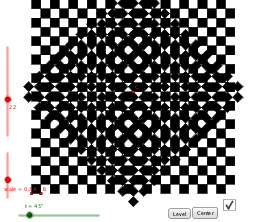
This GeoGebra example demonstrates how rotating a copy of a square grid or line array creates moiré patterns, visual interference, and symmetric motion effects. It involves rotation, affine transformations, vectors, sequences, parameterized animation, and the effect of angular frequency on pattern density. The construction uses Vector to define directions, Rotate to turn points or vectors by parameter t, and Sequence to generate multiple grid elements; objects such as t, N, A, B, v, u, scale, list1, and buttons control angle, count, base points, vectors, scaling, and animation state. It is suitable for middle and high school geometry, transformation geometry, parametric equations, dynamic geometry lessons, and mathematical art visualization.
GeoGebra Commands & Parameters
Vector(A, B) → vRotate(B, 90°, A) → B'Vector(A, B') → uSequence(Sequence[Polygon[A + (((2 * i) + Mod[j, 2]) * v) + (j * u), A + (((2 * i) + 1 + Mod[j, 2]) * v) + (j * u), 4], i, 0, ceil(N / 2) - 1], j, 0, N - 1) → list1Rotate(Dilate[list1, scale, C], t, C) → list1'
AI Drawing Prompt Reference
Create a dynamic rotating grid to demonstrate moiré patterns and visual interference caused by grid rotation. Start by drawing a base vector, then rotate it 90 degrees to get a second vector. Use these two vectors to generate a square grid, controlled by parameters for grid count and size. Apply scaling and translation transformations to the grid, then animate its rotation with a parameter to observe the symmetric motion and interference effects during rotation.
The prompt above was compiled from the original drawing commands and is for reference only.