
Rotate an Object
Loading the math board and drawing, please wait…
In collections
rotations
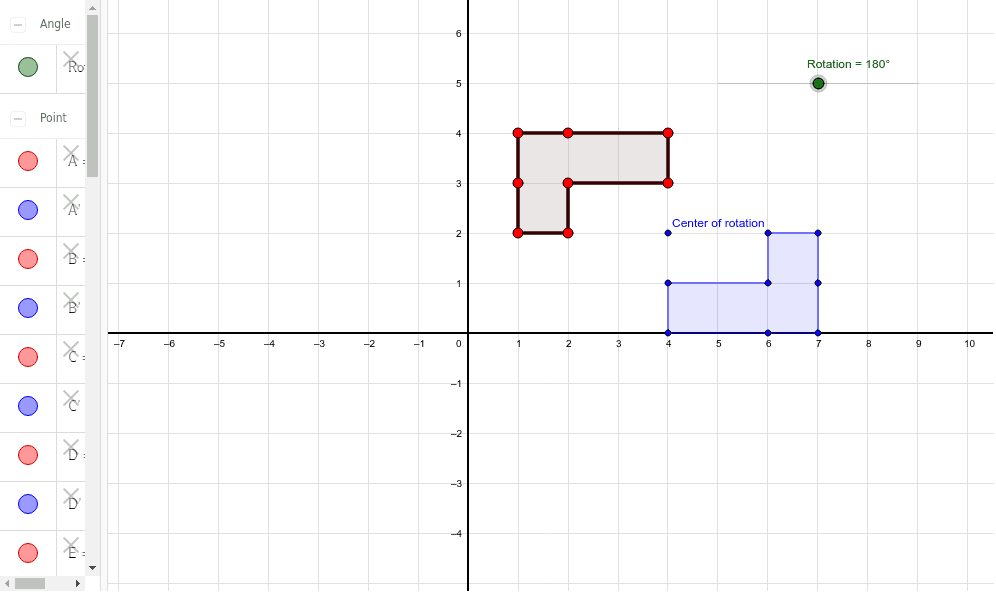
This example demonstrates how to change the shape of an object by altering the center and angle of rotation. It involves core math concepts like rotation, geometric transformation, and coordinate geometry. Constructed using GeoGebra commands Polygon and Rotate. Suitable for high school geometry transformation teaching and geometric construction practice.
GeoGebra Commands & Parameters
Polygon(A, B, C, D, E, F, G, H) → poly1, a, b, c, d, e, f, g, hRotate(A, -Rotation, I) → A'Rotate(B, -Rotation, I) → B'Rotate(C, -Rotation, I) → C'Rotate(D, -Rotation, I) → D'Rotate(E, -Rotation, I) → E'Rotate(F, -Rotation, I) → F'Rotate(G, -Rotation, I) → G'Rotate(H, -Rotation, I) → H'Polygon(A', B', C', D', E', F', G', H') → poly1', a', b', c', d', e', f', g', h'
AI Drawing Prompt Reference
Draw an 8-point polygon, then rotate the polygon around a central point with a negative angle. First, draw the polygon, then sequentially rotate each vertex around the central point, and finally draw the rotated polygon.
The prompt above was compiled from the original drawing commands and is for reference only.