
Rhombus Construction Demo by Jessica Swee
Loading the math board and drawing, please wait…
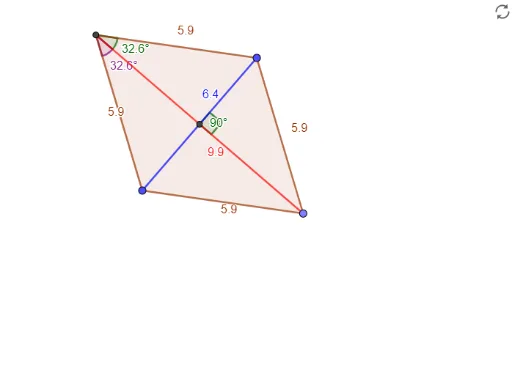
This example dynamically demonstrates the geometric properties and transformations of a rhombus using GeoGebra. It involves core concepts like polygon construction, vector operations, angle measurement, rotational transformations, and optimization problems. The construction utilizes commands and objects such as Line, LineBisector, Intersect, Point, Circle, Polygon, Segment, and Angle. Suitable for high school mathematics education to understand symmetry, vector applications, and geometric transformations.
GeoGebra Commands & Parameters
Line(A, B) → fLineBisector(A, B) → gIntersect(f, g) → CPoint(g) → DCircle(C, D) → cIntersect(c, g, 2) → EPolygon(A, D, B, E) → q1, a, d, b, eSegment(E, D) → hSegment(B, A) → iAngle(D, C, B) → αAngle(C, E, B) → βAngle(A, E, C) → γ
AI Drawing Prompt Reference
Draw a rhombus by first creating two intersecting line segments, finding their intersection point and the perpendicular bisector of one segment. Use the intersection point as the center and the distance from the intersection to the foot of the perpendicular as the radius to draw a circle. The circle intersects the perpendicular bisector at two additional vertices. Connect these four points to form the rhombus and measure the sizes of the three interior angles.
The prompt above was compiled from the original drawing commands and is for reference only.