
RepTile Rectangle
Loading the math board and drawing, please wait…
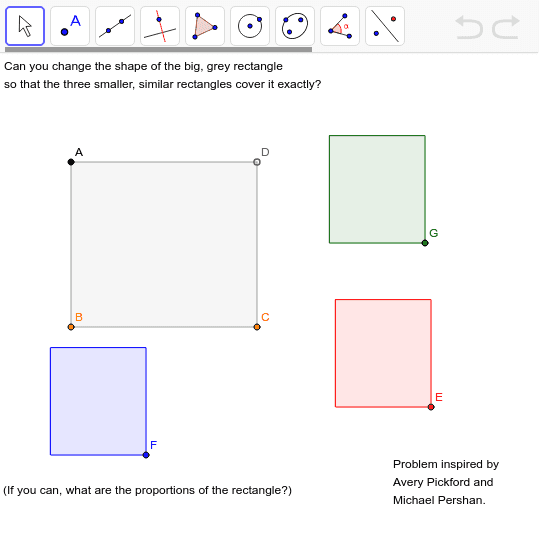
This example demonstrates how to construct a rectangle by translating and combining vectors. It involves core mathematical concepts like vectors, linear functions, trigonometric functions, and differential equations. Key GeoGebra commands and objects used include Point, Polygon, and Translate. Suitable for high school mathematics learning and exploring geometric transformations.
GeoGebra Commands & Parameters
Point(x = x(A)) → BPoint(y = y(B)) → CPolygon(A, B, C, D) → poly1, a, b, c, dTranslate(Rotate[Polygon[Dilate[A, 0.5773502691896258, B], Dilate[B, 0.5773502691896258, B], Dilate[C, 0.5773502691896258, B], Dilate[D, 0.5773502691896258, B]], 90*°, B], Vector[B, E]) → poly2Translate(Rotate[Polygon[Dilate[A, 0.5773502691896258, B], Dilate[B, 0.5773502691896258, B], Dilate[C, 0.5773502691896258, B], Dilate[D, 0.5773502691896258, B]], 90*°, B], Vector[B, F]) → poly3Translate(Rotate[Polygon[Dilate[A, 0.5773502691896258, B], Dilate[B, 0.5773502691896258, B], Dilate[C, 0.5773502691896258, B], Dilate[D, 0.5773502691896258, B]], 90*°, B], Vector[B, G]) → poly4
AI Drawing Prompt Reference
Draw a rectangle by translating and combining vectors, demonstrating core mathematical concepts of vectors and linear functions, involving rotation and dilation, forming multiple combined rectangles to explore geometric transformations.
The prompt above was compiled from the original drawing commands and is for reference only.