
Representing Fractions on a Number Line: Unfamiliar Fractions
Loading the math board and drawing, please wait…
In collections
Ordnen und Vergleichen von Bruchzahlen
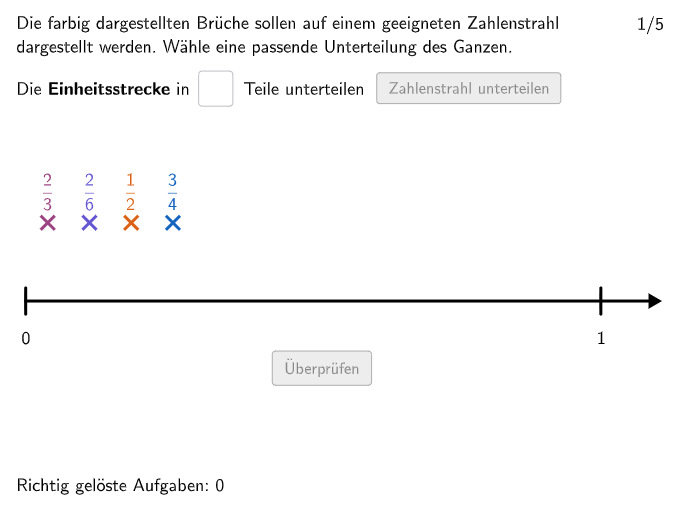
This example demonstrates how to represent fractions on a number line, helping students understand the relationship between fractions and lines. The key mathematical concepts include rational numbers, comparing and ordering natural numbers as well as non-negative decimals and fractions. Construction involves using GeoGebra commands such as Distance, Shuffle, Element, Max, etc., to create rays, fraction points, and graphical elements. Suitable for elementary school students in grades 5-6 for math practice and classroom activities.
GeoGebra Commands & Parameters
Distance(StrahlEndPL, StrahlEndPR) → laengestrahlShuffle({1, 2, 3, 4, 5}) → randomNosQuestion, {4, 2, 3, 1, 5}Element(randomNosQuestion, questionCount) → questionNumElement(NennerMatrix, questionNum, 1) → nenner1Element(NennerMatrix, questionNum, 2) → nenner2Element(NennerMatrix, questionNum, 3) → nenner3Element(ZaehlerMatrix, questionNum, 3) → zaehler3Element(ZaehlerMatrix, questionNum, 2) → zaehler2Element(ZaehlerMatrix, questionNum, 1) → zaehler1Max({bruchwert1, bruchwert2, bruchwert3}) → maxbruchwertCircle(Bruch1Punkt, 0.2) → CircleFrac1Element(NennerMatrix, questionNum, 4) → nenner4Element(ZaehlerMatrix, questionNum, 4) → zaehler4Circle(Bruch4Punkt, 0.2) → CircleFrac4Circle(Bruch2Punkt, 0.2) → CircleFrac2IsInRegion(Bruch2Pos, CircleFrac2) → bruch2correctCircle(Bruch3Punkt, 0.2) → CircleFrac3IsInRegion(Bruch3Pos, CircleFrac3) → bruch3correctIsInRegion(Bruch4Pos, CircleFrac4) → bruch4correctPolygon(StrahlRegionE1, StrahlRegionE2, StrahlRegionE3, StrahlRegionE4) → StrahlRegion, strahlregione1, strahlregione2, strahlregione3, strahlregione4Shuffle(Sequence[i, i, 1, (nenner * maxganze)]) → ZaehlerListe1, {1, 2, 4, 5, 3}Union(Sequence[StrahlEndPL + ((laengestrahl / maxganze, 0) * i), i, 0, maxganze], Sequence[(10, (-1 * i)), i, 1, 15]) → UnterteilungenGanzeSequence(Element[UnterteilungenGanze, i + 1], i, 0, maxganze + 5) → GanzePunkteIf(nenner ∈ {2, 3, 4}, 2, 1) → minstrahlgrenzeIf(nenner ≟ 2, 5, If[nenner ≟ 3 ∨ nenner ≟ 4, 4, If[nenner ∈ {5, 6, 7}, 2, If[nenner ≟ 8 ∨ nenner ≟ 9, 1.5, 1.1]]]) → maxstrahlgrenzePolygon(PtopLeftCornerFeedback, PtopRightCornerFeedback, PbottomRightCornerFeedback, PbottomLeftCornerFeedback) → rectangleCorrect, ptopleftcornerfeedback, ptoprightcornerfeedback, pbottomrightcornerfeedback, pbottomleftcornerfeedbackUnion(Sequence[StrahlEndPL + (unterteilungsvektor * i), i, 0, (unterteilungen * maxganze)], Sequence[(10, (-1 * i)), i, 1, 15]) → UnterteilungenPunkteSegment(StrahlEndPL, StrahlEndPInf) → ZahlenStrahlPolygon(VR1E1, VR1E2, VR1E3, VR1E4) → VR1, vr1e1, vr1e2, vr1e3, vr1e4Polygon(VR2E1, VR2E2, VR2E3, VR2E4) → VR2, vr2e1, vr2e2, vr2e3, vr2e4Polygon(VR3E1, VR3E2, VR3E3, VR3E4) → VR3, vr3e1, vr3e2, vr3e3, vr3e4Distance(Corner[SolText1, 1], Corner[SolText1, 2]) → BreiteSolText1Distance(Corner[SolText2, 1], Corner[SolText2, 2]) → BreiteSolText2Distance(Corner[SolText3, 1], Corner[SolText3, 2]) → BreiteSolText3Textfield(unterteilungeninput) → InputBoxUnterteilungenShuffle({1, 2}) → modus, {2, 1}Polygon(VR4E1, VR4E2, VR4E3, VR4E4) → VR4, vr4e1, vr4e2, vr4e3, vr4e4Sequence(Segment[UnterteilungenPunkte(i) + (0, 0.15), UnterteilungenPunkte(i) + (0, -0.15)], i, 1, Length[UnterteilungenPunkte]) → UnterteilungenStreckenSequence(Segment[GanzePunkte(i) + (0, 0.25), GanzePunkte(i) + (0, -0.25)], i, 1, 5) → StreckenGanzeSegment(Bruch1Punkt + (0, 1.6), Bruch1Punkt + (0, 0.5)) → SolStrecke1Segment(Bruch2Punkt + (0, 1.6), Bruch2Punkt + (0, 0.5)) → SolStrecke2Segment(Bruch3Punkt + (0, 1.6), Bruch3Punkt + (0, 0.5)) → SolStrecke3Segment(Bruch4Punkt + (0, 1.6), Bruch4Punkt + (0, 0.5)) → SolStrecke4Union(Sequence[StrahlEndPL + (solunterteilungsvektor * i), i, 0, (optU * maxganze)], Sequence[(10, (-1 * i)), i, 1, 15]) → UnterteilungenPunkteSolSequence(Segment[UnterteilungenPunkteSol(i) + (0, 0.15), UnterteilungenPunkteSol(i) + (0, -0.15)], i, 1, Length[UnterteilungenPunkteSol]) → UnterteilungenStreckenSol
AI Drawing Prompt Reference
Draw a horizontal number line. Over it, create a fraction-representation layout: choose several fractions with denominators in the range shown (based on a small random selection of split patterns), and mark their positions on the number line using circular markers centered at those fraction points. Add a set of evenly spaced subdivisions along the number line so that integer points and the fraction points align with the same tick structure. Finally, outline the main fraction area with a rectangle-like quadrilateral, and for each marked fraction point draw a vertical reference line segment between the number line and the upper part of the diagram, forming a clear visual guide for whether the fraction points lie in the intended region.
The prompt above was compiled from the original drawing commands and is for reference only.