
Repeated Dilation and Rotation
Loading the math board and drawing, please wait…
In collections
Symmetry, Transformation and Tessellation
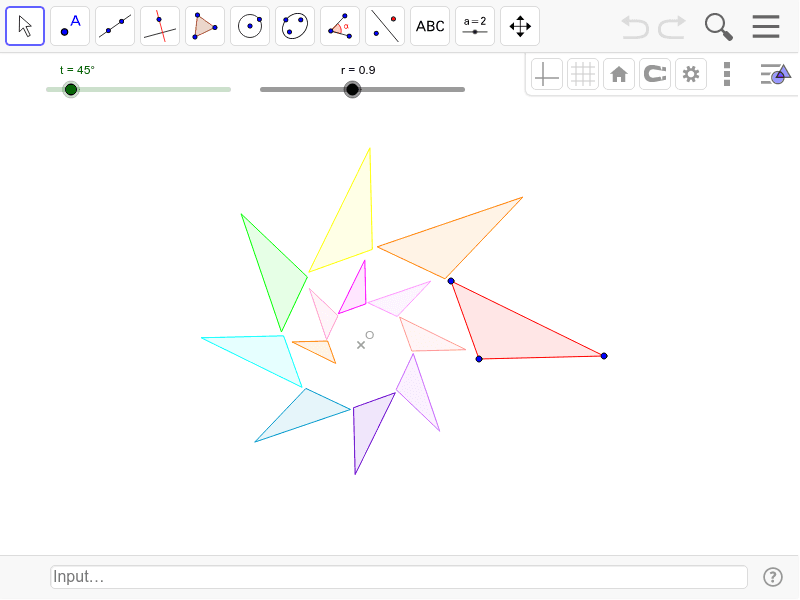
This example demonstrates how complex geometric patterns are generated through repeated dilation and rotation operations. The core math concepts involved include dilation, rotation, coordinate geometry, and transformation. The construction utilizes GeoGebra commands like Polygon and Rotate, along with objects such as t, r, O, A, B, C, T0, c, a, b, T1, T2, T3, T4, T5, T6, T7, T8, T9, T10, T11, T12. It is suitable for high school mathematics education, helping students understand the effects of combined transformations on shapes, and can also be used for exploring parametric equations and loci.
GeoGebra Commands & Parameters
Polygon(A, B, C) → T0, c, a, bRotate(Polygon[Dilate[A, r, O], Dilate[B, r, O], Dilate[C, r, O]], t, O) → T1Rotate(Dilate[T1, r, O], t, O) → T2Rotate(Dilate[T2, r, O], t, O) → T3Rotate(Dilate[T3, r, O], t, O) → T4Rotate(Dilate[T4, r, O], t, O) → T5Rotate(Dilate[T5, r, O], t, O) → T6Rotate(Dilate[T6, r, O], t, O) → T7Rotate(Dilate[T7, r, O], t, O) → T8Rotate(Dilate[T8, r, O], t, O) → T9Rotate(Dilate[T9, r, O], t, O) → T10Rotate(Dilate[T10, r, O], t, O) → T11Rotate(Dilate[T11, r, O], t, O) → T12
AI Drawing Prompt Reference
Draw a complex geometric pattern generated by repeated dilation and rotation. Start with a triangle, then repeatedly dilate and rotate it, keeping the rotation angle and dilation scale constant, for a total of twelve iterations, to observe the evolution of the pattern.
The prompt above was compiled from the original drawing commands and is for reference only.