
Reflections Activity Part 1 Answer Key: Polygon Mirror Transformations
Loading the math board and drawing, please wait…
In collections
Reflections Investigation Activity
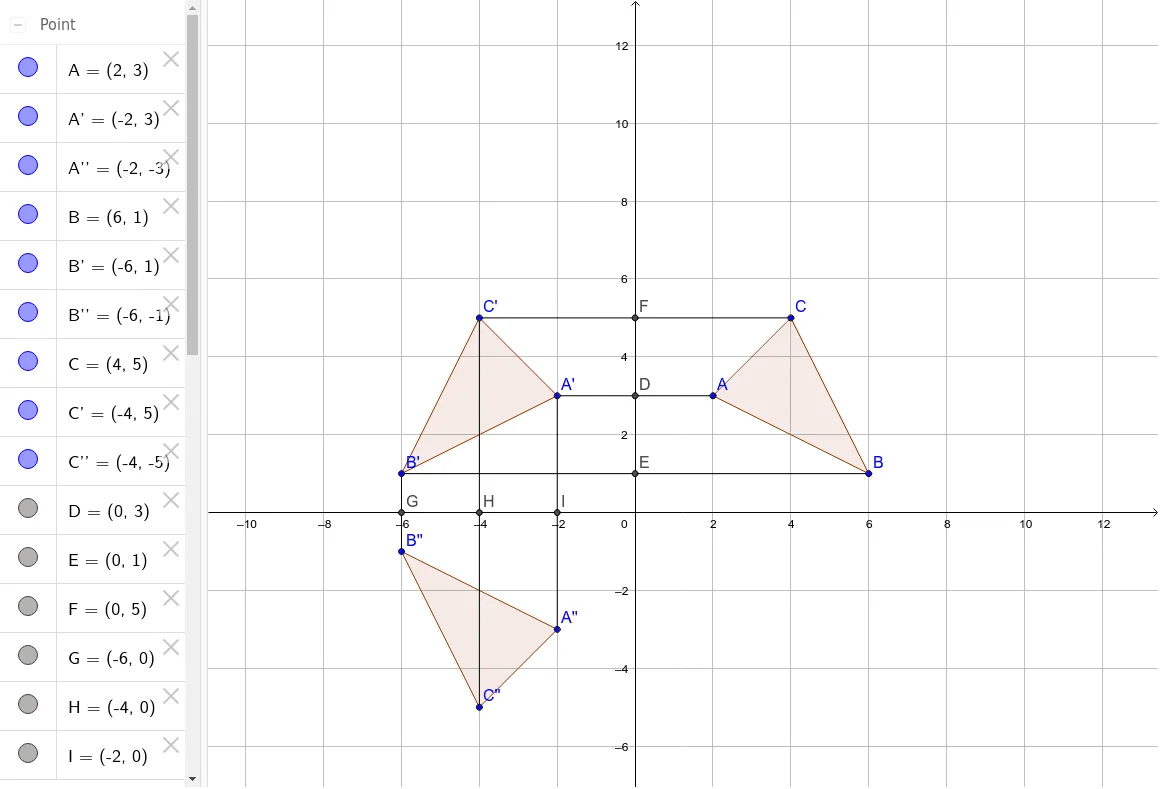
① This GeoGebra example demonstrates the reflection (mirror) transformation of a polygon, showing the original triangle, its first reflection, and a second reflection, to help students visually understand axial symmetry. ② Core math concepts include reflection (line symmetry), composition of transformations, relationships between corresponding points and segments, and the roles of midpoints and intersections in the transformation. ③ Construction highlights: using the Polygon command to create triangle poly1, the Mirror command to reflect it across line c and segment d to produce poly1' and poly1'', and using Segment, Intersect, and Midpoint commands to construct auxiliary segments, intersection points, and midpoints, with labeled corresponding points A', B', C', etc., fully illustrating the reflection process. ④ Suitable for middle school geometry instruction or self-study, as an answer key for reflection activities, and useful for teachers demonstrating or students verifying reflection properties.
GeoGebra Commands & Parameters
Polygon(A, B, C) → poly1, c, a, bMirror(A, yAxis) → A'Mirror(B, yAxis) → B'Mirror(C, yAxis) → C'Polygon(A', B', C') → poly1', c', a', b'Mirror(A', xAxis) → A''Mirror(B', xAxis) → B''Mirror(C', xAxis) → C''Polygon(A'', B'', C'') → poly1'', c'', a'', b''Segment(A, A') → dSegment(B, B') → eSegment(C, C') → fIntersect(d, yAxis) → DMidpoint(e) → EMidpoint(f) → FSegment(A'', A') → gSegment(B', B'') → hSegment(C', C'') → iMidpoint(h) → GMidpoint(i) → HMidpoint(g) → I