
Rectangular Art Example
Loading the math board and drawing, please wait…
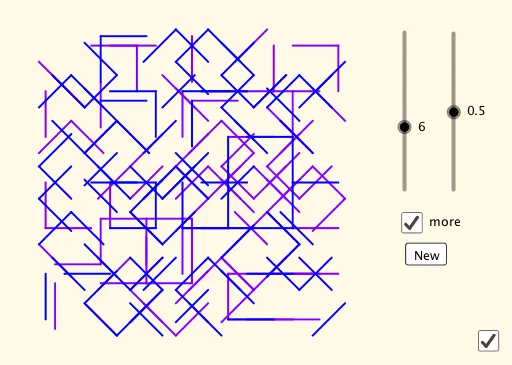
This example dynamically demonstrates the construction of rectangles combined with scatter plots, showcasing the application of rectangles in art. It involves core mathematical concepts such as rectangles, scatter plots, means, geometric mean, addition, and trapezoids. The construction uses GeoGebra commands like Sequence for sequence generation, along with objects A, C, D, B, E, F, G, H, n, l1, l2, l3, m1, a, l2', m1', l4', aspect, b, button1, l4, c for auxiliary graphics and animations. It is suitable for high school mathematics teaching, demonstrating the integration of geometric construction and data analysis.
GeoGebra Commands & Parameters
Sequence(Random[0, 1], i, 1, 6) → l1Sequence(Sequence[Sequence[Random[0, 100] / 100, i, 1, 6], j, 1, n], k, 1, n) → l2Sequence(Sequence[Random[0, 3], j, 1, n], k, 1, n) → m1Sequence(Sequence[Sequence[Random[0, 100] / 100, i, 1, 6], j, 1, n], k, 1, n) → l2'Sequence(Sequence[Random[0, 3], j, 1, n], k, 1, n) → m1'Sequence(Sequence[Translate[Rotate[RemoveUndefined[Sequence[If[Element[Element[l2', j, k], i] ≤ a, Element[l3, i]], i, 1, 6]], (45° * Element[m1', j, k]), (sqrt(2) / 2, 0.5)], (j, k)], j, 1, n], k, 1, n) → l4'Sequence(Sequence[Translate[Rotate[RemoveUndefined[Sequence[If[Element[Element[l2, j, k], i] ≤ a, Element[l3, i]], i, 1, 6]], (45° * Element[m1, j, k]), (sqrt(2) / 2, 0.5)], (j, k)], j, 1, n], k, 1, n) → l4
AI Drawing Prompt Reference
Create a dynamic example showing the combination of rectangles and scatter plots, demonstrating their application in art. Generate six sets of random coordinate points, then draw rectangles based on these points. Apply rotation and translation transformations to the rectangles so they rotate and move around the points, finally combining all the graphics to showcase the integration of geometric construction and data analysis.
The prompt above was compiled from the original drawing commands and is for reference only.