
Quadrilateral Pretenders - Rectangles
Loading the math board and drawing, please wait…
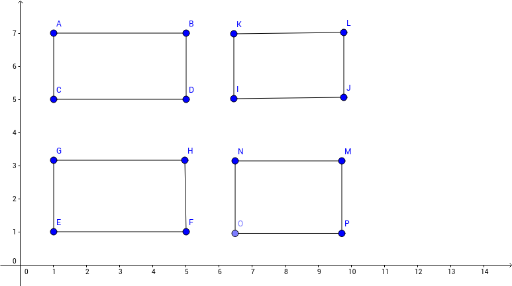
This example demonstrates how to construct and explore the geometric properties of rectangles using GeoGebra. Core math concepts include polygons, perimeter, line segments, orthogonal lines, definite integrals, and piecewise functions. Construction highlights involve commands like Segment, OrthogonalLine, Point, Line, and Intersect to create points, lines, segments, and perpendiculars, forming rectangles. Suitable for high school mathematics education to understand rectangle definitions, properties, and related mathematical applications.
GeoGebra Commands & Parameters
Segment(A, B) → fSegment(C, D) → gSegment(C, A) → hSegment(D, B) → iSegment(E, F) → jOrthogonalLine(E, j) → kOrthogonalLine(G, k) → lPoint(l) → HSegment(F, H) → mSegment(G, H) → nSegment(E, G) → pSegment(I, J) → qLine(K, q) → rSegment(I, K) → sLine(J, s) → tIntersect(r, t) → LSegment(K, L) → aSegment(J, L) → bSegment(M, N) → cOrthogonalLine(N, c) → dOrthogonalLine(M, c) → ePoint(d) → OOrthogonalLine(O, d) → f_1Intersect(e, f_1) → PSegment(O, P) → g_1Segment(M, P) → h_1Segment(N, O) → i_1
AI Drawing Prompt Reference
Draw a rectangle by first creating four sides AB, BC, CD, and DA, then draw a vertical line through points B and D, which intersects a vertical line through points A and C at point H, and finally draw sides BH, DH, AH, and CH.
The prompt above was compiled from the original drawing commands and is for reference only.