
Pythagorean Theorem: Calculating Hypotenuse in Right Triangles
Loading the math board and drawing, please wait…
In collections
Satz des Pythagoras - Einführung
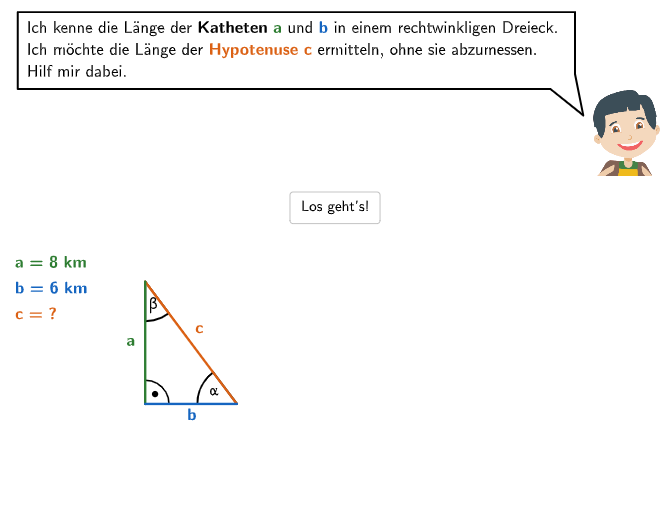
This interactive GeoGebra material helps students master the practical application of the Pythagorean theorem. It includes: ①calculating hypotenuse length from given legs (a=5cm, b=12cm or a=15cm, b=8cm); ②understanding various forms of the theorem (a²+b²=c², e²=f²+g², etc.); ③explaining why different symbol notations are equivalent. The construction uses GeoGebra commands including Textfield, Point, Segment, Polygon, Angle, Distance, and Rotate to draw right triangles and dynamically display calculations. Suitable for Grade 7-8 students, ideal for classroom practice or self-review, developing students' ability to correctly write and apply the Pythagorean theorem.
GeoGebra Commands & Parameters
Textfield(input12) → Eingabefeld12SelectedIndex(DropDown21) → input21Element({4, 5, 6, 6.1, 7, 8, 9, 10, 11, 12, 13, 15, 16, 18, 19}, step2) → stepIf(step ≟ 16, (11.4, -3.4), If[step ≥ 17, A1Ende, A1Start]) → A1SelectedIndex(DropDown3) → input3SelectedIndex(DropDown1) → input1SelectedIndex(DropDown5) → input5SelectedIndex(DropDown6) → input6SelectedIndex(DropDown7) → input7Vector(C1, A1) → v2_{1}Vector(C1, B1) → v1_{1}Sequence(O1 + (m * (v2_{1} + (0.6, 0))), m, 0, 3) → listOPoint(Segment[listO(4), O2]) → C4Textfield(input9) → Eingabefeld9Point(Segment[listO(3), O3]) → C3Point(Segment[listO(2), O4]) → C2Point(Segment[B1, C1]) → S1Point(Segment[A1, C1]) → S2Textfield(input2) → Eingabefeld2Point(Line[V1, xAxis]) → V2Segment(B1, A1) → s3Segment(B1, S1) → s1Segment(A1, S2) → s2Angle(Polygon[C1, A1, B1]) → wa3, wa2, wa1Polygon(A2, B2, C2) → d2, t3, t1, t2Polygon(B3, C3, A3) → d3, u1, u2, u3Polygon(A4, B4, C4) → d4, v3, v1, v2Angle(d2) → wb2, wb1, wb3Angle(d3) → wc1, wc3, wc2Angle(d4) → wd2, wd1, wd3Zip(Midpoint[A, B] + (0.2 * Vector[C, Midpoint[A, B]]), A, {A1, A2, A3, A4}, B, {B1, B2, B3, B4}, C, {C1, C2, C3, C4}) → listM3Zip(Midpoint[B, C] + (0.15 * Vector[A, C]), A, {A1, A2, A3, A4}, B, {B1, B2, B3, B4}, C, {C1, C2, C3, C4}) → listM1Zip(Midpoint[A, C] + (0.09 * Vector[B, C]), A, {A1, A2, A3, A4}, B, {B1, B2, B3, B4}, C, {C1, C2, C3, C4}) → listM2Zip(B + (0.19 * Vector[B, C + (1 / 2 * (A - C))]), A, {A1, A2, A3, A4}, B, {B1, B2, B3, B4}, C, {C1, C2, C3, C4}) → listMBAngle(A1, B1, B2) → wa4Angle(A2, B2, B3) → wb4Angle(A3, B3, B4) → wc4Angle(A4, B4, B1) → wd4Point(Line[L1, xAxis]) → L2Zip(A + (0.18 * Vector[C, B]) + (0.08 * Vector[C, A]), A, {A1, A2, A3, A4}, B, {B1, B2, B3, B4}, C, {C1, C2, C3, C4}) → listMDPoint(Line[L3, xAxis]) → L4Distance(L3, L4) → lupesize2Rotate(R1a, wa1, Q1) → R1bAngle(R1a, Q1, R1b) → va1Rotate(R1a, wa1 + wa3, Q1) → R1cRotate(R1c, wa2, Q1) → R1dAngle(R1c, Q1, R1d) → va2Angle(R1b, Q1, R1c) → va3Rotate(R2a, wa1, Q2) → R2bAngle(R2a, Q2, R2b) → vb1Rotate(R2b, wa3, Q2) → R2cRotate(R2c, wa2, Q2) → R2dAngle(R2b, Q2, R2c) → vb3Angle(R2c, Q2, R2d) → vb2Rotate(R3a, (-wa2), Q3) → R3bRotate(R3b, (-wa3), Q3) → R3cRotate(R3c, (-wa1), Q3) → R3dAngle(R3d, Q3, R3c) → vc1Angle(R3b, Q3, R3a) → vc2Angle(R3c, Q3, R3b) → vc3Rotate(R4a, wa1, Q4) → R4bRotate(R4b, wa3, Q4) → R4cRotate(R4c, wa2, Q4) → R4dAngle(R4a, Q4, R4b) → vd1Angle(R4b, Q4, R4c) → vd3Angle(R4c, Q4, R4d) → vd2Textfield(input4) → Eingabefeld4Polygon(A1, B1, C1) → d1, c1, a1, b1Textfield(input14) → Eingabefeld14Textfield(input15) → Eingabefeld15Textfield(input16) → Eingabefeld16Textfield(input17) → Eingabefeld17Textfield(input18) → Eingabefeld18Textfield(input19) → Eingabefeld19LaTeX(step, true, true) → Text12Polygon(DFlink3, DFlink1, DFlink2) → dflink, dflink3, dflink1, dflink2Angle(dflink) → wflink1, wflink2, wflink3Textfield(input20) → Eingabefeld20CountIf(m ≟ true, m, {selected1, selected2, selected3, selected4}) → numselectedTextfield(input10) → Eingabefeld10Textfield(input11) → Eingabefeld11Textfield(input13) → Eingabefeld13If(path1, Pos0 + (1.3, -1.9), Pos0 + (1.3, -3.3)) → Pos9If(path1, Pos0 + (3.45, -2.02), Pos0 + (3.45, -3.6)) → Pos10If(path1, Pos0 + (5.75, -2.02), Pos0 + (5.75, -3.6)) → Pos11Element(Join[{Sequence[Posi0 + (m * (0, -1.22)) + (1.1, -1), m, 0, 2], {Posi0 + (2.4, -5.2)}}], If[correct18, 4, If[correct16 ∧ correct17, 3, If[correct14 ∧ correct15, 2, 1]]]) → PosiSolAngle(A1, B1, B2) → wa4punktAngle(A2, B2, B3) → wb4punktAngle(A3, B3, B4) → wc4punktAngle(A4, B4, B1) → wd4punktZip(A + (0.25 * Vector[A, C + (2 / 5 * (B - C))]), A, {A1, A2, A3, A4}, B, {B1, B2, B3, B4}, C, {C1, C2, C3, C4}) → listMAIf(path1, Pos0 + (4.9, -3.3), Pos0 + (3.7, -1.9)) → Pos12Element(Sequence[Pos0 + (2, -3.1) + (m * (0, -1.3)), m, 0, 2], If[path1, If[correct12, 3, If[correct9 ∧ correct10 ∧ correct11, 2, 1]], If[correct9 ∧ correct10 ∧ correct11, 3, If[correct12, 2, 1]]]) → PosSol4If(path1, If[correct12, 3, If[correct9 ∧ correct10 ∧ correct11, 2, 1]], If[correct9 ∧ correct10 ∧ correct11, 3, If[correct12, 2, 1]]) → solPosPoint(Line[Py1, xAxis]) → Py2
AI Drawing Prompt Reference
Create a right-triangle geometry diagram for learning the Pythagorean theorem: first draw a right triangle by constructing two perpendicular legs and the connecting hypotenuse, keeping clear vertex-to-edge relationships. Mark the three interior angles at the triangle’s vertices (the angles formed by each pair of connected sides). Add several auxiliary polygons that share the same key vertex positions and connect to the original triangle to illustrate corresponding configurations. Then perform a rotation around one vertex using the marked angle as the starting direction to generate a new rotated position, and label the resulting angle to show how the angle measure relates before and after rotation.
The prompt above was compiled from the original drawing commands and is for reference only.