
Pythagoras' Theorem Demonstration by Louiecw
Loading the math board and drawing, please wait…
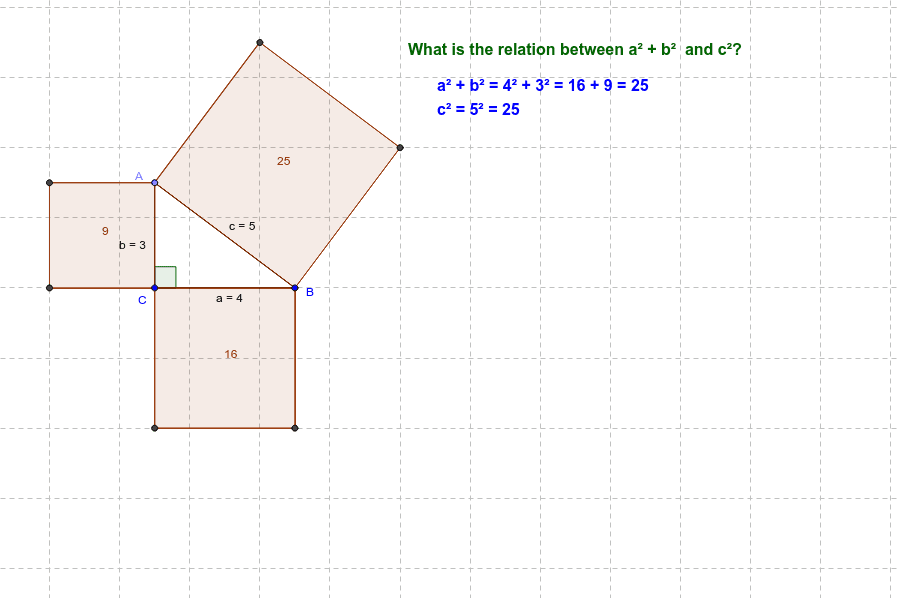
This example dynamically illustrates the relationship between the sides of a right triangle, visually demonstrating the geometric meaning of Pythagoras' Theorem. It involves core mathematical concepts such as right triangles, side lengths, Pythagorean theorem, and coordinate geometry. Construction highlights include commands like Segment, OrthogonalLine, Point, Angle, and Polygon from GeoGebra. Suitable for middle school students and above to learn geometric theorems and vector knowledge, as well as high school coordinate geometry teaching.
GeoGebra Commands & Parameters
Segment(C, B) → aOrthogonalLine(C, a) → b_1Point(b_1) → ASegment(A, C) → bAngle(B, C, A) → αSegment(A, B) → cPolygon(A, B, 4) → poly1, d, e, f, g, D, EPolygon(B, C, 4) → poly2, h, i, j, k, F, GPolygon(C, A, 4) → poly3, l, m, n, p, H, ISegment(C_1, B_1) → a_1OrthogonalLine(C_1, a_1) → b_2Point(b_2) → A_1Segment(A_1, C_1) → b_3Angle(B_1, C_1, A_1) → α_1Segment(A_1, B_1) → c_1
AI Drawing Prompt Reference
Draw a right triangle with its three sides dynamically showing the relationship, use three small squares to represent the squares of the two legs and the hypotenuse, label the angles, clearly demonstrating the geometric meaning of the Pythagorean theorem, suitable for students learning geometric theorems and coordinate geometry.
The prompt above was compiled from the original drawing commands and is for reference only.