
Problem 1B: Finding the Image of a Translation
Loading the math board and drawing, please wait…
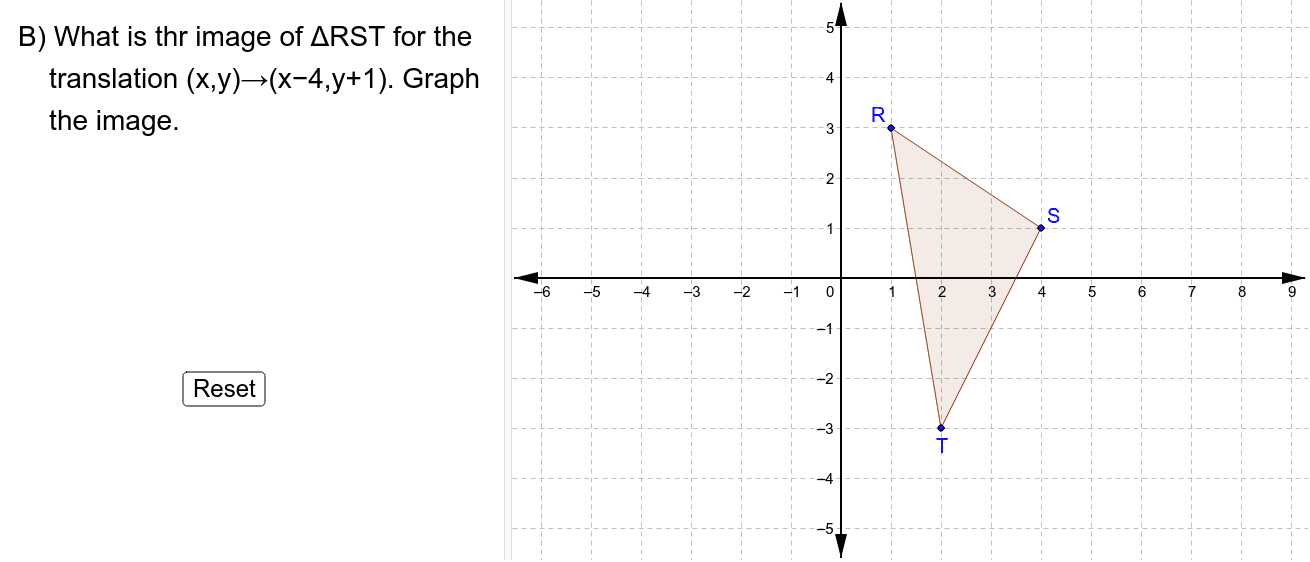
This GeoGebra example demonstrates how to find the image of a triangle under a translation transformation, and explores the geometric relationship between the original triangle and its translated copy, including overlapping regions and the union of polygons. The core mathematical concept is translation in plane geometry, where every point moves by the same vector, preserving distances and parallelism. The construction uses GeoGebra commands such as Point, Polygon, and IsInRegion, creating multiple points (M, L, K, J, G, I, H, F, E, D), polygons poly1, poly2, and poly3, as well as translated points R', S', T' and a button (button1) to control the translation dynamically. This resource is suitable for middle or high school students learning geometric transformations, vectors, and spatial reasoning, and can also serve as an interactive demonstration for teachers.
GeoGebra Commands & Parameters
Point(yAxis) → IPoint(yAxis) → HPolygon(D, E, F, G, H, I, J, K, L, M) → poly3, d, m, e, f, g, h, i, j, k, lPolygon(R, S, T) → poly1, c, a, bPolygon(R_1, S_1, T_1) → poly2, c_1, a_1, b_1IsInRegion(S_1, poly3) → ShowBIsInRegion(R_1, poly3) → ShowAIsInRegion(T_1, poly3) → ShowC
AI Drawing Prompt Reference
Draw a triangle and its translated copy by the same vector, highlighting the geometric relationship. The original triangle consists of several points, and the translated triangle is formed by moving these points equally. Use distinct colors for both triangles and shade the overlapping region. Include a button to dynamically adjust the translation vector, observing changes in the overlap and transformation effect.
The prompt above was compiled from the original drawing commands and is for reference only.