
Probability & Statistics: Lucky Wheel Probability Problems
Loading the math board and drawing, please wait…
In collections
Wahrscheinlichkeitsrechnung - Einführung
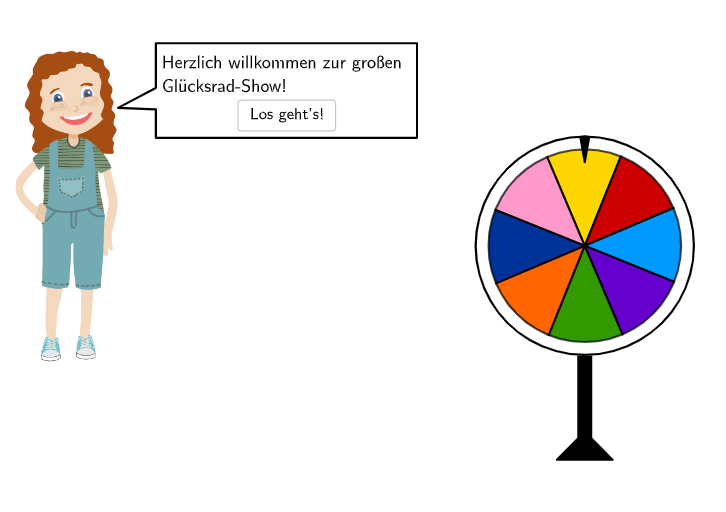
This example demonstrates probability calculations and decision-making analysis using a GeoGebra lucky wheel. It involves core math concepts like probability, comparing likelihoods, and statistical patterns. The construction summary utilizes commands/objects such as Circle, CircleSector, Point, Textfield, and Sequence. Suitable for 7th-8th grade students in probability & statistics education and activities.
GeoGebra Commands & Parameters
Sequence(Random[1, 10], i, 1, 10) → randomNumbers, {1, 3, 10, 3, 3, 8, 8, 9, 2, 7}Element(randomNumbers, Mod[questionCount, Length[randomNumbers]] + 1) → randomNumberTextfield(input) → inputBoxCircle(MP, radius) → glücksrad1Circle(MP, radius + 0.3) → glücksrad2CircleSector(MP + (0, radius - 0.3), MP + (0, radius - 0.3) + (0.6 * (cos(80°), sin(80°))), MP + (0, radius - 0.3) + (0.6 * (cos(100°), sin(100°)))) → zeigerSequence(MP + (radius * (cos(360° - k°), sin(360° - k°))), k, 0, 1079) → PGRListPoint(PGRList) → PosGR0CircleSector(MP, PosGR1, PosGR8) → sek1CircleSector(MP, PosGR2, PosGR1) → sek2CircleSector(MP, PosGR3, PosGR2) → sek3CircleSector(MP, PosGR4, PosGR3) → sek4CircleSector(MP, PosGR5, PosGR4) → sek5CircleSector(MP, PosGR6, PosGR5) → sek6CircleSector(MP, PosGR7, PosGR6) → sek7CircleSector(MP, PosGR8, PosGR7) → sek8If(index1 < 360, 3, (-2.55 / (end1 - 360) * index1) + 3 + (2.55 * 360 / (end1 - 360))) → speedmean(Unique[RemoveUndefined[Sequence[IndexOf[true, SektorZeiger, k], k, 1, Length[SektorZeiger]]]]) → posSektor1PolyLine({PosSB, Corner[txt031, 1] + (0.5 * (Corner[txt031, 4] - Corner[txt031, 1])), Corner[txt031, 1], Corner[txt031, 2] + (0.2, 0), Corner[txt031, 3] + (0.2, 0.15), Corner[txt031, 4] + (0, 0.15), Corner[txt031, 1] + (0.5 * (Corner[txt031, 4] - Corner[txt031, 1])) + (0, 0.5), PosSB}) → sb03Point(PGRList) → PosGS0CircleSector(MP, PosGS1, PosGS7) → sek51CircleSector(MP, PosGS2, PosGS1) → sek52CircleSector(MP, PosGS3, PosGS2) → sek53CircleSector(MP, PosGS4, PosGS3) → sek54CircleSector(MP, PosGS5, PosGS4) → sek55CircleSector(MP, PosGS6, PosGS5) → sek56CircleSector(MP, PosGS7, PosGS6) → sek57Join({Sequence[MP + ((2 * radius / 3) * (cos(((-index2))° - (360° * (Sum[einteilung2, k] - einteilung2(k) / 2) / Sum[einteilung2])), sin(((-index2))° - (360° * (Sum[einteilung2, k] - einteilung2(k) / 2) / Sum[einteilung2])))), k, 1, Length[einteilung2]] + (-0.5, 0.48), Reverse[Sequence[StartStar + (k * (MP + ((-radius) - 1, 0) - StartStar)), k, 0, 1, 0.05]]}) → PosStarListPoint(PosStarList) → PosStarPolygon(PosStar, PosStar + (1, 0), PosStar + (1, -0.96), PosStar + (0, -0.96)) → polyStar, posstar, f, g, hIndexOf(PosStar, PosStarList) → StarIndexPolyLine({PosSB, Corner[txt052, 1] + (0.5 * (Corner[txt052, 4] - Corner[txt052, 1])), Corner[txt052, 1], Corner[txt052, 2] + (0.2, 0), Corner[txt052, 3] + (0.2, 0.15), Corner[txt052, 4] + (0, 0.15), Corner[txt052, 1] + (0.5 * (Corner[txt052, 4] - Corner[txt052, 1])) + (0, 0.5), PosSB}) → sb052If(index2 < 360, 3, (-2.55 / (end2 - 360) * index2) + 3 + (2.55 * 360 / (end2 - 360))) → speed2PolyLine({PosSB, Corner[txt061, 1] + (0.5 * (Corner[txt061, 4] - Corner[txt061, 1])), Corner[txt061, 1], Corner[txt061, 2] + (0.2, 0), Corner[txt061, 3] + (0.2, 0.15), Corner[txt061, 4] + (0, 0.15), Corner[txt061, 1] + (0.5 * (Corner[txt061, 4] - Corner[txt061, 1])) + (0, 0.5), PosSB}) → sb06mean(Unique[RemoveUndefined[Sequence[IndexOf[true, SektorZeiger2, k], k, 1, Length[SektorZeiger2]]]]) → posSektor2If(step ≟ 3, gedreht1 ∧ posSektor1 ≟ 1 ∧ index1 ≟ end1, step ≟ 4, option41, step ≟ 5, StarIndex ≟ 2 ∧ showFB5, step ≟ 6, gedreht2 ∧ posSektor2 ≟ 2 ∧ index2 ≟ end2, true) → clickableBtnNextRemove(721…1080, Sequence[(k * 45), k, 1, 40]) → RandomListPolyLine({PosSB, Corner[txt011, 1] + (0.25 * (Corner[txt011, 4] - Corner[txt011, 1])), Corner[txt011, 1] + (0, -0.2), Corner[txt011, 2] + (0.2, -0.2), Corner[txt011, 3] + (0.2, 0.15), Corner[txt011, 4] + (0, 0.15), Corner[txt011, 1] + (0.25 * (Corner[txt011, 4] - Corner[txt011, 1])) + (0, 0.5), PosSB}) → sb01PolyLine({PosSB, Corner[txt021, 1] + (0.4 * (Corner[txt021, 4] - Corner[txt021, 1])), Corner[txt021, 1], Corner[txt021, 2] + (0.2, 0), Corner[txt021, 3] + (0.2, 0.15), Corner[txt021, 4] + (0, 0.15), Corner[txt021, 1] + (0.5 * (Corner[txt021, 4] - Corner[txt021, 1])) + (0, 0.5), PosSB}) → sb02PolyLine({PosSB, Corner[txt051, 1] + (0.4 * (Corner[txt051, 4] - Corner[txt051, 1])), Corner[txt051, 1], Corner[txt051, 2] + (0.2, 0), Corner[txt051, 3] + (0.2, 0.15), Corner[txt051, 4] + (0, 0.15), Corner[txt051, 1] + (0.5 * (Corner[txt051, 4] - Corner[txt051, 1])) + (0, 0.5), PosSB}) → sb05If(step ≟ 3, ¬drehen, true) → clickableBtnBackJoin({Sequence[MP + ((2 * radius / 3) * (cos((-(index1°)) - (360° * (Sum[einteilung1, k] - einteilung1(k) / 2) / Sum[einteilung1])), sin((-(index1°)) - (360° * (Sum[einteilung1, k] - einteilung1(k) / 2) / Sum[einteilung1])))), k, 1, Length[einteilung1]] + (-0.5, 0.48), Reverse[Sequence[StartStar + (k * (MP + ((-radius) - 1, 0) - StartStar)), k, 0, 1, 0.05]]}) → PosStarList1Text("\textsf{\bold{Zieh mich!}}", MP + ((1.65 * radius) * (cos(((-index2))°), sin(((-index2))°))), false, true, 0, 0) → text8Text("\textsf{\bold{Zieh mich!}}", MP + ((1.35 * radius) * (cos((-(index1°))), sin((-(index1°))))), false, true, 0, 0) → text7Angle(MP + (1, 0), MP, PosGR0) → Angle03CircleArc(MP, PosArc, PosGR0) → arc03Segment(PosArc, PosArc + (0.01 * UnitVector[Tangent[PosArc, glücksrad1]])) → arrow03Angle(MP + (1, 0), MP, PosGS0) → Angle07CircleArc(MP, PosArc07, PosGS0) → arc07Segment(PosArc07, PosArc07 + (0.01 * UnitVector[Tangent[PosArc07, glücksrad1]])) → arrow07
AI Drawing Prompt Reference
This is a lucky wheel diagram with a central point surrounded by multiple sector regions. The sectors are separated by gaps, forming a circular structure. The diagram includes a larger main circle and a smaller inner circle, along with some star patterns. Text labels may appear between sectors. The overall layout is used for probability calculations and decision-making analysis, where the size and number of sectors represent different outcomes. The diagram is clear and helps visualize probability distributions.
The prompt above was compiled from the original drawing commands and is for reference only.