
Principle of Curve Transforming Between Circle and Square
Loading the math board and drawing, please wait…
In collections
My 3D Collection
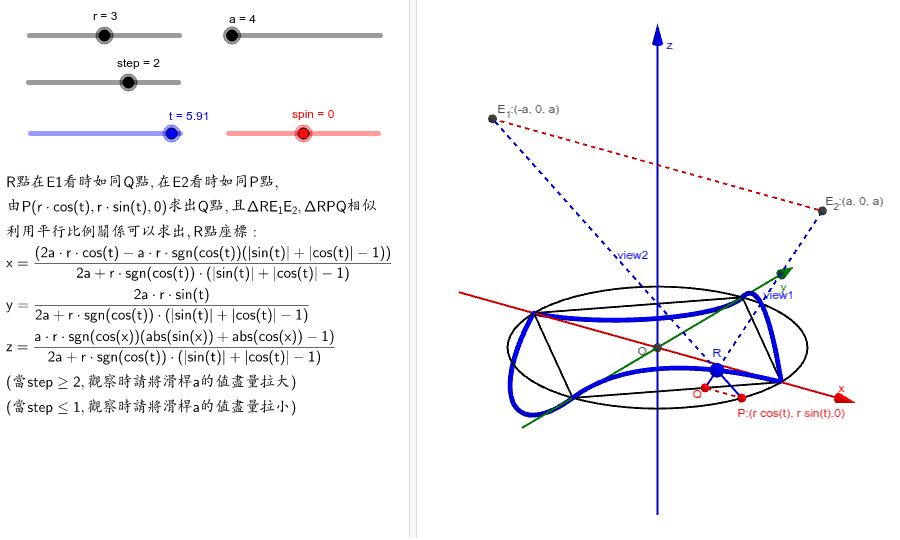
This GeoGebra example dynamically demonstrates how a curve continuously morphs between a circle and a square, illustrating the principle of geometric shape transformation. The core mathematical concepts involve parametric equations of circles, the centroid (geometric center) of an equilateral triangle, intersections of lines and planes, and the construction of transitional forms using parametric curves (CurveCartesian) and surfaces (Surface). The construction uses commands such as Intersect to find intersection points, Segment and Line to build basic skeletons, Circle to define the initial circle, PolyLine to outline polygons, CurveCartesian to generate parametric curves, and Surface to create 3D transitional surfaces. A slider controls the step size and spin for animation. This is suitable for high school to early college students learning parametric equations, geometric transformations, and dynamic geometry, as well as for teachers creating interactive lessons to visualize the mathematical essence of continuous shape deformation.
GeoGebra Commands & Parameters
Intersect(xAxis, yAxis) → OSegment(A, B) → fLine(E_1, P) → gPlane(E_2, E_1, P) → b_1Intersect(b_1, f) → QLine(E_2, Q) → hIntersect(g, h) → RCircle((0, 0, 0), r, Vector[(0, 0, 1)]) → cSegment(P, R) → iSegment(Q, R) → jSegment(E_1, P) → uSegment(E_2, Q) → vSegment(E_2, E_1) → k_1Segment(P, Q) → lPolyLine((r, 0, 0), (0, r, 0), ((-r), 0, 0), (0, (-r), 0), (r, 0, 0)) → mCurveCartesian(f_1(t), f_2(t), f_3(t), t, 0, (2 * π)) → bSurface(f_1(t), f_2(t), f_3(t) + s, t, 0, (2 * π), s, -1, 1) → d