
Polygons & Circles: Rotational Construction
Loading the math board and drawing, please wait…
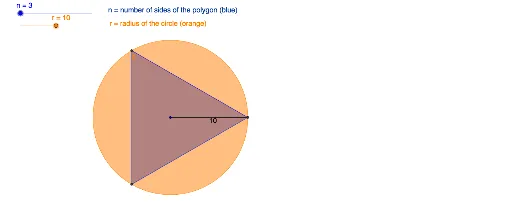
This example demonstrates the construction of regular polygons inside a circle, combined with rotation and scaling to generate nested or intersecting patterns, illustrating the geometric relationships between polygons and circles. Core mathematical concepts include circles, regular polygons, rotation, dilation (scaling), combinatorial counting, and fractional proportions. Construction highlights: using GeoGebra commands such as Circle to create the base circle, Polygon to construct the polygon, Rotate to apply rotation, and Segment to connect key points; objects include center A, radius r, rotation parameter n, polygon poly1, and numerous auxiliary points and segments (e.g., B', a, b, d, etc.), with sliders or parameters controlling the number of rotations and scaling factors to produce dynamic pattern changes. Suitable for middle and high school geometry lessons, mathematical exploration activities, or geometric pattern design in art, helping students intuitively understand rotational symmetry, dilation transformations, and inscribed polygon relationships.
GeoGebra Commands & Parameters
Circle(A, r) → cRotate(B, (360 / n)°, A) → B'Polygon(B, B', n) → poly1, a, j, n_5, C, D, E, F, G, H, I, J, K, m, L, M, N, O, P, Q, R, S, T, U, p, V, W, Z, A_1, B_1, C_1, D_1, E_1, F_1, G_1, q, H_1, I_1, J_1, K_1, L_1, M_1, N_1, O_1, P_1, Q_1, s, R_1, S_1, T_1, U_1, V_1, W_1, Z_1, A_2, B_2, C_2, t, D_2, E_2, F_2, G_2, H_2, I_2, J_2, K_2, L_2, M_2, f_1, N_2, O_2, P_2, Q_2, R_2, S_2, T_2, U_2, V_2, W_2, g_1, Z_2, A_3, B_3, C_3, D_3, E_3, F_3, G_3, H_3, I_3, h_1, J_3, K_3, L_3, M_3, N_3, O_3, P_3, Q_3, R_3, S_3, i_1, T_3, U_3, V_3, W_3, Z_3, A_4, B_4, C_4, D_4, b, j_1, k_1, l_1, m_1, n_1, p_1, q_1, r_1, s_1, t_1, d, a_1, b_1, c_1, d_1, e_1, f_2, g_2, h_2, i_2, j_2, e, k_2, l_2, m_2, n_2, p_2, q_2, r_2, s_2, t_2, a_2, f, b_2, c_2, d_2, e_2, f_3, g_3, h_3, i_3, j_3, k_3, g, l_3, m_3, n_3, p_3, q_3, r_3, s_3, t_3, a_3, b_3, h, c_3, d_3, e_3, f_4, g_4, h_4, i_4, j_4, k_4, l_4, l, m_4, n_4, p_4, q_4, r_4, s_4, t_4, a_4, b_4, c_4, i, d_4, e_4, f_5, g_5, h_5, i_5, j_5, k_5, l_5, m_5Segment(A, B) → k
AI Drawing Prompt Reference
Draw a circle and inscribe a regular polygon inside it. Rotate and scale the polygon to overlap or nest it with the original, creating intricate geometric patterns. Highlight rotational symmetry and scaling transformations, along with the relationship between polygons and circles. Use sliders to control the number of rotations and scaling factors for dynamic pattern changes.
The prompt above was compiled from the original drawing commands and is for reference only.