
Perimeter of Composite F-Shape Figures (GeoGebra Dynamic)
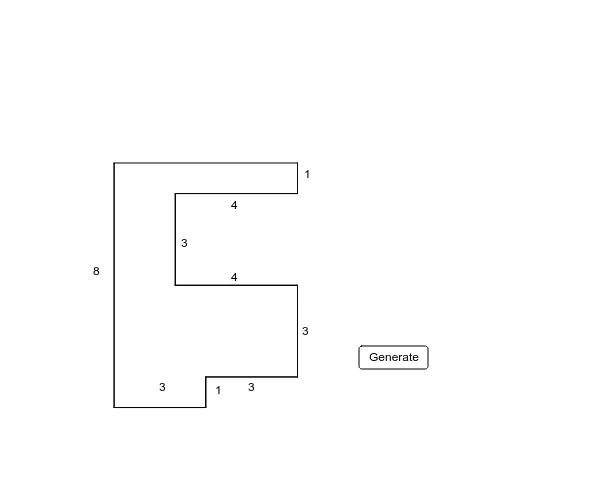
Loading the math board and drawing, please wait…
①This example demonstrates a dynamic GeoGebra construction of composite F-shaped figures made of multiple rectangles, with real-time calculation of the outer perimeter.②The core mathematical concept is perimeter calculation for composite shapes, involving decomposition of the boundary into segments and summing their lengths.③Construction highlights: uses Random command to generate vertex coordinates, Intersect for intersection points, Segment to build edges, Distance to measure lengths, and a button (button1) to refresh random shapes; objects include points (A-J), segments (a-t), and auxiliary variables.④Suitable for upper elementary to middle school students learning geometry perimeter, and useful for classroom demonstrations or student exploration of how perimeter varies with different F-shape configurations.
GeoGebra Commands & Parameters
Random(8, 10) → y4Random(4, 6) → x1Random(1, 3) → x2Random(4, 5) → y2Random(4, 6) → x3Random(1, 3) → y1Random(1, 3) → x4Random(6, 7) → y3Intersect(xAxis, yAxis) → JSegment(A, B) → aSegment(B, C) → bSegment(C, D) → cSegment(D, E) → dSegment(E, F) → eSegment(F, G) → fSegment(G, H) → gSegment(H, I) → hSegment(I, J) → iSegment(J, A) → jDistance(j, a) → kDistance(b, c) → lDistance(d, e) → mDistance(f, g) → nDistance(h, i) → oRandom(1, 10) → z1Segment(A, B) → pSegment(B, C) → qSegment(C, D) → rSegment(D, E) → sSegment(E, F) → tSegment(F, G) → a_1Segment(G, H) → b_1Segment(H, I) → c_1Segment(I, J) → d_1Segment(J, A) → e_1
AI Drawing Prompt Reference
Draw a composite F-shaped figure made of several rectangles, with vertices generated at random coordinates on a coordinate plane. The shape is formed by nine vertices connected in sequence to create a closed outline composed of horizontal and vertical segments, resembling the letter F. Measure and label the distances between certain parallel segments inside the figure to compute the outer perimeter. Include a refresh button that regenerates the random shape, dynamically showing how the perimeter changes with different F-configurations. All segments and vertices should be clearly visible, suitable for teaching geometry perimeter concepts.
The prompt above was compiled from the original drawing commands and is for reference only.