
Pentagon Angle Theorems via Transformational Geometry
Loading the math board and drawing, please wait…
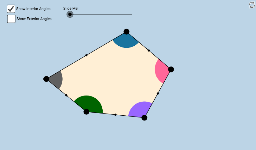
① This GeoGebra applet uses transformational geometry tools to help students discover the sum of interior and exterior angles of a pentagon, demonstrating that the interior angles always sum to 540° and the exterior angles to 360° for any pentagon. ② Core mathematical concepts include polygon angle-sum theorems, exterior angle theorem, transformations (translation, rotation, dilation, reflection), and angle measurement with logical reasoning. ③ Construction highlights: The applet employs commands such as Segment, Midpoint, Ray, Circle, Intersect, CircleSector, Vector, Translate, Mirror, Dilate, Rotate, Line, If, Point, Polygon, and CircleArc, with objects including pentagon vertices A–E, auxiliary points F–U, segments, circles, arcs, vectors, and transformed copies, allowing dynamic dragging of vertices or sliders to observe angle changes. ④ Suitable for middle school to high school students learning polygon angle properties, or for teachers demonstrating geometric transformations in class, this interactive tool encourages students to infer theorems through hands-on manipulation, fostering geometric intuition and deductive reasoning.
GeoGebra Commands & Parameters
Segment(D, E) → i_3Midpoint(i_3) → M_3Ray(A, B) → aRay(B, C) → bRay(C, D) → cRay(D, E) → dRay(E, A) → eCircle(A, 1.5) → fCircle(B, 1.5) → gCircle(C, 1.5) → hCircle(D, 1.5) → kCircle(E, 1.5) → pSegment(C, A) → iSegment(C, E) → jIntersect(f, a, 1) → FIntersect(f, i, 1) → GIntersect(f, e, 1) → HIntersect(f, e, 2) → IIntersect(p, e) → J,Intersect(p, j) → K,Intersect(p, d, 1) → LIntersect(p, d, 2) → MIntersect(k, d, 1) → NIntersect(k, c, 2) → OIntersect(h, c, 1) → PIntersect(h, j, 1) → QIntersect(h, i, 1) → RIntersect(h, b, 1) → SIntersect(g, a, 2) → TIntersect(g, b, 1) → UIntersect(g, a, 1) → VCircleSector(A, F, G) → qCircleSector(A, G, H) → rCircleSector(B, U, V) → sCircleSector(C, P, Q) → tCircleSector(C, Q, R) → c_1CircleSector(C, R, S) → d_1Intersect(k, c, 1) → WCircleSector(D, O, N) → e_1CircleSector(D, N, W) → f_1CircleSector(E, M, J) → g_1CircleSector(E, J, K) → h_1CircleSector(E, K, L) → k_1CircleSector(A, I, F) → p_1CircleSector(B, T, U) → q_1Intersect(h, b, 2) → ZCircleSector(C, Z, P) → r_1Vector(A, B) → uVector(C, B) → vVector(E, D) → wVector(C, D) → u_1Vector(C, E) → v_1Vector(A, E) → w_1Translate(d_1, v) → s_1Mirror(s_1, B) → t_1Dilate(A, If[0 < l ≤ 1, 1 - l, 0], B) → A'Dilate(C, If[0 < l ≤ 1, 1 - l, 0], B) → C'Dilate(A, If[1 < l ≤ 2, 2 - l, 0], E) → A'_1Dilate(C, If[1 < l ≤ 2, 2 - l, 0], E) → C'_1Dilate(C, If[2 < l ≤ 3, 3 - l, 0], D) → C'_2Vector(A, B) → a_1Vector(C, C') → b_1Vector(A, A'_1) → i_1Rotate(E, If[2 < l ≤ 3, (((-(l - 2)) * 180))°, -180°], M_3) → E'Vector(E, E') → j_1Vector(C, C'_2) → l_1Vector(C, C'_1) → m_1Translate(d_1, b_1) → c_2Translate(r, i_1) → r'_1Translate(r, w_1) → r'_2Translate(k_1, w) → d_2Translate(k_1, j_1) → e_2Translate(c_1, v_1) → f_2Translate(c_1, m_1) → g_2Translate(t, u_1) → t'Translate(t, l_1) → t'_1Translate(q, a_1) → r'Translate(d_1, b_1) → h_2Vector(A, A') → n_1Line(E, C) → a_2Line(E, D) → b_2Segment(E, C) → i_2Vector(D, C) → u_2Vector(E, C) → v_2Vector(A, C) → w_2Vector(B, C) → l_2Dilate(B, If[0 < o < 1, 1 - o, 0], C) → B'Dilate(A, If[1 < o < 2, 2 - o, 0], C) → A'_2Dilate(E, If[2 < o < 3, 3 - o, 0], C) → E'_1Dilate(D, If[3 < o < 4, 4 - o, 0], C) → D'Vector(B, B') → m_2Vector(A, A'_2) → n_2Vector(E, E'_1) → s_2Vector(D, D') → t_2Translate(q_1, m_2) → c_3Translate(q_1, l_2) → d_3Translate(p_1, w_2) → e_3Translate(g_1, v_2) → f_3Translate(e_1, u_2) → g_3If(1 < o < 2, Translate[p_1, n_2]) → h_3If(2 < o < 3, Translate[g_1, s_2]) → k_3If(3 < o < 4, Translate[e_1, t_2]) → p_3Point(a_2) → A_1Point(a_2) → B_1Ray(C, B_1) → a_3Ray(E, A_1) → b_3Polygon(A, B, C, D, E) → poly1, a_4, b_4, c_4, d_4, e_4Polygon(A, B, C) → poly2, c_5, a_5, b_5Polygon(A, C, E) → poly3, e_5, a_6, c_6Polygon(E, C, D) → poly4, d_5, e_6, c_7Segment(E, A) → j_3Segment(A, B) → l_3Segment(B, C) → m_3Segment(C, D) → n_3Midpoint(j_3) → M_4Midpoint(l_3) → M_5Midpoint(m_3) → M_1Midpoint(n_3) → M_2Rotate(d_1, If[0 < l ≤ 1, (((-l) * 180))°, -180°], M_1) → k_2Rotate(C, If[0 < l ≤ 1, (((-l) * 180))°, -180°], M_1) → C'_3Segment(M_1, C'_3) → q_3Rotate(q, If[0 < l ≤ 1, ((l * 180))°, 180°], M_5) → q'Rotate(A, If[0 < l ≤ 1, ((l * 180))°, 180°], M_5) → A'_3Rotate(R, 180°, M_1) → R'Line(B, R') → s_3Segment(M_5, A'_3) → r_3Rotate(r, If[1 < l ≤ 2, (((-(l - 1)) * 180))°, -180°], M_4) → r'_3Rotate(A, If[1 < l ≤ 2, (((-(l - 1)) * 180))°, -180°], M_4) → A'_4Segment(M_4, A'_4) → p_2Rotate(t, If[2 < l ≤ 3, (((l - 2) * 180))°, 180°], M_2) → t'_2Rotate(C, If[2 < l ≤ 3, (((l - 2) * 180))°, 180°], M_2) → C'_4Segment(M_2, C'_4) → q_2Vector(E, D) → j_2Translate(L, j_2) → L'Ray(D, L') → r_2CircleArc(C, R, S) → t_3CircleArc(C, Q, R) → f_4CircleArc(C, P, Q) → g_4CircleArc(A, F, G) → h_4CircleArc(A, G, H) → k_4CircleArc(E, K, L) → p_4Segment(M_3, E') → i_4
AI Drawing Prompt Reference
Draw a pentagon and display its interior and exterior angles. Use transformations like translation, rotation, dilation, and reflection to intersect each vertex with corresponding circles, creating multiple auxiliary points and segments. Represent each interior and exterior angle as a sector, labeling the angle measures. Observe how angles change and theorems are verified by dragging vertices or using sliders.
The prompt above was compiled from the original drawing commands and is for reference only.