
Parabola and Circle Intersection – Dynamic Exploration with GeoGebra Slider
Loading the math board and drawing, please wait…
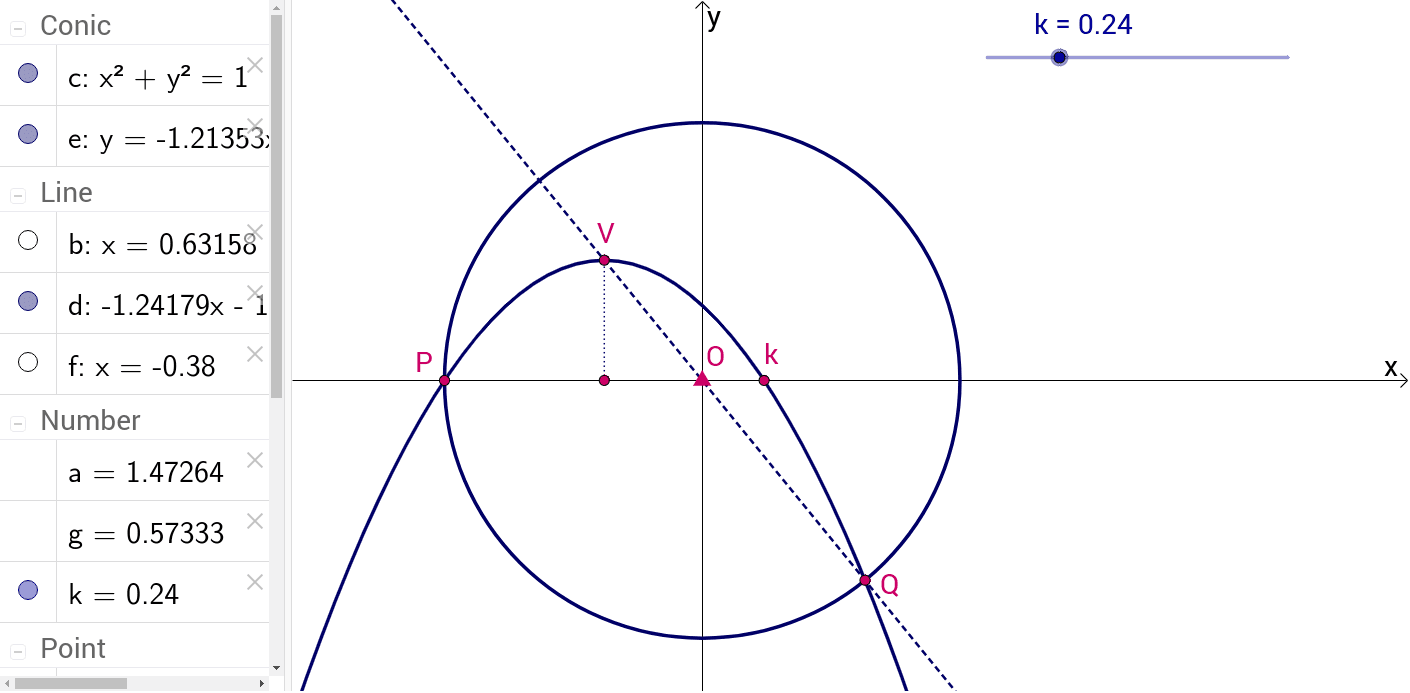
① This example dynamically visualizes the intersection changes between the parabola y = a(x + 1)(x − k) and the unit circle x² + y² = 1.
② Core mathematical concepts covered include quadratic function graphs, circle equations, coordinate geometry intersection problems, the effect of parameters a and k on graph positions, and dynamic geometry demonstrations using a slider.
③ The GeoGebra construction employs the Intersect, Circle, Midpoint, Line, and Segment commands. Key objects are O (circle center), c (circle), P (intersection), k (parameter point), m (midpoint), b (auxiliary point), Q (another intersection), a (parameter a), e, F, f, V, d, g, h, etc., enabling real‑time updates via a slider.
④ Suitable for high‑school mathematics (analytic geometry, problem solving) and college introductory mathematics courses, especially for teaching the combined application of quadratic functions and circles, parameter variation studies, and practical exploration of dynamic geometry software.
GeoGebra Commands & Parameters
Intersect(xAxis, yAxis) → OCircle(O, 1) → cIntersect(c, xAxis, 1) → PIntersect(c, b, 2) → QMidpoint(P, m) → FLine(F, yAxis) → fIntersect(e, f, 1) → VLine(Q, V) → dSegment(F, V) → h
AI Drawing Prompt Reference
Draw a unit circle centered at the origin and the parabola y = a(x+1)(x−k) with parameters a and k controlled by sliders. Show the intersection points of the parabola and the circle, mark the circle’s intersection with the x‑axis, and the midpoint between that point and a movable point on the circle. Through the midpoint draw a vertical line, intersect it with a line through the other circle intersection, and connect the midpoint to that intersection as a segment. The whole construction updates dynamically as the sliders change, illustrating how the parameters affect the intersection geometry.
The prompt above was compiled from the original drawing commands and is for reference only.