
Ordering Real Numbers Interactive Demo (Based on IM 6.7.3.3)
Loading the math board and drawing, please wait…
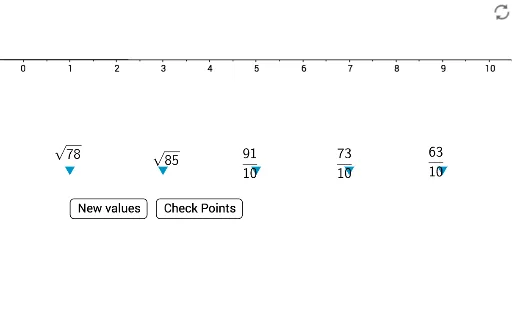
① This GeoGebra applet demonstrates the ordering of real numbers on a number line through an interactive interface, allowing users to manipulate buttons and sliders to see how a set of real numbers is arranged in ascending order. ② The core mathematical concept is the order property of real numbers, including number line representation, comparison, and sorting logic, with additional connections to variance in statistics as indicated by the construction summary. ③ Construction highlights: The applet uses the Sequence and Segment commands to generate sequences and segments, defines multiple lists (list1 through list9) and objects such as dens, error, flist, and uses buttons (button1, button2, button3) for interaction, sliders for parameters n and p, text elements (text6, text7), and points (A, B, C, D, E, F, G, H, I, J) to build a dynamic sorting environment. ④ This is suitable for middle or high school students learning about real numbers, number lines, and ordering, as well as for teachers demonstrating the concept in class, helping students grasp the intuitive process of comparing and ordering real numbers.
GeoGebra Commands & Parameters
Sequence(Random[5, 95] / 10, i, 1, 5) → list7_1Sequence(RandomElement[dens], i, 1, 5) → list6_1Sequence(Element[list7, i], i, 1, 5) → flistSequence((-x(Element[list8, i])) + Element[flist, i] > error, i, 1, 5) → toosmallSequence(x(Element[list8, i]) - Element[flist, i] > error, i, 1, 5) → toobigSegment(A, B) → f_1Sequence(Segment[(-2 + i, -0.12), (-2 + i, 0.12)], i, 0, 4, 1) → list1Sequence(Text[-2 + i, (x(C) + (1.02 * i), y(C))], i, 0, 4) → list2Sequence(Segment[(-2 + i, -0.11), (-2 + i, 0.11)], i, 0, 4, 0.5) → list3Sequence(Segment[(-2 + i, -0.09), (-2 + i, 0.09)], i, 0, 4, 0.25) → list4Sequence(Segment[(-2 + i, -0.07), (-2 + i, 0.07)], i, 0, 4, 0.125) → list5Sequence(sqrt(Random[1, 100]), i, 1, 5) → list9Sequence(RandomElement[{Element[list7_1, i], Element[list9, i]}], i, 1, 5) → list7_2
AI Drawing Prompt Reference
Draw a number line with 5 randomly generated real number points, arranged in ascending order. Use buttons and sliders to adjust the positions of these points to ensure they are correctly sorted on the number line. Also, include 5 points on the number line, each with a label showing the value of the point.
The prompt above was compiled from the original drawing commands and is for reference only.