
Number Pyramids
Loading the math board and drawing, please wait…
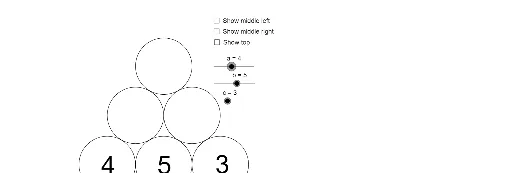
This example demonstrates the construction of number pyramids. It involves key mathematical concepts such as sequences and geometric construction. Using GeoGebra commands like Intersect, Point, Circle, etc., a dynamic number pyramid can be built. Suitable for middle school and above students to learn sequences and geometric construction.
GeoGebra Commands & Parameters
Intersect(xAxis, yAxis) → APoint(yAxis) → BCircle(A, B) → c_1Point(xAxis) → CIntersect(c_1, xAxis, 2) → DCircle(C, D) → dPoint(xAxis) → EIntersect(d, xAxis, 2) → FCircle(E, F) → eOrthogonalLine(C, xAxis) → a_1OrthogonalLine(D, xAxis) → b_1OrthogonalLine(F, xAxis) → fPoint(b_1) → GPoint(f) → HCircle(G, Radius[d]) → gCircle(H, Radius[d]) → hPoint(a_1) → ICircle(I, Radius[g]) → k
AI Drawing Prompt Reference
On a coordinate plane, start at the origin and pick a point on the vertical axis. Draw a circle centered at the origin passing through that point, and find its intersection with the positive horizontal axis. Then choose another point on the horizontal axis, draw a circle centered there passing through that intersection, and take its second intersection with the horizontal axis. Repeat this process to create a chain of circles along the axis. From each key point on the horizontal axis, draw a perpendicular line upward. On these perpendiculars, select points and draw circles centered at them with radii equal to the radii of the previous circles. This builds a layered pyramid-like arrangement of circles and vertical lines, illustrating a sequence and geometric construction.
The prompt above was compiled from the original drawing commands and is for reference only.